X MP3 Repair Tool 1.2
X MP3 Repair Tool 1.2 is a free, portable Windows 10/11 app from the X Codec Pack team that checks MP3 files frame by frame and fixes cut-off downloads, wrong length, junk data and broken tags without re-encoding.
- Updated
- Size
- 14.8MB
- Downloads
- 1
X MP3 Repair Tool fixes MP3 files that skip, stop early, show the wrong length or refuse to play.
It is a free, portable app for 64-bit Windows 10 and 11 from the team behind X Codec Pack, with no ads and no sign-up.
Nothing is re-encoded, so a repaired song sounds exactly as it did before.
What X MP3 Repair Tool Actually Does
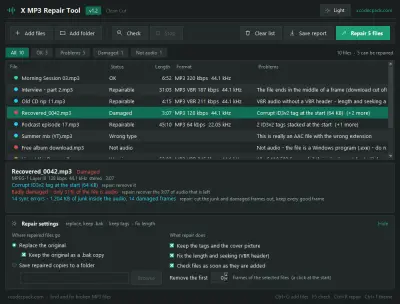
An MP3 is a long chain of small pieces called frames. The app reads every frame instead of trusting the file name or size, then lists each problem it found and the fix it will apply.
Nothing changes until you press Repair. Good frames are copied as they are, and only the broken parts around them are cut out or rebuilt.
| What you notice | What is wrong | What repair does |
|---|---|---|
| A 4-minute song shows as 40 minutes, or seeking jumps to the wrong place | The length header is missing or out of date | Rebuilds the header and seek table from the real frames |
| The song ends with a pop or an error | A download stopped in the middle of a frame | Drops the half frame so the file ends cleanly |
| Playback skips or chirps partway through | Junk data sits inside the audio | Cuts out the junk and the damaged frames next to it |
| The cover picture or song details are missing | The tag is corrupt, stacked or the wrong size | Corrects the tag and keeps the cover |
| Some players refuse the file completely | It is AAC, M4A, FLAC, WAV or OGG saved as .mp3 | Renames it to the right extension |
Wrong length is the classic problem with variable bitrate files that were joined, edited or cut off. Our guide to VBR MP3 files explains why players get it wrong.
How to Repair Your Files
- Add your music. Drop files or a whole folder on the window - subfolders are included.
- Read the dots. Green is fine, blue can be repaired, and red is damaged or not audio at all.
- Click a file to see why. The pane below the list shows every problem and what repair will do about it.
- Press Repair. Only the files that need it are touched, and the button shows how many.
For a large library you can save the results of a whole folder as an HTML page or a CSV spreadsheet.
Your Originals Stay Safe
Each repaired file is checked in memory before anything is written. If the result is not better, the original is left alone.
- Replace the original keeps a .bak copy beside it - to undo, delete the repaired file and remove .bak from the copy's name.
- Save repaired copies to a folder leaves the originals completely untouched.
What it cannot bring back.
If a download simply stopped, the missing music is gone and no tool can recreate it. Repair makes the file play cleanly to its real end, and the result shows the new length.
It Also Spots Fake MP3 Files
Not every file ending in .mp3 is music. Web pages, programs and decoy downloads with a few seconds of sound are flagged as Not audio, and the Play button is switched off for them.
Never open a file marked as a program.
Right-click it and choose Move to the Recycle Bin instead. A real song is never a Windows program in disguise.
Files marked Wrong type are real audio in another format, often AAC from a YouTube converter. To see exactly what is inside any media file, MediaInfo lists the format, bitrate and length.
Remove a Click at the Start
In Repair settings, set Remove the first to a few frames, select the files and press Repair. One frame is about 26 ms, so 10 frames trims roughly a quarter of a second.
Set it back to 0 afterwards, or the next files you repair get trimmed too. For careful editing with a waveform in front of you, Audacity is the better tool.
Other Formats Need FFmpeg
The deep frame-by-frame repair covers MP3, MP2 and MPA files. To check AAC, M4A, FLAC, OGG, WAV and WMA as well, put ffmpeg.exe and ffprobe.exe from FFmpeg in a folder named bin next to the app.
For those formats it rebuilds the container without re-encoding when that fixes the errors. When it does not, the file is left as it was.
Before You Run It
There is no installer. Download the single 14.8 MB file from the X MP3 Repair Tool download page and run it from any folder.
The file is not code-signed, so Windows SmartScreen may say the publisher is unknown. Choose More info, then Run anyway.
Once a day the app checks whether a newer version exists and shows a small badge if so. It has a dark and a light theme, switched with Ctrl+T.
Who Should Look Elsewhere
The tell is what is actually wrong. This tool repairs damaged files, so it is the wrong pick when the file is healthy and something else bothers you.
- The song titles or artists are wrong. Mp3tag edits tags and covers for whole albums at once.
- Some songs are louder than others. MP3Gain evens out the volume without re-encoding.
- The file is beyond repair. Convert a good source again with X Audio Converter.
- No MP3 plays at all on your PC. That is a missing codec, not a broken file, and X Audio Codec Pack fixes it.
- You run Windows 7 or 8, or 32-bit Windows. The older MP3val still works there.
- You want every technical detail. MP3 Diags goes deeper, with a steeper learning curve.
Already use foobar2000? Its right-click Utilities menu can also fix a VBR header, one job at a time. More repair utilities are in the Fix&Repair Tools category.
Quick questions
Is X MP3 Repair Tool free?
Yes. It is free, with no account, no trial and no ads in the app.
Does repairing an MP3 lower the sound quality?
No. The audio frames are copied byte for byte, and only the broken parts around them are removed or rebuilt.
Why does my MP3 show the wrong length?
The header that tells players how long the song is has gone missing or out of date, usually after the file was cut off, joined or edited. Repair rebuilds it from the real frames.
Can it fix an MP3 that stops playing halfway?
Often, yes. Junk and damaged frames in the middle are cut out and the rest is kept. If the download simply stopped, the missing part cannot be brought back.
Does it keep my tags and album art?
Yes, with Keep the tags and the cover picture ticked. A tag with the wrong size is corrected instead of thrown away.
Which Windows versions does it run on?
Windows 10 and 11, 64-bit only. It is a single program with no installer.
Download X MP3 Repair Tool 1.2 and see how it handles your files, or tell us how you got on if you have used it before.
Be the first to review X MP3 Repair Tool 1.2
Thanks, it's in!
Your review will appear once it has been checked.
Related to X MP3 Repair Tool
More free downloads to try-

Mp3tag Closest match
Download Mp3tag to edit MP3 tags, add album art, and organize your music library.
Mentioned in our X MP3 Repair Tool write-up
-

FFmpeg
FFmpeg is the command-line multimedia engine that most other conversion, encoding and streaming tools on this site quietly run on.
Mentioned in our X MP3 Repair Tool write-up
-

Free DVD to MP3 Converter
Tipard Free DVD to MP3 Converter extracts audio from DVD and transforms it into MP3 without compromising on quality.
In common: mp3, without
-

MP3 Cutter and Editor
MP3 Cutter and Editor enables you to extract parts of MP3 files without compromising on sound quality.
In common: mp3, without
-

VirtualDub2 Most popular
VirtualDub2 is the portable, frame-accurate end of the video editors category, built for filtering and re-encoding single files rather than assembling a timeline.
In common: frame, encoding
-

4K Video Downloader
4K Video Downloader Plus is a Windows media manager that pulls video and audio off streaming sites and saves them as MP4, MKV or MP3 files.
In common: them, mp3