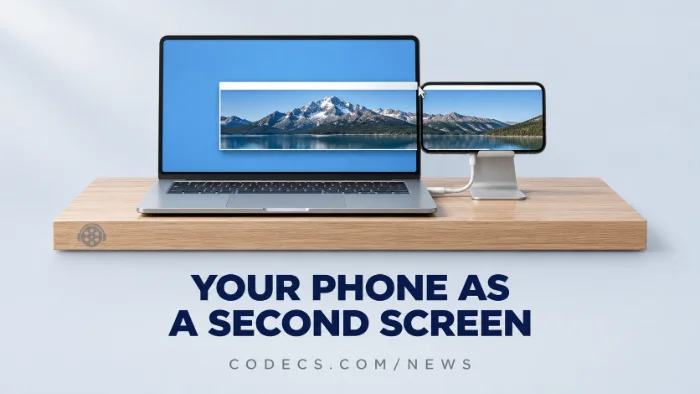
Your Android phone could one day become a second screen for your Windows 11 PC. Microsoft has not announced it, but the feature has been spotted inside its own Link to Windows app.
The short answer: it is not something you can turn on yet, and nobody outside Microsoft knows when it will arrive.
You do not have to wait, though, because a free app already does the same job today.
Here is what was found, why the video codec behind it matters, and how to use your phone as a second screen right now.
What Was Actually Found
Android Authority found a feature called Extend display in the code of Link to Windows, the Microsoft app that pairs your Android phone with your PC. Windows Latest followed up on 20 November with more detail from the same code.
The idea is simple. Instead of showing your phone on your PC, as Phone Link does today, it would work the other way round and turn the phone into an extra monitor for Windows.
That is something Apple does not offer either. Its Sidecar feature turns an iPad into a Mac display, but not an iPhone.
What we do not know yet:
Microsoft has not confirmed the feature, a release date, or which phones and PCs it will support. Features found in code sometimes change a lot before launch, and some never ship at all.
Why the Video Codec Matters
A second screen over Wi-Fi is really a live video stream. Your PC records its own desktop many times a second, squeezes it into video and sends it to the phone, which plays it back.
According to Windows Latest, the code mentions two codecs for that stream: H.264 and HEVC, also called H.265. HEVC packs the same picture into roughly half the data, so text and windows can stay sharp without a perfect Wi-Fi signal.
Almost every Android phone from the last several years can decode HEVC in hardware, and most PCs with a graphics chip from the last few years can encode it. H.264 is the safe fallback for older devices on either side.
The same codec your phone films in:
HEVC is also the format most phones record video in. If those clips play with sound but no picture on your PC, the free HEVC Video Extensions from Device Manufacturer fix that in two minutes.
Not sure your PC handles HEVC in hardware? Our guide on checking whether your PC decodes H.265 shows you how.
Use Your Phone as a Second Screen Today
The free app most people use for this is spacedesk. It is free for personal use and works over Wi-Fi or a USB cable.
- Install the Windows driver. Download the spacedesk driver for Windows from the official site and restart if it asks.
- Install the phone app. Get spacedesk from the Google Play Store on your Android phone or tablet.
- Connect. With both on the same Wi-Fi, open the app and tap your PC's name - the phone becomes an extra screen.
- Arrange it. Open Settings, then System, then Display on your PC to choose where the new screen sits and whether it extends or mirrors.
Expect a small delay on Wi-Fi. That is fine for a chat window, a music player or notes, but not for games or video editing.
Galaxy tablet owner?
Samsung tablets have this built in as Second Screen. Turn it on from the tablet's quick panel, then press Win + K on your PC and pick the tablet.
The Mix-Up to Avoid
Windows 11 already has a setting called Projecting to this PC. It sounds like the answer, but it works the other way round - it shows your phone's screen on the PC, not your PC's desktop on the phone.
Phone Link is the same. It mirrors your phone and its apps onto Windows, much like the Android apps that now stream into Windows search.
If you mainly want your phone's photos and videos on the PC rather than a second screen, Quick Share can back them up to Windows for free. VLC Media Player then plays any of them with nothing else installed.
Quick questions
Can I use my Android phone as a second monitor in Windows 11?
Not with a built-in Windows feature yet. Microsoft appears to be working on one in Link to Windows, and the free spacedesk app does it today over Wi-Fi or USB.
When will Extend display come to Windows 11?
Nobody knows. Microsoft has not announced it, and the feature has only been found in app code so far.
Will it work with an iPhone?
Everything found so far points to Android only, because it lives in the Link to Windows app for Android. Apple's own Sidecar does not support iPhones either.
Why does HEVC matter for a second screen?
The desktop is sent to the phone as live video. HEVC needs about half the data of H.264 for the same picture, so the screen stays sharper on an average Wi-Fi connection.
Is spacedesk safe and free?
It is free for personal use and made by datronicsoft. Download the Windows driver only from the developer's own site and the phone app only from Google Play.
The bottom line
A built-in way to use your Android phone as a Windows 11 screen looks to be on its way, but it is not here yet and may change before it is. If you want a second screen today, spacedesk does it for free in about five minutes.






Latest news comments
What readers are saying AllI was having the same error issue with the dead playlist link the other guy above did. Thank you so much for ...
Team replied News: Free USA IPTV Playlist: The American TV That Is Really Free 2 commentsInteresting development with the Fire TV Stick 4K — losing Kodi sideloading is a big deal for a lot of users. For those ...
News: The New Fire TV Stick 4K Can't Run Kodi - Here's Which Fire Stick Still Can 3 commentsBrave just enabled it by default for stable users yesterday (1.97). Not specified is chromeOS will be passively gaining decode capability too, and ...
Team replied News: JPEG XL Is Back in Chrome: What It Means and How to Open JXL Files 1 comment