MSI Center 2.0.76.0
The MSI Center takes optimization to the next level with easily adjustable system modes and resources for a wide range of scenarios and needs.
- Updated
- Size
- 562.7MB
- Downloads
- 1.5K
- This week
- 18See the Top 20 downloads this week
MSI Center is the official system management utility for MSI laptops and motherboards, giving you complete control over performance profiles, RGB lighting, hardware monitoring, and AI-powered optimizations from a single dashboard.
The software uses a modular design that lets you install only the features you need - avoiding unnecessary background processes that can slow down your system.
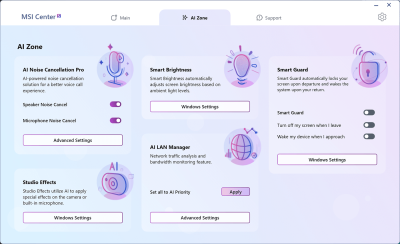
The AI Engine automatically detects your current activity and adjusts CPU performance, display settings, audio profiles, and keyboard backlighting to match.
Whether you're gaming, editing video, or browsing the web, MSI Center handles the optimization without manual intervention.
AI Noise Cancellation Pro uses machine learning to filter background noise from your microphone while preserving voice clarity - ideal for video calls, streaming, and online meetings.
The AI LAN Manager prioritizes network bandwidth for gaming and video conferencing, reducing latency and preventing lag spikes during critical moments.
For users who want deeper insight into their hardware, GPU-Z provides detailed graphics card specifications, real-time temperature monitoring, and clock speed tracking that complements MSI Center's built-in monitoring.
If you're running NVIDIA graphics, the NVIDIA App handles driver updates and game optimization alongside MSI Center.
AMD users can pair it with AMD Radeon Adrenalin for comprehensive GPU management.
Audio customization extends beyond MSI Center's built-in Nahimic integration. FxSound adds bass enhancement, 3D surround effects, and audio restoration that works system-wide with any application.
For advanced users who want granular control, Equalizer APO provides professional-grade audio processing with unlimited filters and effects.
MSI Center includes driver management for MSI-specific components, but system-wide driver updates require additional tools.
Snappy Driver Installer Origin handles offline driver installation for every device in your system, while Driver Store Explorer removes outdated driver packages that accumulate over time and consume disk space.
The Theme Switch option lets you choose between light and dark interfaces to match your desktop environment and reduce eye strain during late-night sessions.
Download MSI Center to unlock your MSI laptop's full potential with AI-powered performance optimization and complete hardware control.
Be the first to review MSI Center 2.0.76.0
Thanks, it's in!
Your review will appear once it has been checked.
Related to MSI Center
More free downloads to try-

PotPlayer Most popular
A free DirectShow player for Windows with FFmpeg decoders built in, deep filter control, and subtitle rendering that holds up against dedicated tools.
In common: control, built
-

FxSound
FxSound is a free, open-source system-wide audio enhancer for Windows that lifts volume, bass and clarity in every application at once.
Mentioned in our MSI Center write-up
-

DirectX
DirectX is the Windows graphics, sound and input layer for games and video; the June 2010 runtime adds the DLLs older games still need.
Popular in Other Tools
-

uTorrent
uTorrent is the original lightweight BitTorrent client for Windows, free to use but ad-supported, with paid upgrades that remove the adverts.
Popular in Other Tools