Two free encoders, both excellent, and almost every comparison of them lists features the other one also has.
StaxRip 2.52.5 and HandBrake 1.11.2 are both free, both open, and both very good at turning one video file into another.
They overlap far more than most comparisons admit, which is exactly why the real differences are easy to miss.
Here is what they share, what actually separates them, and which one belongs on your machine.
The short version. If you are not on Windows, install HandBrake, because StaxRip does not run anywhere else. On Windows and undecided, start with HandBrake and move to StaxRip only when you hit something it will not let you change.
The Two Numbers That Settle It for a Lot of People
StaxRip is Windows 10 and 11 only. HandBrake runs on Windows, macOS and Linux, so for a large share of readers the comparison ends right there.
The second number is size. StaxRip is a 704MB download because it bundles an entire encoding toolchain, while HandBrake is 22.5MB because it carries only what it needs.
Neither number makes a tool better. They do tell you what kind of thing you are installing: a workshop or a machine.
What They Actually Have in Common
This is the part that usually gets skipped, and skipping it is how people end up choosing on false differences.
- Both are completely free, with no watermark, no trial and no account.
- Both encode H.264, H.265 and AV1, and both output MP4 and MKV.
- Both use your graphics card for fast encodes when you want speed over file size.
- Both queue jobs, so you can point them at a pile of files and walk away.
- Both handle subtitles, including adding external SRT files.
- Both are actively maintained, with releases within the last few months.
So if you read somewhere that StaxRip is the one with GPU acceleration or batch processing, that was true years ago and is not true now. Those are table stakes.
Where StaxRip Genuinely Pulls Ahead
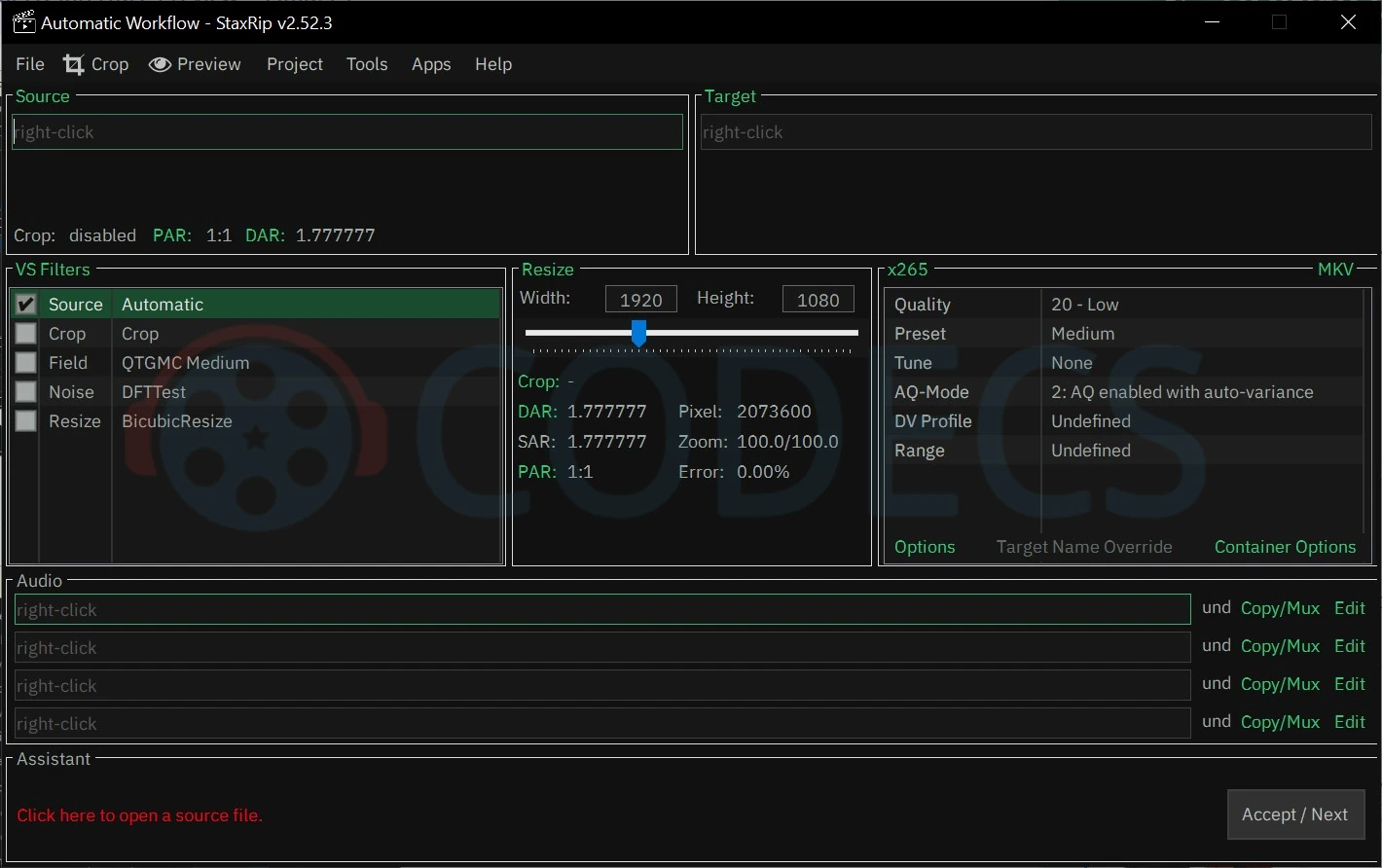
StaxRip is not really an encoder at all. It is a conductor that runs separate tools in sequence and hands frames between them cleanly, so nothing is written to disk in between.
The tools it conducts are the serious ones, including x264 for H.264 and x265 for HEVC.
- Real filtering. StaxRip builds an AviSynth+ script behind every job, so denoising, deinterlacing and clean-up happen in the same pass with no intermediate file.
- Access to the newest codecs. The 2.52 branch wires up VVenC for VVC, the codec that succeeds HEVC on paper, which HandBrake does not offer.
- Encoder-level control. You can reach the actual x265 and SVT-AV1 parameters, not a curated subset of them.
- Compressibility checks. It tells you how a source will respond before you commit hours to the full encode.
- Truly portable. No installer and no registry entries, so you can keep several builds side by side and compare their output.
If you are chasing the smallest file at a given quality across a large library, that control compounds. Our StaxRip HEVC Encoding guide walks a real job through from source load to finished MKV.
Where HandBrake Genuinely Pulls Ahead
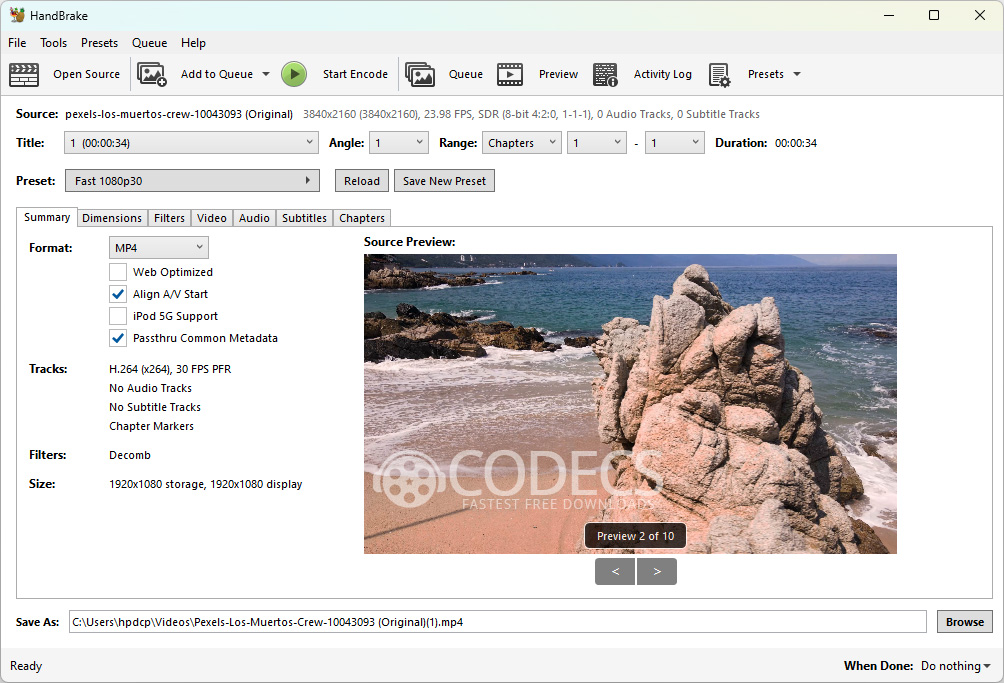
HandBrake's advantage is that it has decided things for you, and the decisions are good ones.
- Presets that are actually correct. Pick your phone, tablet, TV or console and the output plays, with no research into levels and profiles.
- It runs on your machine. Windows, macOS and Linux, which matters if you are not on Windows or move between systems.
- Preview before you commit. Encode a few seconds and look at it, rather than discovering a problem after forty minutes.
- Drag and drop DVD folders. No file browsing, no source indexing decisions to make.
- You can learn it in an evening. Every setting is on one screen with a label that means something.
None of that is a compromise. For most jobs a good preset and a sensible quality slider produce a file nobody could tell apart from a hand-tuned one.
The Setup Traps Nobody Warns You About
HandBrake needs a runtime. On Windows you must install Microsoft Desktop Runtime 5.x first, or the program simply will not start. This trips up a lot of first-time installs.
StaxRip must go in a clean folder. Do not unpack a new version over an existing install. Extract it somewhere fresh with 7-Zip, then copy your old Settings folder across by hand.
One more StaxRip note: if you are updating from a version older than 2.50.0, overwrite the default encoder profiles as well. Otherwise the newer SVT-AV1 options will not all appear.
Which One Should You Install
| If this is you | Install |
|---|---|
| You use macOS or Linux | HandBrake, StaxRip is Windows only |
| You want a file that plays on your phone tonight | HandBrake |
| You are ripping a DVD collection | HandBrake, or VidCoder |
| You need denoising or deinterlacing done properly | StaxRip |
| You are re-encoding a large library for storage | StaxRip |
| You want to experiment with VVC or tune AV1 | StaxRip |
| You are not sure yet | HandBrake, it is 22.5MB and reversible |
There is no rule against keeping both. StaxRip installs into its own folder and touches nothing else, so running the two side by side costs you a bit of disk and no conflicts at all.
If Neither Quite Fits
The gap between these two is wide, and several tools sit in it. Any of them may suit you better than forcing one of the pair.
- VidCoder wraps the HandBrake engine in a more rip-focused interface for DVD and Blu-ray work.
- FastFlix is the strongest free option if you need HDR10+ metadata passed through intact.
- Shutter Encoder and ShanaEncoder sit one tier below StaxRip in complexity.
- MeGUI is the historical choice for an AviSynth-driven workflow with heavy batch use.
- MKVToolNix handles chapters, track stripping and subtitle attaching without re-encoding anything.
There are plenty more in the rest of the video encoders if none of those land.
Quick questions
Does StaxRip produce better quality than HandBrake?
Not inherently, because both call the same underlying encoders. StaxRip lets you reach settings HandBrake hides, so a skilled user can squeeze more out of it, but at matched settings the output is comparable.
Can I run StaxRip on a Mac?
No. StaxRip is Windows 10 and 11 only, so on macOS or Linux HandBrake is the practical choice.
Why is StaxRip 704MB and HandBrake only 22.5MB?
StaxRip bundles a complete toolchain of separate encoders, filters and audio tools inside one portable folder. HandBrake ships only its own engine.
Does HandBrake support AV1?
Yes, through SVT-AV1 in software and through Intel, NVIDIA and AMD hardware encoders. AV1 is not a StaxRip exclusive.
Do either of them need the command line?
No, both are graphical programs. If you are curious about the trade-off, we compared graphical interfaces and the command line separately.
What is transcoding, exactly?
It is decoding a video and re-encoding it into a different format, which is what both of these tools do. There is a fuller explanation of what transcoding actually means if the terms blur together.
Pick one and start with a five-minute clip
Neither tool asks for money or an account, so the fastest way to decide is to encode the same short clip in both and look at the results. If you have an NVIDIA card, NVEnc is worth trying alongside the software encoders.
Go and download HandBrake or download StaxRip, whichever the table pointed you at.
Then tell us which one you went with and how it handled your footage.


How to Stream With VLC: Open a Stream URL or ...
5/5This is amazing! I could no longer afford cable so I cut the cord and started watching Hulu, Youtube, ...
Read More →Don't Open a .xmpeg File Before Reading This
3/5It's never a good sign when the potential malware you downloaded has the EXACT same filename as the example. ...
Read More →Free Popular IPTV Playlist: Where to Get Fres...
3/5How can you create a DSTV channels on IPTV?
Read More →