X IPTV Player 1.0
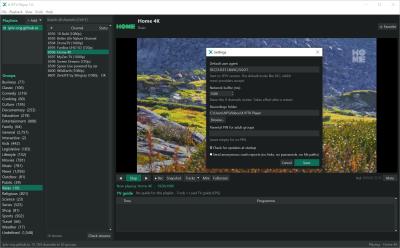
X IPTV Player 1.0 is a free Windows 10/11 app from the X Codec Pack team that plays M3U playlists and Xtream logins with a TV guide, a dead-channel checker, recording and a built-in VLC engine, with no ads.
- Updated
- Size
- 44.42MB
- Downloads
- 1
X IPTV Player is a free Windows app for watching your own IPTV playlist on a PC, with a TV guide, a dead-channel checker and one-click recording.
It comes from the team behind X Codec Pack, it has no ads and no sign-up, and the VLC playback engine is built in.
Version 1.0 is the first public release, so expect quick updates as people start using it.
What X IPTV Player Actually Does
IPTV providers give you a playlist link, an M3U file or an Xtream Codes login. X IPTV Player turns that into a channel list with groups, logos and a TV guide, and plays any channel with a double-click.
It is only a player. It does not sell, include or unlock paid channels, so you bring the playlist and it does the watching part well.
- M3U and M3U8 playlists: from a file, a link or by dragging the file onto the window, with groups, logos and per-channel user agents kept.
- Xtream Codes logins: live TV, movies with a seek bar and series with a season and episode picker. Pasting a full get.php link fills in the login for you.
- TV guide (EPG): now and next above the video and the full schedule below it, loaded automatically when the playlist or account names a guide.
- Favorites and history: star channels with Ctrl+D, and the last 40 channels you watched are one click away.
- Mini player: a small always-on-top window for keeping a match or the news in the corner while you work.
The Three Features That Set It Apart
A built-in dead channel checker. Check streams tests every channel in a group and marks it OK, Slow or Dead, and one tick hides the dead ones. Xtream accounts are checked slowly so you do not hit your connection limit.
Recording while you watch. Press Rec and the live stream is saved untouched to a .ts file in Videos\X IPTV Player, so there is no quality loss. The badge on the video shows the time and file size as it grows.
Free channels with no playlist at all. Discover free channels loads thousands of free public channels from the iptv-org project, sorted by category, country or language.
For a deeper check of a whole playlist outside the player, IPTV Checker scans every channel and exports a cleaned list. Our IPTV Finder also builds playlists from free public channels in your browser.
How to Start Watching
- Add your playlist: click + Add and choose a playlist file, a playlist link or an Xtream Codes login.
- Pick a group: channels are sorted into the groups from your playlist, and the search box finds any channel across all of them.
- Double-click to watch: the channel plays with the guide below it. Press F for fullscreen and PgUp or PgDn to zap.
Not sure whether you have an M3U link or an Xtream login? Our guide to Xtream Codes versus M3U explains the difference in a couple of minutes.
If your playlist has no guide built in, right-click it and choose Set TV guide (EPG) link. Our list of free EPG links that still work has addresses to paste in.
Installer or Portable
Both versions need 64-bit Windows 10 or 11. The installer, about 44 MB, sets the app up for your user account only, with no admin rights needed.
The portable ZIP, about 76 MB, runs from any folder or USB stick with nothing installed. Both include the VLC 3.0.24 engine, so you do not need VLC Media Player installed separately.
About your passwords.
Xtream passwords are encrypted with your Windows account, hidden in logs and crash reports, and never sent to xcodecpack.com. If Windows Defender flags the new app, it is a known false positive with fresh Python-built programs.
Tools That Work Well With It
Provider lists are often huge and messy. The free X M3U Converter from the same team keeps only the channel groups you want, removes duplicates and keeps the IPTV tags intact.
For internet radio rather than TV, X Radio Stream Finder plays 35,000+ stations. If some recordings will not play in other programs, X Codec Pack adds the missing codecs to Windows.
No playlist yet? Our free IPTV playlist guide covers where the legal free lists are, and the free USA IPTV playlist focuses on American channels.
Who Should Look Elsewhere
If you watch on a TV box rather than a PC, X IPTV Player will not help, because it is Windows only. TiviMate and OTT Navigator are the usual picks on Android TV.
On a phone or tablet, IPTV Smarters Pro takes the same Xtream login. On a Mac or Linux PC, the open-source IPTVnator is the closest match.
If you want IPTV as one part of a full media centre, Kodi does that with add-ons.
For more choices, see the IPTV players category and our comparison of free IPTV players.
Worth saying.
The player is legal, but what you watch depends on where the playlist came from. If a service offers every paid channel for a few pounds or dollars a month, read is IPTV legal before you pay.
Quick questions
Is X IPTV Player free?
Yes. It is completely free, with no ads, no registration and no paid tier.
Does it come with channels?
No. You add the playlist or login from your own provider. For free public channels, use Discover free channels inside the app.
Do I need to install VLC?
No. The VLC engine is built into both the installer and the portable ZIP, so the app works on its own.
Where are recordings saved?
In Videos\X IPTV Player, as .ts files named after the channel and time. You can change the folder in Tools, Settings.
Why do some channels not play?
Streams go offline, move or are blocked in some countries. Run Check streams to find the dead ones, and set a custom user agent if your provider needs one.
Download X IPTV Player 1.0 and load your playlist, or tell us how you got on if you have used it before.
Available files
- X IPTV Player 1.0WindowsInstaller44.4 MB
- X IPTV Player 1.0WindowsPortable76.0 MB
Be the first to review X IPTV Player 1.0
Thanks, it's in!
Your review will appear once it has been checked.
Related to X IPTV Player
More free downloads to try-

IPTV Smarters Pro Closest match
IPTV Smarters Pro is a free Android IPTV player that turns an M3U playlist or an Xtream Codes login into a browsable channel list with a full TV guide.
Mentioned in our X IPTV Player write-up
-

VLC Media Player
VLC Media Player is the free, open-source player that opens almost any video or audio file with no codec pack to install.
Mentioned in our X IPTV Player write-up
-

ProgDVB
A Windows player built around live television, pulling channels from tuner hardware, satellite, cable and IPTV playlists rather than from files on your disk.
In common: iptv, playlists, player
-

1by1 Top rated
1by1 is an ultra-lightweight audio player for Windows that plays MP3 and common audio formats directly from folders - no playlists, no databases, no bloat.
In common: playlists, plays, player
-

QuickTime Alternative Most popular
QuickTime Alternative is a free Windows utility that plays MOV and QuickTime files without requiring Apple's QuickTime Player.
In common: plays, player
-

MPC-BE
MPC-BE is a free, open-source Windows media player with its own built-in decoders, so most files play without a codec pack.
In common: plays, player