You hit play on a 4K HDR movie. The picture flips into HDR mode beautifully - and the audio just vanishes for a second.
If LAV Filters and your media player are involved, you are not hitting a codec bug.
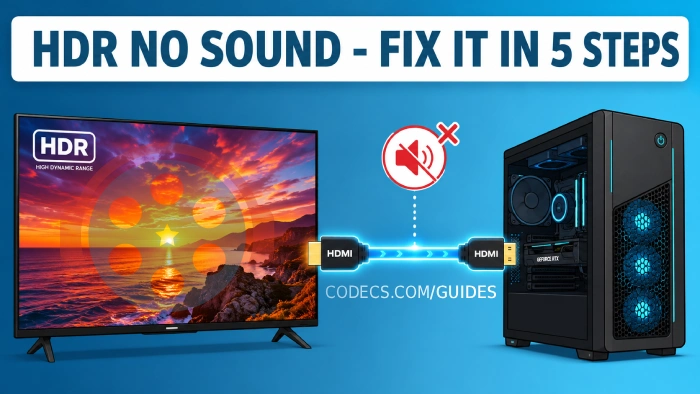
You are hitting an HDMI handshake problem that quietly affects thousands of HDR setups on Windows.
Here is exactly why HDR cuts your audio at the start - and the five fixes that actually work in 2026.
Why HDR Triggers Audio Dropouts (The Real Cause)
When Windows switches into HDR output, your GPU renegotiates the entire HDMI signal with your display, AVR, or soundbar. That handshake briefly silences the audio device.
LAV Filters did not lose your audio. The HDMI chain dropped it during the format change.
The fix is to stop that switch from happening mid-playback. Five steps below get you there.
Step 1: Enable HDR in Windows Before Playback Starts
The cleanest fix is the simplest one. Turn HDR on at the OS level before you launch your video.
In Windows: Settings -> System -> Display, then toggle on Use HDR.
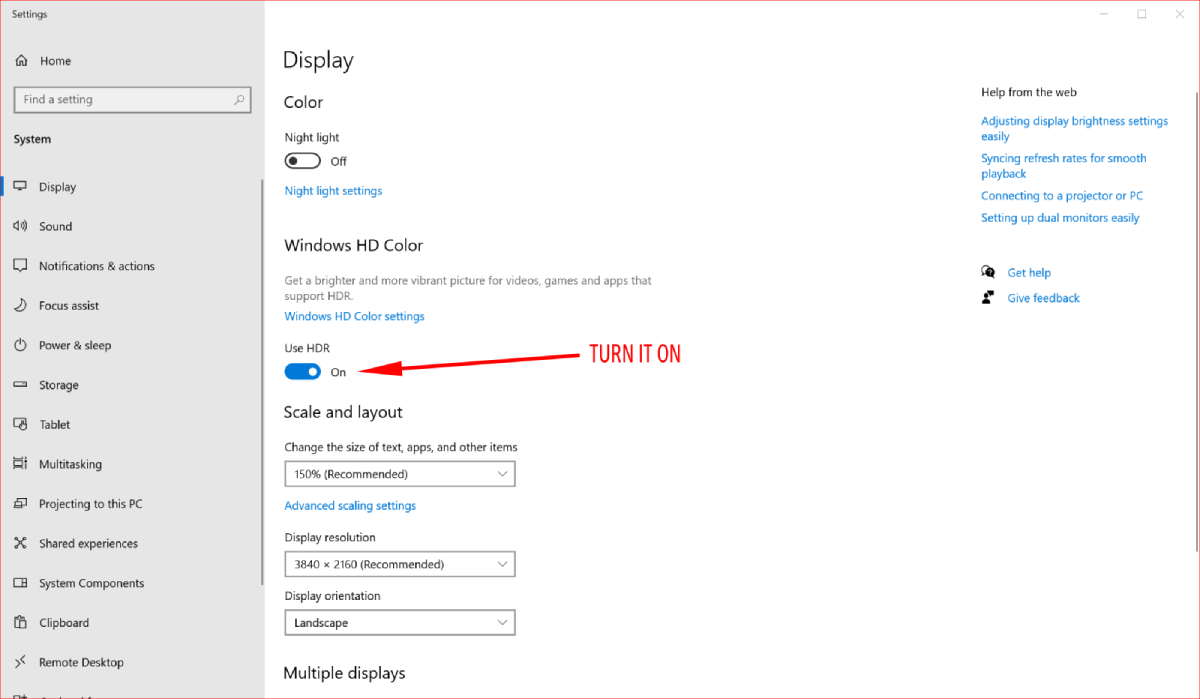
This avoids the mid-playback HDMI re-sync entirely. Audio stays connected because nothing in the signal chain is changing when you press play.
Step 2: Disable Auto HDR Passthrough in Your Media Player
If your player auto-switches into HDR passthrough mid-stream, that is the exact moment the audio drops.
For MPC-HC users:
- Open Options -> Playback -> Output
- Disable any Auto HDR passthrough toggle
- Set the renderer to MPC Video Renderer for stable HDR handling
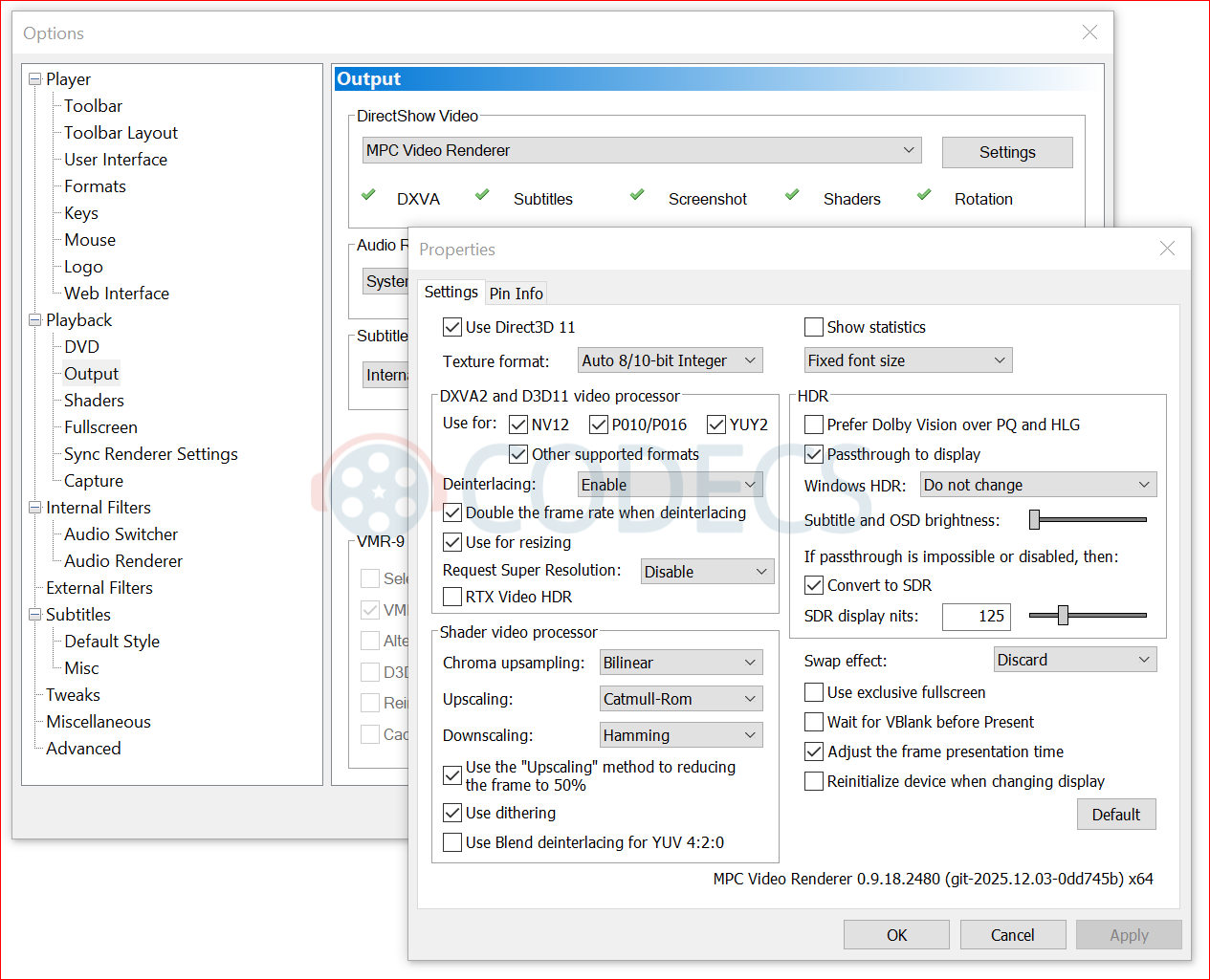
If your media player offers tone-mapping, enabling it sidesteps the HDR mode switch altogether. The image stays in SDR territory and the audio chain stays calm.
Step 3: Update Your GPU Driver and LAV Filters
Old drivers and old filter builds handle HDMI handshakes badly. The newer the stack, the faster the re-sync - and the shorter the silent moment.
- Update your NVIDIA, AMD, or Intel display driver to the latest version
- Grab the current LAV Filters build for improved HDR handshake speed
If you would rather not configure things by hand, K-Lite Codec Pack bundles a current LAV Filters with sane HDR defaults pre-applied.
Step 4: Choose a Stable Audio Renderer
Some audio renderers tolerate HDMI re-sync gracefully. Others lock up.
For MPC-HC, use MPC Audio Renderer or System Default. Avoid WASAPI Exclusive if your AVR or soundbar takes a while to handshake.
WASAPI Exclusive is excellent for bit-perfect output, but it grips the audio device hard. When HDMI re-syncs underneath, the lock can take a few seconds to recover - which is exactly the dropout you are hearing.
Step 5: Tame Your HDMI Chain
If steps 1 to 4 do not fully clear it, the bottleneck is downstream of Windows. The handshake is slow at the hardware level.
Try these in order:
- Connect your GPU directly to the TV instead of routing through an AVR
- Switch the GPU output format to YCbCr 4:2:2 in your control panel
- Set output to 10-bit color depth (12-bit can be slower on older AVRs)
- Try a different HDMI port on the receiver - some negotiate faster than others
- Update AVR or soundbar firmware via the manufacturer app
When the Dropout Still Will Not Go Away
If you have worked through all five steps and the dropout persists, the issue is usually one of three things:
- A receiver that simply takes too long to handshake (firmware-level limit)
- An older HDMI cable that is failing at HDR-level bandwidth
- A TV that is slow to lock into HDR mode
In those cases, locking Windows into permanent HDR (Step 1) remains the most reliable workaround. The mode switch never happens mid-playback because the mode is already locked.
For HDR HEVC content specifically, also confirm the HEVC Video Extension is installed on Windows 11. A missing decoder can compound the symptoms and make the audio drop look worse than it is.
Frequently Asked Questions
Why does my HDR video have no sound at the start?
HDR playback triggers an HDMI re-handshake between your GPU and the display chain.
The audio device briefly resets during that switch, which is why sound disappears for a second or two when the video begins.
Does updating LAV Filters fix HDR audio dropouts?
Often yes. Newer LAV Filters builds handle HDR handshakes faster, which shortens or eliminates the silent moment - especially when paired with current GPU drivers.
Is this a Windows 11 problem or a media player problem?
Neither - it is an HDMI signaling issue triggered by HDR mode switching.
The fix is to stop the switch from happening mid-playback by enabling HDR before playback starts.
Should I use WASAPI Exclusive for HDR playback?
Probably not. WASAPI Exclusive locks the audio device tightly and recovers slowly from HDMI re-sync.
Stick with System Default or MPC Audio Renderer until your chain is fully stable.
Will a better HDMI cable fix HDR audio drops?
It can help if your current cable is below HDMI 2.0 spec. A certified Premium High Speed or Ultra High Speed cable handshakes more reliably at HDR bandwidth.
Wrap-Up
Most HDR audio dropouts come down to one moment: Windows flipping into HDR mode while the player is already running.
Block that switch by enabling HDR up front, disable auto-passthrough in your player, keep LAV Filters and GPU drivers current, and you have solved it.


Don't Open a .xmpeg File Before Reading This
3/5It's never a good sign when the potential malware you downloaded has the EXACT same filename as the example. ...
Read More →Free Popular IPTV Playlist: Where to Get Fres...
3/5How can you create a DSTV channels on IPTV?
Read More →EAC3 Audio Not Supported in MX Player? Fix It
4/5EAC3 Audio Not Supported in MX Player? Fix It
Read More →