We audited the codecs.com software archive and found dozens of Windows players and codec packs that had quietly stopped - and one recommendation of our own that had gone stale.
The job was routine inventory work: check that download links resolve, that screenshots match current versions, that each page reflects reality.
Then a pattern showed up, and it was not one or two stale entries.
Whole categories of Windows multimedia software had gone quiet, and some of them still get thousands of searches a month from people who have no idea they are installing something frozen in 2013.
For almost everything, install VLC media player. It is free, maintained, and plays every format you will realistically meet.
For DVDs and 1080p Blu-ray discs, PowerDVD is the last commercial disc player still developed. For Ultra HD Blu-ray, no player software works any more - rip the disc with MakeMKV and play the file, and both are linked further down.
Everything else below is which old tools died, when, and the three cases where reaching for a dead one is still the right call.
What we mean by abandoned
We counted a player or codec as abandoned if it met one of three tests: no feature release in three years or more, no security patch in a comparable window, or a plain end-of-life statement from its developer.
Some of the names below are formally discontinued. Others sit in what the industry politely calls maintenance mode, which usually means one critical fix every couple of years and otherwise nothing.
Both produce the same result for someone trying to play a video tonight. Software that has not been touched in a decade does not know what HEVC, AV1 or a modern Dolby bitstream is, and it does not know what Microsoft changed in the Windows audio stack last spring.
The list, with real dates
These are upstream release dates, not the dates our own pages were last edited. That distinction matters, and it is the thing that made the audit slower than it should have been.
| Product | Last real release | Status | Still worth it for |
|---|---|---|---|
| Corel WinDVD Pro 12 | Service Pack 8, April 2021 | No releases since | Restoring an OEM licence on old hardware |
| Real Alternative | 2.0.2, February 2010 | Discontinued | Archived .rm and .rmvb files |
| QuickTime Alternative | 3.2.2, final release | Discontinued | Adobe apps that still expect QuickTime |
| Adobe Flash Player | 31 December 2020 | Blocked since 12 January 2021 | Nothing - remove it |
| Adobe AIR | Passed to Harman, 2019 | Orphaned for consumer use | Nothing |
| Media Player Classic (original) | Development ended 2006 | Superseded by its forks | Nothing - the forks do it better |
| AC3 Filter | 2.6b, April 2013 | Discontinued | Manual downmix and dynamic range control |
| ACE Mega CodecS Pack | 6.03 | Discontinued | Nothing |
| Combined Community Codec Pack | 2015.10.25 beta | Discontinued | Nothing |
| Codec Pack All in 1 | 6.0.3.0 | Dormant | Nothing |
| Storm Codec | No recent activity | Dormant | Nothing |
| 3GP Player | 2011 | Dormant | Nothing - VLC opens .3gp |
The rest of this page is what those rows mean in practice, category by category.
The disc players, and a correction we owe you
The biggest casualties are in the dedicated disc-player category, the one that sold most of its licences bundled on laptops between 2008 and 2015.
Corel WinDVD Pro 12 is the headline example. The line goes back to InterVideo in the late 1990s, Corel bought it in 2006, and the last patch was Service Pack 8 in April 2021.
It still plays DVDs and 1080p Blu-rays on supported hardware, but it has documented problems on Intel 12th-generation and newer chips, recent NVIDIA drivers can block Blu-ray playback outright, and Windows 11 installs often need manual cleanup first.
An earlier version of this page said PowerDVD was the only Windows option that still played certified Ultra HD Blu-ray discs. That stopped being true in 2023 and we should have caught it sooner.
CyberLink discontinued Ultra HD Blu-ray disc playback in PowerDVD 20, 21, 22 and PowerDVD 365 after October 2023, along with the online authentication it depended on. Their own support notice says UHD discs will become unplayable in PowerDVD.
The reason given was hardware: PC platforms built since 2020 largely do not meet the requirements UHD Blu-ray playback needs, and CyberLink does not control the firmware vendors.
So the honest 2026 position is that no mainstream player software plays Ultra HD Blu-ray discs on Windows. Not PowerDVD, not VLC, not anything else you can buy or download.
The route that does work is to read the disc once and play the file afterwards. MakeMKV pulls the video off the disc without re-encoding it, and any modern player handles what comes out.
The catch is the drive rather than the software. UHD discs need a drive with compatible firmware, and most standard Blu-ray drives will not read them at all, so check the drive before buying anything.
For ordinary DVDs and 1080p Blu-ray, PowerDVD is still the last commercial disc player under active development, and that part of the old recommendation stands. VLC handles standard Blu-ray too once libaacs is configured, at no cost.
The format helpers: Real, QuickTime and Flash
A whole category of "alternative" players existed because two companies, RealNetworks and Apple, shipped Windows software people disliked. The alternatives stripped out the ads and the auto-updaters and just played the files.
Real Alternative opens .rm and .rmvb files without installing RealPlayer. Its last release was 2.0.2 in February 2010, which makes it the oldest thing on this page still doing a real job.
That job is archives - old recordings, family videos, lectures from fifteen years ago. Nobody creates new RealMedia files, and that is precisely why the tool being frozen does not matter much.
QuickTime Alternative is the same idea for .mov. Apple discontinued QuickTime for Windows in April 2016, after Trend Micro and US-CERT publicly told people to uninstall it over unpatched flaws.
Development on the alternative has stopped too, and for plain playback you no longer need it - VLC and MPC-BE open .mov files with nothing installed. The one case that survives is Adobe software that still expects QuickTime components to be present.
Adobe Flash Player is the cleanest case of all. Adobe ended support on 31 December 2020 and switched on a kill switch that blocks Flash content from 12 January 2021.
Our page for it is a public-service redirect now: do not install this, here is what to use instead, here is how to get it off a machine that still has it. Adobe AIR went a similar way after being handed to Harman in 2019.
The codec packs that froze in place
Codec packs were the other huge category of standalone Windows multimedia software, and the ones that did not move to LAV Filters simply stopped.
ACE Mega CodecS Pack was one of the most downloaded packs on Windows in the mid-2000s and is formally discontinued. Combined Community Codec Pack stopped at a 2015 beta. Codec Pack All in 1, Storm Codec and Windows Essentials Codec Pack are all dormant.
Each was useful in its era, and that era ended when one well-maintained decoding library replaced the whole idea of collecting filters yourself.
AC3 Filter is the exception we kept deliberately. Development stopped in April 2013 and there have been no security patches since, but nothing modern replicates what it does.
Its per-channel equaliser works to one-hertz precision, its dynamic range compression is the best answer to a film that whispers and then explodes at midnight, and its SPDIF passthrough is more configurable than anything current. LAV Filters decodes and passes through; AC3 Filter shapes.
It is the example that proves the rule. Sometimes an abandoned tool stays in use because nothing modern bothered to copy what made it good.
The standalone players in stasis
The original Media Player Classic - Gabest's build, the one that started everything - has not been developed since 2006, and the version on our archive is a community maintenance release from 2011.
We are not recommending it and neither is its own page. Everything it did is done better by the two forks that picked up after Gabest stepped away, and MPC-BE is the one still shipping regular releases.
3GP Player sits in a similar spot - a player dedicated to a phone video format that has essentially disappeared, when VLC opens .3gp files natively.
Even the player built into Windows is heading the same way. Windows Media Player Legacy has not gained a feature since 2009, and Microsoft is taking it apart one feature at a time - an August 2026 test build switched off its captions and subtitles.
5KPlayer, GOM Player and BS.Player are a different case and worth naming separately. All three are still updated, but their installers carry optional bundled offers, so read the screens rather than clicking through them.
The four shifts that ended the era
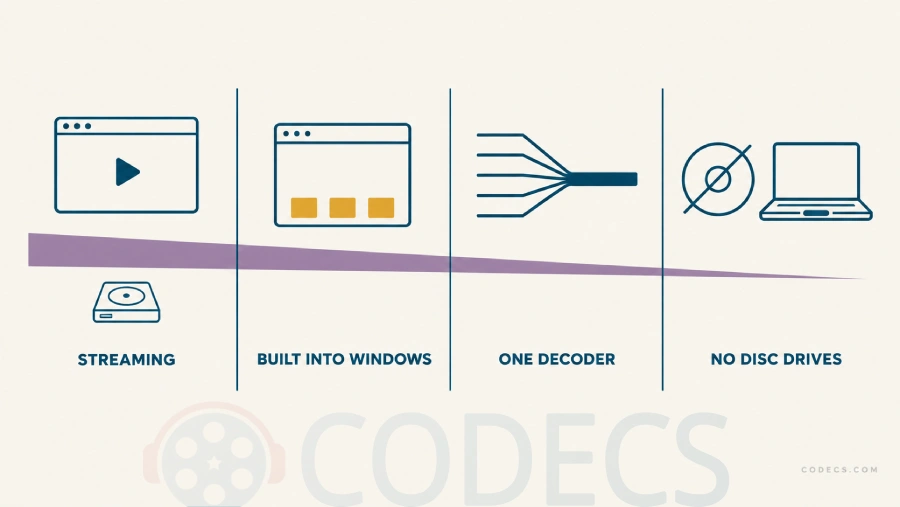
None of these tools died from a single event. Four things happened roughly in parallel between 2015 and 2022, and the standalone-player business model could not survive all four.
Streaming displaced local files. The audience that once installed a dedicated DVD player or codec pack now opens Netflix or YouTube in a browser tab, and "play this file on my computer" shrank to a power-user niche.
Windows absorbed the core functions. Windows 10 added native MKV support, and Windows 11's Media Player covers most modern formats without help. The justification for a separate helper got thinner with each release.
LAV Filters consolidated the codec-pack market. Once K-Lite standardised on LAV Filters as its decoder, the case for any other pack collapsed. Maintaining a codec pack is genuinely hard work, and the users who needed one moved to whichever was best maintained.
Optical discs collapsed for everyone except enthusiasts. Laptops stopped shipping drives, and the OEM bundles that funded disc-player development dried up. Corel kept WinDVD on life support, CyberLink kept PowerDVD going, and everyone else stopped.
When a dead tool is still the right tool
We did not delete the legacy pages, and the audit confirmed why. Three cases hold up.
OEM licence restoration. If a 2013 laptop shipped with a WinDVD licence still attached to the hardware, reinstalling WinDVD is the shortest path back to the player its owner already paid for.
Format-specific archive access. Old .rm files play more reliably in Real Alternative than in some general-purpose players, especially damaged or partial ones. The same logic covers legacy .mov and QuickTime Alternative.
A feature nothing replaced. AC3 Filter's audio panel is still the best manual control over downmixing and dynamic range on Windows, and no maintained tool copies that interface.
In all three cases the rule is identical: install the legacy tool for the legacy job, and use a maintained player for everything else.
What we are not telling you to do. None of these dead tools should be your default player, and none should be installed "just in case". Unmaintained software with no security patches is a reasonable trade for one specific job and a bad trade for daily use.
What to install instead in 2026
The modern Windows media stack falls into four buckets, and these are the pages we keep most carefully maintained.
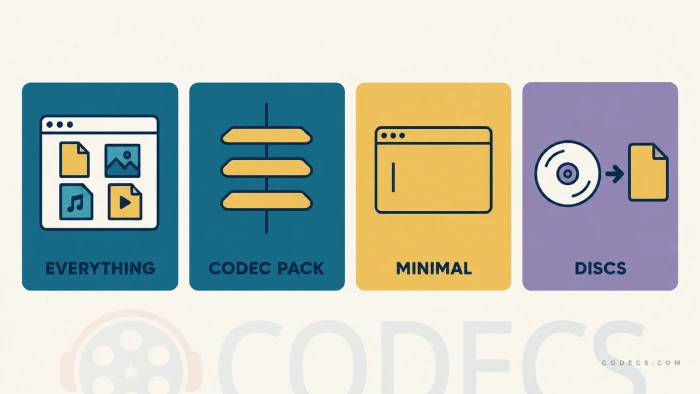
One player for everything. VLC media player is the universal answer - free, open source, plays what you will actually meet, and handles standard Blu-ray with libaacs configured.
A lighter player and a system-wide codec stack. The K-Lite Codec Pack Standard variant ships MPC-HC as the player and LAV Filters as the decoder, which is the same engine behind most modern Windows playback. If you prefer the cleaner interface, MPC-BE pairs with it identically.
The absolute minimum. mpv player is the power-user choice - FFmpeg-based, no installer wizard, configured from a single text file, no interface to speak of.
Discs. PowerDVD for DVD and 1080p Blu-ray, and MakeMKV for anything Ultra HD, because ripping is now the only route that works.
Quick questions
Can anything still play a 4K Ultra HD Blu-ray disc on Windows?
No player software does, since CyberLink withdrew the feature after October 2023. The working route is to rip the disc with MakeMKV and play the file, and that needs a drive with compatible firmware.
Is it safe to install Real Alternative or QuickTime Alternative?
They are unmaintained rather than malicious, and neither has had a security patch in years. Install one for a specific batch of old files, then use a maintained player for everything else.
Do I still need a codec pack in 2026?
Only if you use a DirectShow player such as MPC-HC or Windows Media Player Legacy. Codec packs install DirectShow filters, so they do nothing for the new Windows 11 Media Player. A player that carries its own decoders, like VLC or mpv, covers most people with nothing installed system-wide.
Why is AC3 Filter still recommended when it stopped in 2013?
Because nothing modern replicates its audio processing - per-channel equalisation, dynamic range compression and configurable SPDIF passthrough. It is a specialist tool for one job, not a decoder you leave running for everything.
Should I install the original Media Player Classic?
No. Development ended in 2006 and the build on our archive is a community maintenance release from 2011. MPC-BE is the maintained descendant and does everything the original did.
Does Windows 11 include HEVC playback?
Not automatically. Whether HEVC works out of the box depends on your graphics hardware being able to decode it, not on which Windows build you are running, and where it is missing you need a free extension.
We keep the legacy pages updated with honest status notes rather than deleting them, because someone searching for "WinDVD download" deserves to know what they are about to install. If you spot a status on this page that has changed, leave a comment and we will fix it.


Latest comments
AllI used [link] on tivimate with the Usa m3u Playlist. I cannot get the guide to work.
Team replied Guide: Free EPG URLs for IPTV: TV Guide Links That Still Work 2 comments[link] Epg is not working on this one.
Team replied News: Free USA IPTV Playlist: The American TV That Is Really Free 1 commentSi mund te shikoj te gjitha kanalet e DigitAlb dhe Tring me url pa pagese ne Iptv Player?
Team replied Guide: Free Popular IPTV Playlist: Where to Get Fresh, Legal M3U Links in 2026 20 comments