Every video player has a proper capture command that saves the frame at full quality, and using it instead of Print Screen also sidesteps most of the reasons a screenshot comes out black.
Pressing Print Screen on a paused video gives you a picture of your screen, complete with player controls and whatever scaling your monitor applied.
The player's own command gives you the actual frame, at the resolution the file was encoded at.
It is one keystroke, and it is worth knowing before you troubleshoot anything.
The capture command in each player
Every player worth using has one. These are the two most people have.
- MPC-HC and MPC-BE. File, then Save Image As, or press Alt+I to choose a location - F5 saves straight to your Pictures folder without asking.
- VLC. The Video menu, then Take Snapshot, or press Shift+S, with snapshots landing in your Pictures folder by default.
VLC's save location is changed under Tools, Preferences, All settings, Video, then Video snapshots. There is a Directory field there.
Why this beats a screenshot. The saved frame comes out at the video's own resolution rather than your window size, with no player interface across it, no scaling artefacts and correct aspect ratio. On a 4K file played in a small window, a screenshot gives you a small window and the capture command gives you 4K.
If you do not have either player, VLC Media Player is the simplest to install.
MPC-HC and MPC-BE add frame-stepping, which matters when you need an exact moment rather than roughly the right one.
If you just want a plain screenshot
Sometimes the frame is not the point and you only want to show somebody what is on screen. Windows has two built-in ways.
- Press Windows+Shift+S to draw a box around any part of the screen and copy it.
- Press Windows+PrtScn to save the whole screen straight into your Pictures folder.
Both work on video in almost every case now, which was not true when this guide was first written. If you need more control than that, the screen capture tools section has dedicated applications.
Why the capture comes out black
This is the reason most people arrive here, and the cause has changed completely since the problem first appeared.
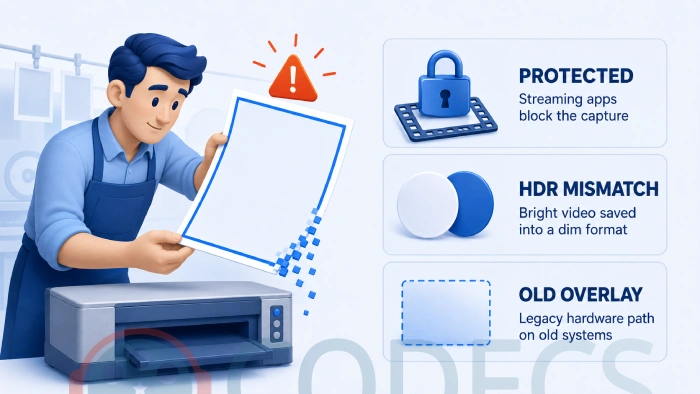
Streaming services block it on purpose. Netflix, Prime Video, Disney+ and the rest return a black frame to any capture, in a browser and in their own apps alike.
It is a licensing condition rather than a fault, so no setting, player or renderer change will alter it. If you are capturing from a streaming service, that is the whole explanation.
The second cause is HDR. Capturing high dynamic range video into an ordinary screenshot means squeezing a much wider brightness range into a narrower one, and the result comes out dark, washed out or oddly grey rather than black.
The fix there is the player's own capture command, which takes the frame before that conversion happens, or turning HDR off for the moment of capture.
The old cause, and why it almost never applies now
For years the answer to a black screenshot was hardware overlay. The video never reached the desktop at all - the graphics card painted it directly over a coloured key, so anything capturing the desktop got the key rather than the picture.
That is what the old advice about avoiding the Overlay Mixer, or unticking "Use overlays from DVD video", was addressing. Both were correct at the time.
Modern renderers do not work that way, so the problem has largely disappeared along with the settings that fixed it. If you are on genuinely old hardware and seeing it, changing renderer is still the answer, and our guide on which renderer to use covers the options.
The related error GetCurrentImage failed, hr = 8000ffff came from the same era and the same cause. It appears when the player cannot read the frame back from the renderer, and switching to a current renderer resolves it.
Capturing from Windows Media Player
Windows Media Player has never had a save-frame command of its own, which is why guides about it are really guides about screenshotting.
On a current Windows, Windows+Shift+S during playback works, and the old advice about disabling overlays is no longer needed or available.
If you are doing this more than occasionally, installing a player with a real capture command will save you time and give better results, for the resolution reason above.
Getting the best possible frame
A few things separate a usable still from a blurry one, and none of them takes long.
- Pause, then step. MPC-HC and MPC-BE step one frame at a time with the arrow keys, so you can land on the exact moment rather than near it.
- Avoid fast motion. Compressed video allocates fewer bits to moving frames, so a still from a pan will always look softer than one from a held shot.
- Save as PNG where you can. JPEG adds its own compression on top of the video's, which is visible on flat areas like skies.
- Do not upscale afterwards. The frame holds what it holds, and enlarging it only makes the compression more obvious.
If the video will not play at all
A capture problem and a playback problem look similar from the outside, and it is worth ruling out the second.
If the picture is missing rather than the capture, that is a decoder issue - LAV Filters or the K-Lite Codec Pack covers most of it.
Our Codec Finder will tell you what the file actually contains, which saves guessing at which of the two you need.
For a quick check with nothing installed, drop the file into the MP4 Player and see whether it plays in the browser. If it does, the file is fine and the problem is local.
Quick questions
Why is my Netflix screenshot black?
Because it is meant to be. Streaming services block frame capture as a licensing requirement, in browsers and apps alike, and there is no setting that changes it.
Which is better, Print Screen or the player's capture?
The player's, every time. It saves the frame at the video's own resolution with no interface across it, while a screenshot captures your window at your screen's scaling.
Where do VLC snapshots go?
Your Pictures folder by default. You can change it under Tools, Preferences, All settings, Video, Video snapshots.
Why does my capture look dark or washed out?
That is usually HDR content being flattened into an ordinary image. Use the player's capture command rather than a screenshot, or turn HDR off while you capture.
Do I still need to change the renderer?
Almost certainly not. That advice addressed hardware overlay, which current renderers do not use, so it only applies on genuinely old systems.
Can I capture a whole sequence of frames?
Yes, MPC-HC and MPC-BE can save a thumbnail sheet from a whole file in one pass, which is faster than stepping through by hand.
Use the player's own capture command, and if the result is black, check what you are capturing from before you change any settings.
Download VLC Media Player if you want a capture command in two minutes, or leave a comment telling us what you were capturing from and what came out.
More players with capture features sit in the media players section, and there is background on the modern pipeline in what Media Foundation is.


Don't Open a .xmpeg File Before Reading This
3/5It's never a good sign when the potential malware you downloaded has the EXACT same filename as the example. ...
Read More →Free Popular IPTV Playlist: Where to Get Fres...
3/5How can you create a DSTV channels on IPTV?
Read More →EAC3 Audio Not Supported in MX Player? Fix It
4/5EAC3 Audio Not Supported in MX Player? Fix It
Read More →