Your phone recorded the video in a format Windows cannot read on its own, and one free Microsoft add-on fixes it in about two minutes.
The video plays perfectly on your phone, then opens on your PC as sound with a black picture, an error, or nothing at all.
Nothing is wrong with the file.
Most modern phones record in HEVC, also called H.265, and Windows 11 and Windows 10 do not ship the decoder that reads it.
The two-minute fix. Install the free HEVC Video Extensions from Device Manufacturer, then reopen the video. On Windows 10, pick version 2.4.109.0 from the same download list.
Is This Your Problem? Four Quick Signs
- You hear the sound, but the picture stays black in Media Player or the Photos app.
- Windows says the codec or format is not supported, sometimes with the code 0xc00d5212.
- File Explorer shows a blank icon where the video thumbnail should be.
- The same file plays fine in VLC, or back on the phone.
If you are not sure, drop the file into our Online HEVC Player, which runs in your browser, uploads nothing and tells you straight away whether the video is HEVC. For any other format, the Codec Finder names what is inside.
Fix It in Windows: Install the Free Decoder
Microsoft makes two editions of the same HEVC decoder. The Microsoft Store charges a small fee for one, while the Device Manufacturer edition is free, signed by Microsoft and does exactly the same job.
- Open the download page. Go to HEVC Video Extensions from Device Manufacturer and click Download.
- Pick the right build. Take the newest one at the top on Windows 11, or 2.4.109.0 further down on Windows 10.
- Double-click the file. It is an AppxBundle, so Windows App Installer opens it and installs it for you.
- Reopen the video. Close Media Player or Photos first, so the app picks up the new decoder.
That is the whole fix for most people. The decoder works system-wide, so File Explorer thumbnails, the Photos app and Media Player all start showing your phone videos.
Which Phones Record This Format
Phone makers switched to HEVC because it keeps the same picture quality in about half the space. That is great for your phone's storage and the reason your PC struggles.
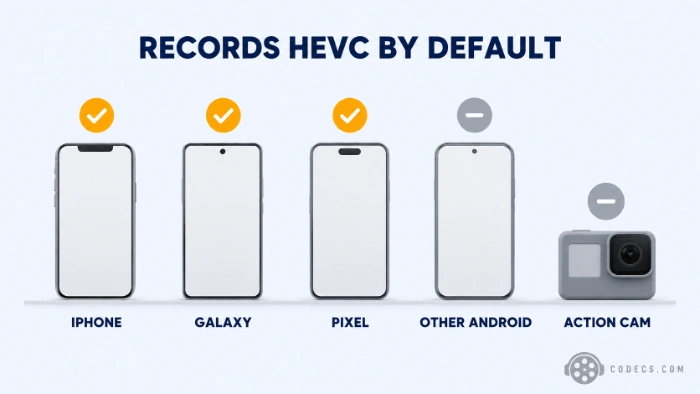
| Phone | Records HEVC | Switch to the compatible format |
|---|---|---|
| iPhone | By default, called High Efficiency | Settings, Camera, Formats, then Most Compatible |
| Samsung Galaxy | By default on recent models | Camera settings, Advanced video options, then turn off High efficiency videos (on some models, set Video format to H.264) |
| Google Pixel | By default on recent models | Camera settings, Video, then turn off Store videos efficiently |
| Other Android phones | Often, and more so since Android 12 | Look in the camera's video settings for High efficiency, HEVC or H.265 |
If you just bought a new iPhone, our news piece on why new iPhone videos will not play on Windows covers the same fix from the other side.
Stop It Happening Next Time
Switching the camera to the compatible format records plain H.264, which every PC, TV and browser plays. The catch is that each video takes roughly twice the space.
Some top settings stay HEVC-only. On iPhone, 4K at 60 frames per second and 240 fps slow motion need High Efficiency, so the compatible format quietly drops them.
iPhone tip. Under Settings, Apps, Photos, the transfer option set to Automatic converts videos to a compatible format when you copy them to a PC by cable. Keep Originals skips that, so switch back to Automatic if you would rather not install anything.
With the free decoder installed, you can leave your phone on its space-saving setting and stop thinking about it.
Already Have the Videos? Play or Convert Them
VLC Media Player carries its own decoders and plays phone HEVC with nothing else installed. Our guide to the best players for HEVC files covers the other good options.
To share a clip with someone whose PC or TV will not play it, convert it to H.264 with HandBrake. On a Galaxy you can also do it on the phone, in the Gallery editor under Size and format.
Installed It and Still a Black Screen?
- Wrong build for your Windows. A Windows 11 build fails quietly on Windows 10, so go back and take 2.4.109.0.
- An older or locked-down PC. 4K phone video needs hardware decoding to play smoothly, so check whether your PC decodes H.265 in hardware.
- Some Dell and HP laptops. These makers have switched HEVC hardware decoding off on certain models, which our news piece on HP and Dell removing HEVC support explains.
If none of these fits, our HEVC troubleshooting guide works through the rest in order.
Your Photos Will Not Open Either?
Phones that record HEVC video usually save photos as HEIC too, which needs a second free add-on, HEIF Image Extensions, alongside the HEVC one.
Our guide on why iPhone HEIC photos will not open on Windows walks through it.
Quick questions
Why does the video play on my phone but not on my PC?
Your phone has an HEVC decoder built in and Windows does not. The file is identical in both places; only the PC is missing the piece that reads it.
Is the fix really free?
Yes. The Device Manufacturer edition of HEVC Video Extensions is free and signed by Microsoft. The Store's paid listing is the same decoder, so there is no reason to pay for it.
Do I need it if I use VLC?
Not for VLC, which brings its own decoder. You need it for the Photos app, Media Player, File Explorer thumbnails and other apps that rely on Windows.
Will the compatible camera setting make my videos look worse?
Not visibly at normal settings, but each file takes roughly twice the space, and some top modes such as 4K at 60 fps may disappear.
Why do some videos from the same phone play and others do not?
Some routes convert the video on the way. An iPhone copying to a PC by cable with Automatic transfer converts it, while videos saved another way often stay in HEVC.
Does this work on Windows 10?
Yes. Take version 2.4.109.0 from the same download page, because the newer builds are made for Windows 11.
The bottom line
Your phone videos are fine, and Windows only needs Microsoft's free HEVC decoder to play them. Install it once and your phone can keep saving space.


Latest comments
Allالبروتوكول (http:// أو [link] بعنوان الـ IP أو الدومين، ورقم المنفذ (مثل :8080 أو :80).• مثال لشكل الرابط: [link]
Team replied Guide: Xtream Codes Explained: How They Work and Differ From M3U 1 commentHola cuando descargo un video con mpc-hc lo descarga en formato webm en vez de mp4 o mp3
Team replied Guide: How to Stream Videos with MPC-HC 1 commentInteresting development with the Fire TV Stick 4K — losing Kodi sideloading is a big deal for a lot of users. For those ...
News: The New Fire TV Stick 4K Can't Run Kodi - Here's Which Fire Stick Still Can 3 comments