Windows has two different HEVC extensions with almost the same name. One is free, one costs 99 cents - and they do exactly the same job.
Here is which one you need, how to tell whether Windows already has it, and what to do when neither will install.
- Want it free? Install HEVC Video Extensions from Device Manufacturer - same decoder, no charge.
- Want it from the Store? "HEVC Video Extensions" costs 99 cents and is identical.
- Want to install nothing? VLC plays HEVC using its own decoder.
- On Windows 11? Whether HEVC works out of the box depends on your graphics chip, not your Windows version.
HEVC in one paragraph
HEVC, also called H.265, squeezes video into roughly half the size of the older H.264 at the same quality.
That is why Netflix and Prime Video stream it, why 4K Blu-ray uses it, and why your iPhone and your drone record in it.
Windows understands H.264 on its own. HEVC it does not, and that gap is what produces "video not supported" and "missing codec" errors.
The two extensions, side by side
| From Device Manufacturer | HEVC Video Extensions | |
|---|---|---|
| Price | Free | 99 cents |
| Who it was made for | PC manufacturers, to preinstall on new machines | Shoppers, via the Microsoft Store |
| What it does | Decodes HEVC in Windows apps | Decodes HEVC in Windows apps |
| Signed by Microsoft | Yes | Yes |
| Easy to find | No, it is hidden from Store search | Yes |
The differences are commercial, not technical. Same decoder, two doors.
The free one: HEVC Video Extensions from Device Manufacturer
It will never win a branding award, but for most Windows 10 and 11 users this is the quiet fix that just works.
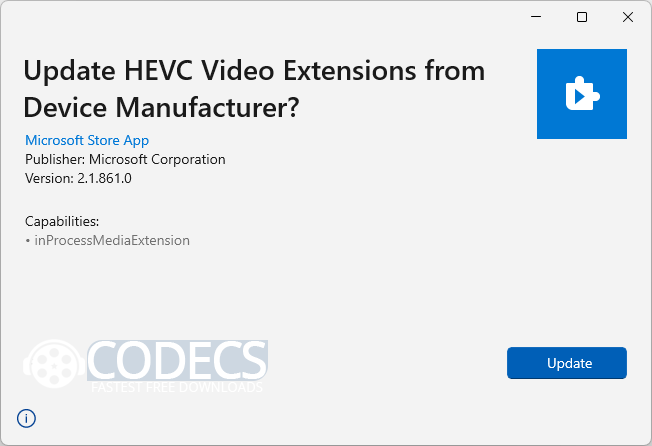
It often arrives preinstalled from your PC maker, which is why some machines play HEVC happily on day one and an apparently identical machine does not.
The catch: Microsoft pulled it from public Store search, so it does not turn up if you go looking. If your PC already has it, do not uninstall it.
If it is gone, or was never there, you can still get the package. The download page here has it, and the free download walkthrough shows how to generate an official Microsoft link yourself if you would rather go to the source.
The paid one: HEVC Video Extensions, 99 cents
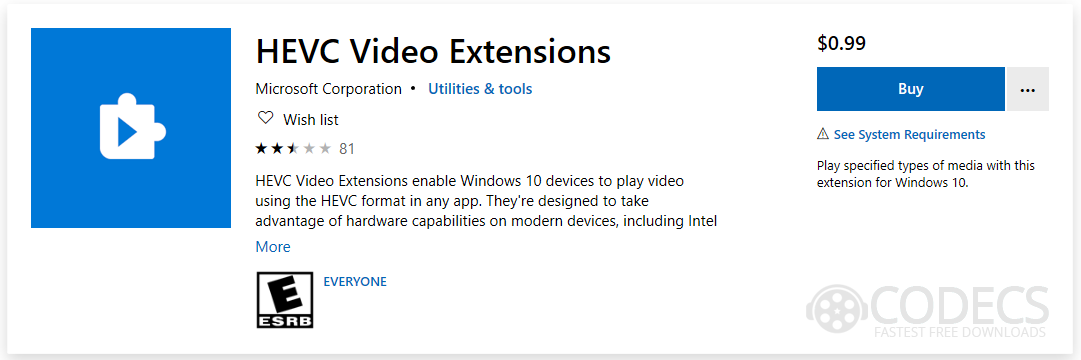
This is the official, supported route. It handles both hardware-accelerated and software decoding depending on what your PC can manage, and it slots into Windows apps and Microsoft Edge without any configuration.
If you value a Store receipt and automatic updates over saving a dollar, buy it. Functionally you gain nothing else.
Does your version of Windows already have HEVC?
| Windows version | HEVC support |
|---|---|
| Windows 10, version 1703 and earlier | Built in. Nothing to install. |
| Windows 10, version 1709 and later | Removed. You need one of the two extensions. |
| Windows 11, all versions | Depends on your graphics chip, not your Windows build. See below. |
That last row is the one that confuses everybody, and most guides get it wrong.
Microsoft's own support staff have explained it plainly: HEVC is patented, so Microsoft pays a royalty on software decoding. If your graphics chip can decode HEVC in hardware, that royalty is already covered by the chip maker and Windows can use the free path.
If your graphics chip cannot, Windows falls back to software decoding, and that is the part Microsoft has to pay for. Hence the extension.
In practice, machines with roughly 2016-or-newer Intel, AMD or NVIDIA graphics often play HEVC with no extension at all. Older ones do not, so two PCs on the same Windows 11 build can behave completely differently and neither is broken.
Why a codec costs money at all
HEVC is not just a powerful format, it is a legally complicated one. Several patent pools claim rights over it, and licence terms differ between them.
That tangle produces real court cases, including a ruling against Netflix over HEVC patent infringement. Our report on it, Court Finds Netflix Guilty of HEVC Patent Infringement, covers how that played out.
So the 99 cents is not Microsoft being greedy. It is a licence fee passed on, and it is also why you should be careful with anything advertising itself as a free HEVC "unlocker" or codec pack from an unfamiliar site.
Browsers are a separate problem
Installing the extension fixes Windows apps. Browsers are their own world.
Microsoft Edge gives consistent hardware-accelerated HEVC playback once the extension is present. Chrome and other Chromium browsers vary enormously depending on your hardware, your Windows version and which browser update you happen to be on.
Some people get round this with modified Chromium builds that include unofficial HEVC support. It works, but you are trusting an unsigned browser with everything you type into it. Not a trade we would make.
Free alternatives: play HEVC with no extension at all
Some players carry their own decoders and never ask Windows for anything.
- VLC Media Player is the default answer - open source, plays HEVC including 4K and HDR, hardware accelerated.
- PotPlayer, MPC-HC, MPV and the rest are compared side by side, including which suits older machines.
Worth knowing where this stops. A player with its own decoder fixes playback in that player, so it will not give you File Explorer thumbnails, Photos previews, or Windows Media Player.
What about AV1?
AV1 is the newer, royalty-free format backed by Google, Microsoft, Netflix and others. On paper it beats HEVC on compression and costs nothing to license.
In practice, hardware support is still catching up and encoding is slow. HEVC remains what your phone records, what your camera outputs and what most 4K files arrive as.
Quick questions
Is the free extension a pirated or cracked version?
No. It is a genuine Microsoft-signed package, published by Microsoft for PC manufacturers. It is simply not listed in Store search.
Can I install both?
You can, but there is no reason to. They provide the same decoder and Windows will just use whichever is registered.
The installer opens and closes and nothing happens. Why?
Usually an older copy is still registered under another Windows account, or the PC is running 32-bit Windows, or a workplace policy has blocked Store services. Installing through PowerShell gets around all three.
Do I need the HEIF extension as well?
Only for photos. HEVC covers video files such as .mp4, .mkv and .mov. HEIF and HEIC are the still-image formats iPhones use, and they install separately.
Will this let me create HEVC files?
No. These extensions decode only, meaning they let you watch. Producing HEVC video needs an encoder, which is a different kind of program.
My video plays but there is no sound.
Then HEVC is not your problem. The video decoded fine and the audio track is the missing piece, most often AC3 or DTS in an .mkv file.






Latest comments
AllI used [link] on tivimate with the Usa m3u Playlist. I cannot get the guide to work.
Team replied Guide: Free EPG URLs for IPTV: TV Guide Links That Still Work 2 comments[link] Epg is not working on this one.
Team replied News: Free USA IPTV Playlist: The American TV That Is Really Free 1 commentSi mund te shikoj te gjitha kanalet e DigitAlb dhe Tring me url pa pagese ne Iptv Player?
Team replied Guide: Free Popular IPTV Playlist: Where to Get Fresh, Legal M3U Links in 2026 20 comments