Windows still keeps a list of installed codecs and it is easy to find, but it shows only one of the three places codecs actually live - which is why it looks nearly empty on a machine that plays everything.
The old Control Panel screen that listed video and audio codecs disappeared with Windows XP.
Its replacement is System Information, which is still built into Windows 11 and Windows 10.
Finding it takes about ten seconds, and understanding what it leaves out takes about a minute.
Where the list lives now
- Press the Windows key, type msinfo32 and press Enter.
- In the left pane, expand Components, then expand Multimedia.
- Click Audio Codecs or Video Codecs to see the list in the right pane.
- Widen the window or the columns to read the file names and version numbers.
This is the direct descendant of the XP dialog, and the information is the same kind: codec name, the file behind it, and its version. You can select a row and copy it if you need to send the details to somebody.
Why the list looks nearly empty
Most people open that screen expecting dozens of entries and find a handful. Nothing is wrong - the list is honest, it is just narrow.
Windows has not decoded media through one shared list for a very long time. There are now three separate places a codec can be registered, and System Information reads only the oldest of them.
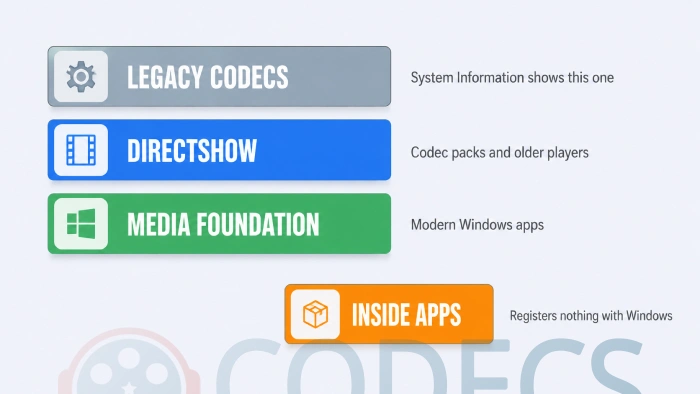
On top of those three, players like VLC and every web browser carry their own decoders inside the application and register nothing with Windows at all. That is why a machine can play a format perfectly while showing no sign of it anywhere in the system.
So the honest answer to "which codecs do I have" is that it depends which layer you mean. For background on the newest of them, see what Media Foundation is.
Seeing the other two layers
If you want the full picture rather than the legacy slice, you need a tool that reads DirectShow filters and Media Foundation transforms as well.
- The complete view. X Codec Inspector lists every DirectShow filter and Media Foundation transform on the machine, flags conflicts between them, and runs portable with nothing to install.
- The hardware angle. DXVA Checker covers the same two layers and adds what your graphics card can decode in hardware, which is the other half of the question.
Conflicts matter more than the raw list does. Two filters claiming the same format is the usual cause of a file that plays in one program and not another, and a tool that flags them saves a lot of guesswork.
There are more of these under Codec Identifiers if you want to compare them.
The question behind the question
Almost nobody wants an inventory for its own sake. They want to know whether one particular file will play, or why it will not.
That is a different question and it has a much faster answer, because you can read the file instead of auditing the machine.
- What is in this file? Our Codec Finder reads it in the browser and names the codecs inside, with nothing uploaded.
- What can my browser decode? The GPU and Codec Checker probes your hardware and browser for H.264, HEVC, AV1 and VP9 support.
- Something is broken and I do not know what. The Codec Troubleshooter walks the common playback faults in four steps.
- I want the details of a file on disk. BetterMediaInfo reports every stream detail in an interface built for Windows 11, and MediaInfo is the long-standing original.
Things that will never appear in the legacy list
Some formats are missing from that screen no matter what you install, because they were never legacy codecs to begin with.
HEVC, AV1, VP9 and OGG all arrive as separate extensions from the Microsoft Store rather than as part of Windows.
The HEVC Video Extension is the one people hit most often, and there is a way to get it free.
For AV1, see our guide on how to play AV1 on Windows 11.
Windows 11 dropped AC-3 in version 24H2. If you are comparing two machines and one is missing something the other has, this is a real difference rather than a fault. Anything that needs AC-3 now depends on a decoder you supply yourself, such as the one inside the K-Lite Codec Pack.
Quick questions
Why does System Information show so few codecs?
Because it reads only the oldest of the three layers Windows uses. Most modern decoding happens in DirectShow, Media Foundation, or inside the app itself.
Is there still a Control Panel page for codecs?
No. That screen was part of the Sounds and Audio Devices dialog in Windows XP and it did not survive the move to later versions.
How do I know if a codec is broken rather than missing?
A conflict between two filters claiming the same format is the usual culprit, and it shows as a file that plays in one program but not another. An inspector tool that flags conflicts will find it faster than reading a list.
Do I need to install codecs at all now?
Usually not. A player that carries its own decoders covers most people, and Store extensions handle the rest.
Where are codec files actually stored?
Scattered, which is part of the problem - system folders for the legacy ones, program folders for filters, and inside the application for app-internal decoders. The file path shown in System Information applies only to the legacy layer.
Can I remove a codec I do not want?
Yes, but uninstall through the program that added it rather than deleting files. A filter manager can unregister one that has no uninstaller left.
Open System Information for the quick answer, and reach for an inspector when the quick answer is obviously incomplete.
Download X Codec Inspector to see all three layers at once, or leave a comment telling us what you were trying to track down.
The full catalogue of decoders sits under Video Codecs.


But How can I do it in Windows7 ?
Microsoft keep moving things around in the Control Panel!