Windows 11 does not decode AV1 out of the box, and the free extension that fixes it takes about a minute to install.
AV1 is a royalty-free video codec built by the Alliance for Open Media.
It compresses better than H.264 or VP9, which is why streaming services moved to it.
The catch on Windows is that a file which plays perfectly on YouTube may show a black screen or an error when you open the same footage locally.
Step 1: Install the AV1 Video Extension
Download the AV1 Video Extension, which is free, and click Install. It usually finishes in under a minute.
On a work or school machine. Managed PCs often block Store installs entirely, so you will need an administrator to approve it - or skip the extension and use one of the players in the next section instead. Microsoft PC Manager will tell you whether your device is managed.
What the Extension Actually Changes
This is the part most guides get wrong, and it is worth two minutes because it saves a lot of confusion later.
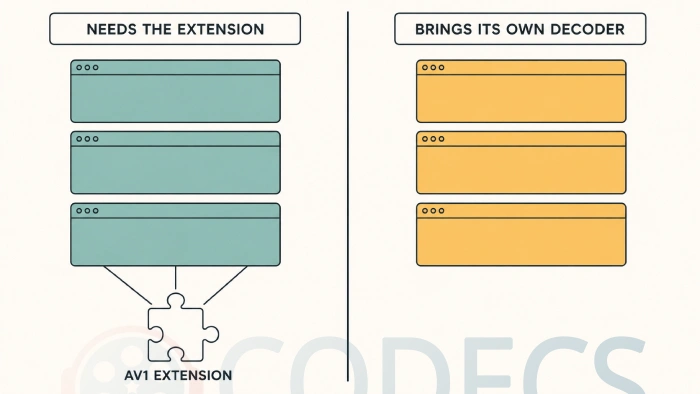
The extension plugs into Media Foundation, which is the decoding layer Windows itself uses. Installing it teaches Windows to decode AV1, which fixes playback in the apps that ask Windows to do the work for them.
It changes nothing at all for players that carry their own decoders, because those never asked Windows in the first place.
| App | Needs the extension? |
|---|---|
| Movies & TV, Windows Media Player | Yes |
| Photos, and File Explorer thumbnails | Yes |
| Microsoft Edge | Yes for some local files |
| VLC Media Player | No, it has its own |
| MPV and PotPlayer | No, they have their own |
| MPC-HC | No, it has its own |
Most of those players use dav1d, the open-source AV1 decoder, which is fast and does not care what Windows thinks.
If all you want is to watch one file, install VLC and you are finished. The extension is worth having so that thumbnails, Movies and TV, and the Photos app all work too, but it is not what makes VLC play your video.
Step 2: Open Your Video
Double-click the file. If it was not playing before and now it does, you are done.
For everything else, the K-Lite Codec Pack bundles a player and the decoders together, which is the simpler route if you would rather install one thing than several.
If It Still Will Not Play
Work through these in order. The first two catch almost everything.
- Restart the app, or sign out and back in. Media Foundation caches its decoder list and will not always notice a new extension straight away.
- Confirm the file is actually AV1. Open it in MediaInfo and read the video format - plenty of files people assume are AV1 turn out to be HEVC, which needs a different extension entirely.
- Try VLC. If VLC plays the file and Movies and TV does not, the file is fine and the extension did not install cleanly - remove it and add it again.
- Check the audio track separately. A silent AV1 video usually means an Opus or a DTS audio stream the player cannot handle, not an AV1 problem at all.
Getting Smooth Playback on 4K
Software decoding AV1 is demanding, and on 4K footage an older processor will drop frames even with everything installed correctly.
Hardware decoding solves it, and recent Intel, AMD and NVIDIA graphics all handle AV1 in silicon. Our guide on which GPUs decode it covers what supports what.
Keep your graphics drivers current, and turn on hardware acceleration in whichever player you settle on. Without it, the work falls back to the processor.
If your machine is too old for AV1 hardware decode, a lower resolution copy will play smoothly where the 4K version stutters.
Where to Go Next
If you want AV1 in your browser as well as on your desktop, our guide on how to enable AV1 on YouTube covers that side, including whether you actually want it on.
To make your own AV1 files rather than just play them, the walkthrough on how to encode your own AV1 files has the commands.
For background on how AV1 compares with everything else, there is our roundup of older codecs against the current ones, and a look at streaming high-resolution video.
And if you are just curious how it ended up everywhere, there is the story of why AV1 won.
Quick questions
Is the AV1 Video Extension free?
Yes. Microsoft charged a small amount for it briefly years ago and it has been free since. If a site is asking you to pay for it, you are on the wrong site.
Do I need it if I only use VLC?
No. VLC brings its own AV1 decoder. Install the extension anyway if you want Explorer thumbnails and the Photos app to work, but VLC alone does not need it.
Does Windows 10 need this too?
Yes, and the same extension covers both. Everything in this guide applies to Windows 10 without modification.
Why does my AV1 video stutter even after installing it?
That is a performance problem rather than a decoding one. Software decoding 4K AV1 is heavy, so enable hardware acceleration in your player and make sure your graphics drivers are current.
I installed it and nothing changed. What now?
Restart the app first, since Media Foundation caches its decoder list. If the file plays in VLC but not in Movies and TV, the extension did not install cleanly and is worth removing and adding again.
How can I tell whether a file is really AV1?
Open it in MediaInfo and read the video format line. Files people assume are AV1 are frequently HEVC, which needs a different extension.
Install the extension for Windows apps, install VLC for everything else, and turn on hardware acceleration if 4K stutters.
Get the AV1 Video Extension and try that file again, or tell us what happened if it still will not play.




Latest reviews
AllJPEG XL Is Back in Chrome: What It Means and How to Open JXL...
5/5Brave just enabled it by default for stable users yesterday (1.97). Not specified is chromeOS will be passively gaining decode ...
The New Fire TV Stick 4K Can't Run Kodi - Here's Which Fire ...
5/5Really interesting news - I had no idea Amazon was switching the new Fire TV Stick 4K over to ...
Free Popular IPTV Playlist: Where to Get Fresh, Legal M3U Li...
5/5Hi! Thanks for creating this list, and I have a small question: why do the channels I used to ...