Microsoft's Scott Hanselman has released gputaskman, a free tool that shows which apps are really using your graphics card's memory - and Windows' own Task Manager can answer most of the same question with no install at all.
That matters if your videos stutter, your games hitch or your PC feels sluggish even though the processor looks idle.
Here's what the new tool does, who it's for, the Task Manager route for everyone else, and the video playback settings to check once you know the culprit.
What gputaskman Actually Shows
Task Manager will tell you that, say, 6GB of graphics memory is in use. gputaskman tries to answer the next question: used by what - your browser, a video player, a game, or the Windows desktop itself?
For each running app it lists the graphics memory (VRAM) it holds, how busy it keeps the graphics card, and how much has spilled over into ordinary system RAM. It also has extra views for people running AI models locally, which is where it started.
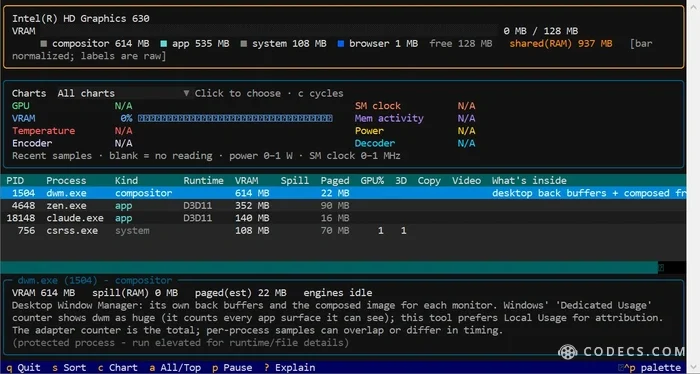
Here it is on our test PC with Intel graphics. The per-app list works - the Windows desktop (dwm.exe) on top, then a browser - but the live charts are blank.
It's Hanselman's own open-source project under the MIT licence. The code and downloads are on GitHub.
Who It's For - and Who Should Skip It
- 64-bit Windows 10 or 11, with Linux, WSL and Apple Silicon Macs also supported
- An NVIDIA or AMD graphics card with a current driver
- Comfort running a program from Windows Terminal or PowerShell
It is a text-based terminal app, not a normal window with buttons, and its author calls it early and experimental. Intel graphics are not on the official Windows support list. On our Intel HD Graphics 630 test PC it still listed memory per app, but usage, temperature and decoder readings showed N/A, so Task Manager below tells Intel owners more.
How to Run It on Windows
- Download the portable ZIP. On the project's GitHub Releases page, pick the windows-x64.zip file, or windows-arm64.zip on a Snapdragon laptop.
- Extract the whole ZIP. Keep the _internal folder next to gputaskman.exe or it won't start.
- Open a terminal in that folder. Right-click inside the folder, choose Open in Terminal, then type .gputaskman.exe and press Enter.
No Python, admin rights or install are needed for the portable build. If you already use Python, pipx install gputaskman works too.
Expect a SmartScreen warning.
The builds are not code-signed yet, so Windows may warn you before it runs. Only download from the official GitHub page, never from a mirror or a "gputaskman setup" site.
No Install Needed: Task Manager's Hidden GPU Columns
Press Ctrl+Shift+Esc to open Task Manager. On the Processes page, right-click any column heading and tick GPU and GPU engine to see which apps are using the graphics card right now.
For memory, open the Details page, right-click a column heading, choose Select columns and tick Dedicated GPU memory and Shared GPU memory. Sort by Dedicated GPU memory to put the biggest user on top.
Don't panic about Desktop Window Manager.
The Windows desktop (dwm.exe) often looks huge, because the windows of other apps are counted against it as well. That double counting is one of the things gputaskman was built to untangle.
Video Stutters? Check the Video Decode Graph
In Task Manager, open Performance, click your GPU, and switch one of the small graphs to Video Decode. Then play the video that stutters.
If Video Decode stays flat while the CPU is busy, your graphics card's built-in video decoder isn't being used, and the processor is doing all the work. That is the commonest reason 4K and HEVC files judder on a perfectly capable PC.
- VLC Media Player: go to Tools > Preferences > Input / Codecs and set Hardware-accelerated decoding to Automatic.
- MPC-HC: in Options > Internal Filters, open the video decoder settings and choose a hardware decoder such as D3D11.
- Browsers: in Chrome or Edge, turn on Use graphics acceleration when available under Settings > System.
In Mozilla Firefox, the same switch is under Settings > General > Performance, once you untick Use recommended performance settings. If a browser hogs graphics memory with dozens of video tabs open, closing them frees it straight away.
Want the Hardware Details Too?
Task Manager and gputaskman tell you who is using the memory. GPU-Z tells you what you have - the exact card, how much memory it carries, the driver version and its live temperature.
And if you're curious how far Windows can go with no graphics card at all, see the experiment that runs Windows 11 on an NPU.
Quick questions
Is gputaskman free and safe?
It's free and open source under the MIT licence, made by Microsoft's Scott Hanselman. The builds aren't signed yet, so download only from the official GitHub page.
Is gputaskman an official Microsoft app?
No. It's Hanselman's own project published on his GitHub account, not part of Windows and not supported by Microsoft.
Does gputaskman work with Intel graphics?
Partly. It officially supports NVIDIA and AMD, but on our Intel HD Graphics 630 test PC it still listed memory per app. Usage, temperature and decoder readings showed N/A, so use Task Manager for those.
How do I see GPU memory per app without installing anything?
Open Task Manager, go to Details, right-click a column heading, choose Select columns and tick Dedicated GPU memory and Shared GPU memory.
What is shared GPU memory?
It's ordinary system RAM the graphics card can borrow. Laptops with built-in graphics rely on it heavily, and it is slower than the card's own memory.
Why does my video stutter when the GPU looks idle?
Usually the player is decoding on the processor instead of the graphics card. Check the Video Decode graph in Task Manager and turn on hardware decoding in your player.
The bottom line
gputaskman is a sharp new tool for NVIDIA and AMD owners who don't mind a terminal. For everyone else, Task Manager's GPU columns and the Video Decode graph will find the culprit, and your player's hardware decoding switch usually fixes it.








Latest news comments
What readers are saying AllI was having the same error issue with the dead playlist link the other guy above did. Thank you so much for ...
Team replied News: Free USA IPTV Playlist: The American TV That Is Really Free 2 commentsInteresting development with the Fire TV Stick 4K — losing Kodi sideloading is a big deal for a lot of users. For those ...
News: The New Fire TV Stick 4K Can't Run Kodi - Here's Which Fire Stick Still Can 3 commentsBrave just enabled it by default for stable users yesterday (1.97). Not specified is chromeOS will be passively gaining decode capability too, and ...
Team replied News: JPEG XL Is Back in Chrome: What It Means and How to Open JXL Files 1 comment