You downloaded a file with the .xmpeg extension and something feels off. Maybe a torrent told you to install a special codec to watch it. Maybe Windows has no idea what to do with it. Either way, your instincts are right to be suspicious.
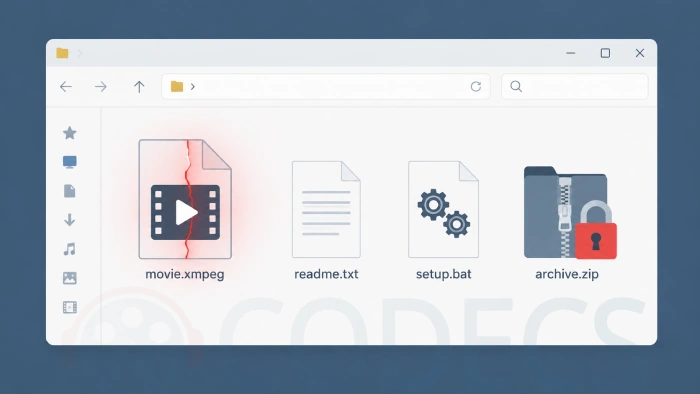
Here is the short version: a .xmpeg file is almost never a video.
It is bait, and the thing it is baiting you toward is an installer.
Kaspersky documented the campaign in August 2025, and Cybernews researchers published a fresh investigation in March 2026 showing it is still running, with a new delivery route.
This guide covers both waves, so you can work out whether the file on your disk is a harmless video with an odd name or the front end of a crypto-stealing Trojan.
The Efimer Trojan uses .xmpeg files as bait, and it is still active in 2026.
Kaspersky counted 5,015 affected users across Brazil, India, Spain, Russia, Italy, Germany, the UK, Canada, France and Portugal in its August 2025 report. Cybernews confirmed the same campaign running through March 2026, this time seeded into Google search results.
The rule that keeps you safe: if a video file tells you to run an executable before you can watch it, the executable is the payload and the video does not exist.
What a .xmpeg File Actually Is
There is no such thing as the XMPEG video format. Unlike the standard MPEG formats behind .mp4, .mpg and .mpeg, the .xmpeg extension has no specification, no decoder and no player that supports it.
That is the whole point of it. An extension Windows cannot open is a problem, and a problem is what the attacker needs you to have before offering you a solution.
So there are only two realistic explanations for a .xmpeg file sitting on your computer.
- Malware bait. Overwhelmingly the common case, and the reason this page exists.
- A video somebody renamed by hand. Rare, and usually your own doing - an MPEG file that got an odd extension somewhere along the way.
Note what is not on that list: no video tool writes .xmpeg files on its own. If you did not rename it yourself, assume the first case.
The 2026 Update: Google Is Now the Trap, Not Torrent Sites
This is the part that has changed, and it is worth knowing even if you never touch a torrent site.
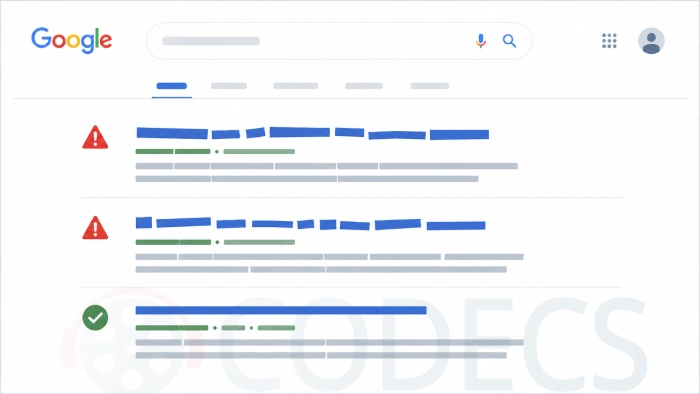
Cybernews scraped the torrent networks directly and found them surprisingly clean. The malware was not in the torrents. It was in the search results people used to find them.
When researchers ran queries shaped like "[movie title] [year] torrent download", 12.11% of the Google results were malicious. The Efimer operators brute-force their way into weakly secured WordPress sites and publish fake download pages on them, so an ordinary small-business domain ends up ranking for a film title.
That is why the URL never looks like a piracy site. A florist's blog offering you a 4K rip is not a coincidence, it is a compromised host.
How the Package Is Put Together
The contents are consistent enough that you can identify it on sight. Here is the 2026 version, with the filenames researchers pulled from live samples.
- You download a torrent file with a machine-generated name such as movie_33463_data.torrent.
- Inside is a large .xmpeg file standing in for the movie, plus a short readme or a small playable .mp4 that explains you need a special codec.
- Alongside it sits a batch file named something like 1. Disable Defender.bat, which adds the folder to Windows Defender's exclusion list.
- Then a password-protected archive, 2. Install Codec.zip, with the password sitting in a text file next to it - in observed samples, simply 2025.
- Inside the archive is the installer - xmpeg_v4085_x1.exe in 2026 samples, xmpeg_player.exe in earlier ones. Running it installs Efimer.
The password on the archive is not for your convenience. It exists so your antivirus cannot read what is inside until you extract it yourself.
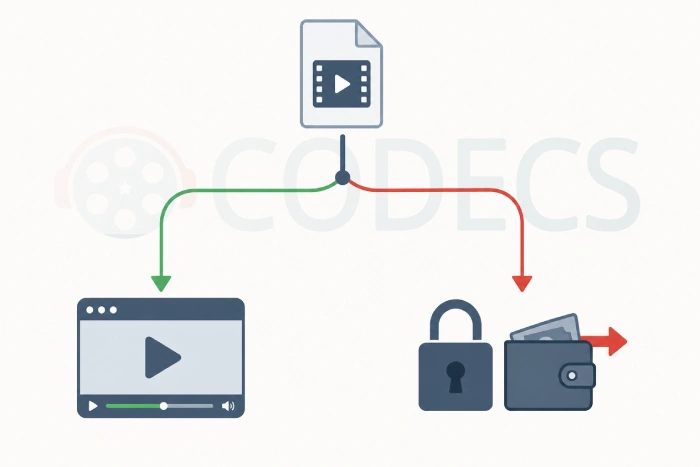
As for what Efimer does once it is running: it watches your clipboard, and when it sees a cryptocurrency address go in, it swaps in the attacker's address instead. It also hunts for wallet recovery phrases and ships them to a command server hidden on Tor.
Five Red Flags You Can Spot in Seconds
You do not need to analyse anything. Any one of these is enough to close the tab.
- Strange-looking letters in the page text. If "Torrent Download" is rendered in odd mathematical or italic-looking characters, the site is substituting lookalike Unicode symbols to slip past Google's automated scanners.
- A URL that has nothing to do with movies. A blog subfolder on an unrelated business domain is a compromised WordPress site, not a release group.
- Anything asking you to disable Defender. No video file has ever needed your antivirus switched off, and nothing legitimate ever will.
- A codec or player installer in the download. Modern players handle nearly every format in existence, so an .exe shipped with a movie is the movie.
- A password-protected archive with the password in a text file. That combination exists purely to blind your scanner.
One more, from this page's own comment section. Several readers describe a short .mp4 that plays fine and politely explains why the main file needs a codec. That video is part of the kit, and it is there to make the rest feel legitimate.
If You Already Ran the Installer
Assume the machine is compromised. Efimer's whole purpose is to sit quietly, so nothing looking normal is evidence of anything.
Work in this order, and note that the crypto step comes before the cleanup step for a reason.
- Disconnect the machine from the internet, and do not open any wallet on it - not to check a balance, not to move funds.
- From a different, clean device, create a new wallet and move your funds to it. Treat every seed phrase that has ever been on the infected PC as public.
- Change the passwords for anything you signed into on that machine, again from the clean device.
- Run a full offline scan with an up-to-date antivirus, and check Windows Defender's exclusion list for the folder the batch file added.
- If you handle real money on this PC, reinstall Windows. A clipboard hijacker with startup persistence is not something to negotiate with.
Manage a WordPress site as well? Check it for posts and pages you did not create, update every plugin, and reset your admin and database passwords, because these sites are how the campaign spreads.
How to Check a .xmpeg File You Already Have
If the file arrived on its own, with no installer and no readme, it might be a genuine video with a renamed extension. Work through these in order and stop at the first step that fails.
Step 1: Look at What Came With It
Open the folder and read the file list before you touch anything. An .exe, a .bat, or a password-locked archive next to your file means the answer is already in - delete the whole folder.
A lone .xmpeg file with nothing beside it is the only version of this worth continuing with.
Step 2: Scan It Before Anything Else
Scan the file with fully updated antivirus software, and run it past a second online scanner if you want a cross-check. Do not rename it, open it or extract anything near it until it comes back clean.
Our security tools section is small, but it is the right kind of software to be installing - chosen by you, from a source you went looking for.
Proton VPN covers the connection, and Wireshark will show you what a suspect machine is actually sending out.
Step 3: Rename It and Try a Real Player
If it passed the scan, rename the extension from .xmpeg to .mpg, then open it in VLC Media Player. VLC carries its own decoders and does not need anything installed alongside it.
If VLC plays it, you had an ordinary MPEG video with a strange name and you are done. mpv player is a good second opinion, and there are plenty more in our media players section.
For everyday format coverage across every player on the machine, the K-Lite Codec Pack is the standard answer, and our codec packs category lists the alternatives.
The point of installing a codec pack from here: you choose to install it, from a source you went looking for, rather than because a file demanded it. That is the entire difference between a codec pack and a fake codec.
Step 4: Try Converting It
If renaming did not work but the file is clean, a converter will tell you quickly whether there is any video in there at all.
- HandBrake is the easy option - drag the file in and see whether it reads the source.
- FFmpeg is the thorough one: ffmpeg -i file.xmpeg -c:v libx264 output.mp4 will name the real container if there is one.
- MKVToolNix can inspect and remux a file that turns out to be a Matroska stream wearing the wrong extension.
If none of them can find a video stream, there is no video. That is your confirmation the file was only ever bait, and you can delete it.
Step 5: Check the File Header (Advanced)
A hex editor settles it in about five seconds. Real MPEG program streams begin with the bytes 00 00 01 BA, and raw MPEG video begins with 00 00 01 B3.
See 4D 5A at the start instead and you are looking at a Windows executable with a video extension stuck on it. The tools in our Codec Identifiers category do the same job with less squinting, and our Codec Finder will tell you what a genuine file actually needs.
The "Copyright Protected by xmpeg Codec" Message
A lot of people land here after seeing this exact line:
"The video is protected from copyright by the xmpeg codec"
There is no DRM system called the xmpeg codec. It does not exist, it never existed, and the sentence is written to sound official enough that you go looking for a download.
Real DRM never asks you to install a mystery .exe from a torrent folder. Close the file, delete the folder, and if you want to test a video safely in future, our online web player and online HEVC player run in the browser with nothing installed.
Quick Decision Guide
| What you are seeing | What it means | Do this |
|---|---|---|
| An .exe or installer in the folder | The installer is the payload | Delete the whole folder |
| A .bat file mentioning Defender | It is clearing a path for the payload | Delete, then check your exclusion list |
| A password-locked archive | Built to blind your scanner | Delete without extracting |
| A message telling you to install a codec | Fake error, the oldest trick here | Close it and delete the file |
| The file arrived alone, from a source you trust | Possibly a renamed MPEG | Scan it, then rename to .mpg and try VLC |
| You renamed it yourself years ago | Almost certainly a real video | Rename back and open it normally |
When you cannot place where the file came from, delete it. No single video is worth the afternoon you would spend rebuilding a PC.
The Real XMPEG Has Nothing to Do With This
Worth clearing up, because the name confuses people. XMPEG is a real freeware MPEG converter that has been on this site for years, with an Adobe Premiere-style interface for exporting MPEG to DivX, XviD, SVCD and DVD.
It last saw an update in April 2005 and has not been developed since. It also does not write .xmpeg files, and it has no connection whatsoever to the malware borrowing its name.
If MPEG conversion is what you actually came for, the Video Encoders category has maintained tools that will serve you better, and our guide to converting old files to MP4 covers the same ground for Xvid.
Why This Still Works in 2026
Fake codec installers are one of the oldest tricks on the internet, and researchers are blunt about it - anyone reasonably computer-literate spots this immediately. So why is it still paying out?
Because the money moved. Millions of people now hold cryptocurrency without holding much technical background, and a clipboard hijacker does not care how careful you usually are - it only needs one paste.
Efimer targets Windows only, which is small comfort if you are reading this on a Windows PC. If you want to know what genuinely runs on your machine, our overview of which video codecs are actually in use is a better guide than anything a torrent tells you, and the same install-from-a-known-source logic applies to installing an APK safely on Android.
Quick questions
Is every .xmpeg file malware?
The file itself is usually inert - it is often padding with no video in it at all. The danger is the installer packaged alongside it, which is what the extension exists to make you want.
Can VLC open a .xmpeg file?
Not by that extension, but rename it to .mpg first and VLC will play it if there is real MPEG video inside. If VLC finds nothing after the rename, there was never a video to play.
Do I need a special codec to watch it?
No, and this is the single claim the whole scam rests on. There is no XMPEG codec, no XMPEG DRM, and no legitimate download that provides either.
Does Efimer affect Mac or Linux?
Researchers found the campaign targets Windows only, so the installer will not run on macOS or Linux. Do not keep the file around anyway, because forwarding it to a Windows machine passes the problem along.
I ran the installer but I do not own any crypto. Am I fine?
No. Efimer adds itself to startup and stays resident, so it is still on the machine collecting clipboard contents and waiting for something worth taking. Clean the system properly rather than assuming it lost interest.
Is the XMPEG converter on this site safe?
Yes, it is a genuine freeware MPEG converter last updated in 2005 and unrelated to the malware using its name. It is also long unmaintained, so a current encoder is the better choice for real work.


Latest reviews
AllHow to Stream With VLC: Open a Stream URL or Send Your Own
5/5This is amazing! I could no longer afford cable so I cut the cord and started watching Hulu, Youtube, ...
Don't Open a .xmpeg File Before Reading This
3/5It's never a good sign when the potential malware you downloaded has the EXACT same filename as the example. ...
Free Popular IPTV Playlist: Where to Get Fresh, Legal M3U Li...
3/5How can you create a DSTV channels on IPTV?