Equalizer APO gives you a proper parametric equaliser across every app on the machine at once, and the setup takes about five minutes - as long as nobody forgets to tell you about the restart.
Equalizer APO is the engine and it has no interface of its own, which puts most people off within a minute.
Peace Equalizer is the free front end that gives it sliders, presets and a taskbar icon.
You install both, restart once, and from then on every sound the PC makes goes through your settings.
Why it works on everything at once
Most equalisers live inside one app, so the one in your music player does nothing for a browser video and nothing at all for a game.
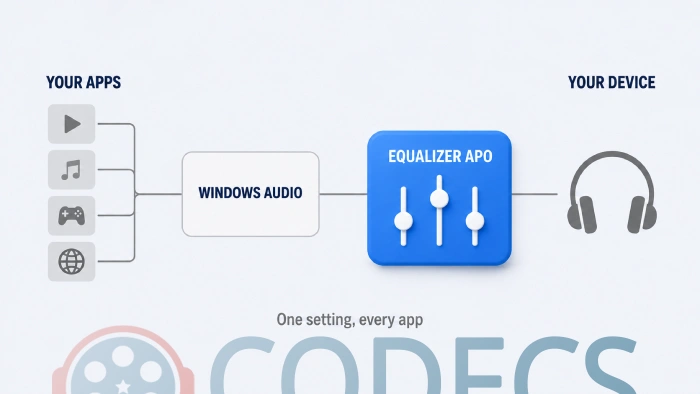
Equalizer APO sits lower down, inside the Windows audio pipeline itself, between everything that makes sound and the device you are listening on.
That position is what makes it powerful and also what makes the setup fussier than an ordinary program. It is attaching itself to a device, not installing an app.
Setting it up
The site serves Equalizer APO and Peace Equalizer together in one package, so you only need one download.
- Run the Equalizer APO installer. Partway through it opens a window called the Configurator.
- In the Configurator, tick the device you actually listen through - your headphones, your speakers, or both. You can select more than one.
- Finish the installer and let it restart the PC when it offers. This is not optional, and the next section explains why.
- After the restart, put Peace in C:\Program Files\EqualizerAPO\config and run it. Use Peace64 on 64-bit Windows, which is almost certainly what you have.
Without the restart, nothing happens. Equalizer APO installs a processing object into the audio pipeline, and the Windows audio service only picks it up when it reloads. Skip the reboot and the tool is installed, running, and completely inaudible - which looks exactly like a broken install and sends most people off to uninstall it.
Using Peace without wrecking the sound
Open Peace and start from one of the built-in presets for music, films or gaming rather than from a flat line. It is much easier to adjust something than to build a curve from nothing.
Drag the frequency sliders, and the change applies as soon as you save. There is no need to restart anything again.
Pull the pre-amp down before you push anything up. Boosting bands adds level to a signal that was already near maximum, and the result clips - a crackling, distorted sound that people reliably blame on the software. As a rough rule, drop the pre-amp by roughly as much as your largest boost.
Small moves are worth more than large ones here. A couple of decibels in the right place does more for speech clarity than a dramatic curve, and the dramatic curve is what makes music sound tiring after an hour.
When it stops working, which it will
Almost every report of Equalizer APO breaking turns out to be one of these three, and none of them is a reinstall.
- You plugged in different headphones. The APO was only installed to the devices you ticked at setup - run C:\Program Files\EqualizerAPO\Configurator.exe again and tick the new one.
- It never took on this device. In the Configurator, select the device and open Troubleshooting options, which lets you change how the APO attaches when the default mode does not work.
- Windows replaced your audio driver. An update can swap a device out from under the APO - Realtek HD Audio Codecs covers most consumer machines, and you re-run the Configurator afterwards.
If you move between headphones and speakers constantly, SoundSwitch changes the default device with a hotkey, which pairs well with having the APO installed on both.
One harmless quirk. Peace sometimes creates startup shortcuts pointing at C:\Program Files (x86) even on a 64-bit install. It looks wrong and it changes nothing - the equaliser still loads and runs normally.
If this is more than you wanted
Not everyone needs a parametric equaliser, and there is no shame in wanting the sound to just be better without a project attached.
FxSound does system-wide enhancement with presets and no configuration, and it installs like an ordinary program. It gives you far less control and asks for none of your time.
If you only care about one app, the equalisers built into VLC Media Player and AIMP are enough and cost nothing to try first.
Equalisation is not spatial sound
These two get confused constantly, and installing the wrong one is a wasted evening.
An equaliser changes the balance of what you hear, making bass heavier or speech clearer. Spatial sound changes where sounds seem to come from, placing footsteps behind you or rain above you.
They are independent and they stack, so you can run both. Our guide covers how to turn on spatial sound, and there is a straight comparison of Windows Sonic, Dolby Atmos and DTS if you want the paid options weighed up.
What an equaliser cannot fix
It reshapes what reaches your ears, which means some problems are simply out of its reach.
- A bad recording. Detail that was never captured cannot be boosted back into existence, and trying mostly raises noise.
- Cheap headphones. You can flatten an ugly peak, but you cannot add range the drivers do not have - our guide to choosing headphones is the better place for that money.
- Editing a file permanently. Equalizer APO changes playback only, so use Audacity when you want the change written into the file itself.
Quick questions
Do I really have to restart?
Yes, once, straight after installing. The Windows audio service has to reload before the processing object attaches, and until it does the equaliser is inaudible.
Is Equalizer APO free?
Completely, and it is open source. Peace Equalizer is free as well, and both come in the same download here.
Do I need Peace at all?
No, but almost everyone wants it. Without it you configure Equalizer APO by editing a text file by hand.
Why did it stop working after I changed headphones?
The APO is installed per device, and your new one was never selected. Re-run the Configurator and tick it.
Will it slow my PC down?
Not noticeably. It is a very light piece of processing and it runs on the audio thread, not on anything you would feel in a game.
Why does my audio crackle now?
You are almost certainly clipping. Lower the pre-amp until it stops, roughly matching the size of your biggest boost.
Install, tick your device, restart, then start from a preset and move it a little at a time.
Download Equalizer APO and Peace to set it up, or leave a comment telling us what you were trying to fix and whether the curve you landed on helped.
More system audio utilities sit under Other Tools, and Dolby Access is worth a look if positioning rather than tone is what you were really after.


Latest reviews
AllHow to Stream With VLC: Open a Stream URL or Send Your Own
5/5This is amazing! I could no longer afford cable so I cut the cord and started watching Hulu, Youtube, ...
Don't Open a .xmpeg File Before Reading This
3/5It's never a good sign when the potential malware you downloaded has the EXACT same filename as the example. ...
Free Popular IPTV Playlist: Where to Get Fresh, Legal M3U Li...
3/5How can you create a DSTV channels on IPTV?