Ever pressed “Play” and wondered what magic fairy dust makes your video glide onto the screen?

Behind every smooth video playback is a complex chain of demuxers, decoders, and renderers working together.
Understanding how codecs work helps you choose the right tools for playback issues - and we'll show you exactly which ones to download.
What Is a Codec?
Codec stands for "coder-decoder." When you save or stream video, the codec compresses your data into a smaller file.
When you play that file, the codec decompresses it back to watchable video and audio.
Think of codecs as specialized translators - they convert raw video data into efficient compressed formats and back again.
Popular video codecs include H.264/AVC (the current standard), H.265/HEVC (double the compression efficiency), and AV1 (the royalty-free future of streaming).
Containers vs. Codecs - The Lunchbox Analogy
A container (MP4, MKV, AVI) is like a lunchbox - it holds everything together.
The codec is what's inside - video, audio, and subtitles stored as separate streams.
You can put different codecs inside the same container. An MP4 file might contain H.264 video with AAC audio, or H.265 video with Dolby audio.
When playback fails, it's usually because your system lacks the right codec decoder - not because the container is incompatible.
Tools like MKVToolNix let you inspect and edit container contents without re-encoding.
Lossy vs. Lossless Compression
Lossy codecs discard some data to achieve smaller files.
You won't notice the difference in most viewing situations, and file sizes drop dramatically. Examples include H.264, H.265, and MP3.
Lossless codecs preserve every bit of original data. File sizes are larger, but quality is identical to the source.
FLAC for audio and FFV1 for video archiving use lossless compression.
| Codec | Type | Use Case | Quality | Compression |
|---|---|---|---|---|
| H.264 | Lossy | Streaming/video calls | High | Good |
| H.265/HEVC | Lossy | 4K+ video | Higher | Better |
| AV1 | Lossy | Web video | Excellent | Very High |
| MP3 | Lossy | Music | Medium | High |
| FLAC | Lossless | Audio archiving | Excellent | Low |
For encoding your own videos, the Internet Friendly Media Encoder provides a user-friendly interface for x265 compression.
The Codec Pipeline - How Playback Actually Works
When you click play, your video file passes through several processing stages:
Input File → Demuxer/Splitter → Decoder → Renderer → Output
Each component handles a specific job. Understanding this chain helps you diagnose playback problems and choose the right software solutions.
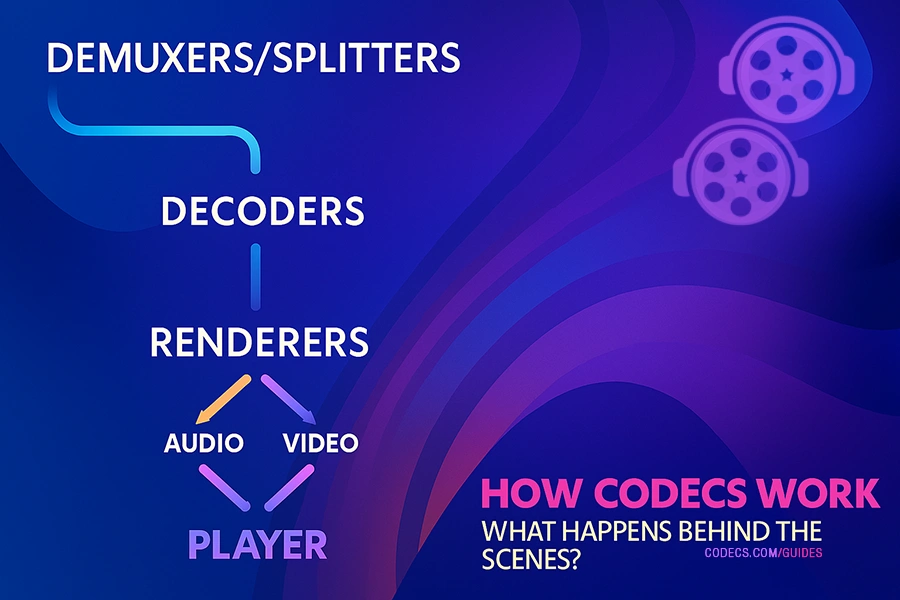
Demuxers and Splitters - Separating the Streams
Demuxers (also called splitters) are the first step in playback. They open your video file and separate it into individual streams - video goes one direction, audio another, subtitles to a third path.
Without a proper demuxer, your player can't even begin processing the file. The LAV Splitter (part of LAV Filters) handles virtually every container format - MP4, MKV, AVI, MOV, and dozens more.
When videos won't open at all, updating your splitter filters often solves the problem. The K-Lite Codec Pack includes LAV Splitter configured and ready to use.
Decoders - Translating Compressed Data
Once the demuxer separates your streams, decoders translate the compressed data back into raw video frames and audio samples.
Each codec format requires a matching decoder. If you're missing the HEVC decoder, H.265 videos won't play. Without an AV1 decoder, YouTube's highest-quality streams display errors.
Modern decoder packages like LAV Filters support H.264, HEVC, VP9, AV1, and virtually every audio format. They also enable hardware acceleration - offloading decoding work to your GPU for smoother 4K playback and lower CPU usage.
For system-wide codec support covering every format, download the K-Lite Mega Codec Pack. It bundles LAV Filters with MPC-HC and configuration tools.
Renderers - Displaying the Final Result
Renderers take decoded video frames and display them on your screen. They handle synchronization, color processing, and output to your monitor.
The MPC Video Renderer provides high-quality output with HDR support and minimal resource usage. It integrates perfectly with MPC-BE for the best possible playback quality.
Audio renderers send decoded sound to your speakers or headphones, handling surround sound formats and volume normalization.
Lights, Camera, Codec!
So there you have it, folks!
The wacky world of codecs demystified in all its quirky glory. From demuxers to renderers, each step in the process plays a vital role in bringing your favorite videos to life.




Free Popular IPTV Playlist: Where to Get Fres...
5/5Very good👍👍❤❤
Read More →How to Download HEVC Video Extension for Free
5/5its works! thank you all!
Read More →How to Use Helium Audio Converter: Convert An...
5/5@levi Yes, it works offline, it's a desktop software.
Read More →