Open almost any video file on your computer and something inside it is stamped avc1, which is the file's way of saying the picture is H.264.

It is not a different codec, and it is not a version number.
It is a label, and knowing what it labels explains a surprising number of playback problems.
Here is what the tag means, how to read the rest of it, and what to install if a file carrying it will not open.
What AVC1 Actually Is
An MP4 or MOV file is a set of nested boxes. One of those boxes describes the video track, and inside it sits a four-character name that tells a player which decoder to load.
For H.264 video that name is avc1. It comes from ISO/IEC 14496-15, the specification that defines how H.264 is stored in this family of files, and it is written in lowercase.
H.264, also called AVC or MPEG-4 Part 10, is the compression standard. The MP4 file is the box it travels in. And avc1 is the name written on that box, so the player knows what is inside.
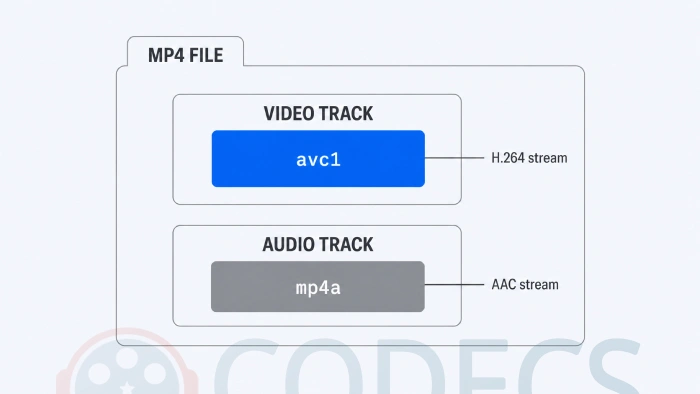
Why you keep seeing it. MediaInfo, VLC's codec panel, browser developer tools and most encoders all report the four-character name rather than the friendly one, which is why a file you know is H.264 shows up as avc1.
AVC1 vs AVC3: The Difference That Trips People Up
There is a second name for the same codec, and it is the reason a file can play perfectly on your laptop and refuse on a television.
H.264 streams carry small configuration blocks called parameter sets, which tell the decoder the resolution, the profile and how the picture is put together. The two names differ only in where those blocks are allowed to live.
| Tag | Where the configuration lives | Where you meet it |
|---|---|---|
| avc1 | Only in the file's track description, read once before playback starts | Downloaded and recorded files, progressive MP4, camera output |
| avc3 | Also allowed inside the video frames themselves, so it can change mid-stream | Live and adaptive streaming, fragmented MP4, some DASH services |
The practical consequence is compatibility. Everything plays avc1, while older smart TVs, cheap set-top boxes and some hardware players never learned avc3 and simply show a black screen.
If a stream will not open on a TV but plays everywhere else, this is one of the first things worth checking. MediaInfo reports the tag in plain sight, and remuxing to avc1 in a tool that supports it usually fixes it without re-encoding.
Reading the Rest of the Tag
Browsers and streaming tools rarely stop at four characters. They write something like avc1.640028, and those six digits are not random.
They are three pairs of hexadecimal, and each pair answers one question: which profile, which constraint flags, which level. Read them in order and the string stops being intimidating.
- 42 is Baseline, 4D is Main, 64 is High - the profile, which decides which compression tools are allowed.
- The middle pair carries the constraint flags. E0 after a Baseline profile is the marker for Constrained Baseline, the real-time variant.
- The last pair is the level in hex, times ten. 1E is 30, meaning level 3.0, and 28 is 40, meaning level 4.0.
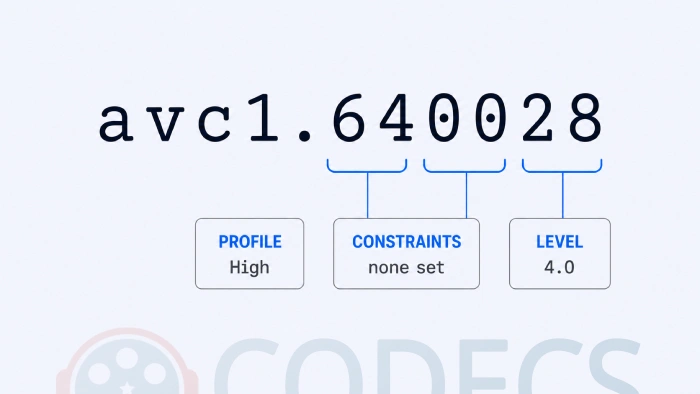
So avc1.640028 is High Profile at level 4.0, which is ordinary 1080p. And avc1.42E01E is Constrained Baseline at level 3.0, which is what a video call looks like.
The Profiles, and Why They Matter
The profile is the part of the string worth understanding, because it is the one that decides whether an older device can play your file at all.
Constrained Baseline strips out the more demanding tools to keep encoding and decoding fast and cheap. Video calls, older phones and low-power hardware live here.
Main adds CABAC entropy coding, weighted prediction and interlaced support. It was the broadcast and standard-definition workhorse and still turns up in older streams.
High adds the 8x8 transform and custom scaling matrices, and it is what almost everything uses today. Blu-ray, streaming services and your phone's camera all produce High Profile H.264.
A common mix-up. Truly lossless H.264 lives in High 4:4:4 Predictive Profile, not in plain High Profile, and almost nothing outside professional workflows will play it.
How AVC1 Compression Actually Works
Three techniques do most of the work, and together they explain why H.264 files stay small without looking obviously damaged.
Motion compensation is the big one. Rather than storing every pixel of every frame, the encoder finds blocks that have simply moved since the last frame and sends the movement instead of the pixels.
Transform coding takes it further. Each frame is divided into 16x16 macroblocks, and the transform works on 4x4 or 8x8 blocks inside those, converting detail into frequency data so the parts your eye barely registers can be thrown away hardest.
In-loop deblocking then smooths the seams between those blocks during decoding. Without it you get the grid pattern that made early digital video look like wet paper, and it is a large part of why H.264 still looks clean at low bitrates.
Where You Will Run Into AVC1
Essentially everywhere, which is the point of it.
- Streaming. Netflix, Disney+, Amazon and the rest all keep an H.264 encode ready as the version that works on anything, and YouTube serves it to devices that cannot take VP9 or AV1.
- Video calls. Zoom, Teams, Meet and FaceTime lean on Constrained Baseline, where low delay matters more than small files.
- Cameras. Phones, action cameras, dashcams and security cameras record H.264 by default, because the encoding chip is cheap and universal.
- Discs. Standard Blu-ray uses H.264 alongside MPEG-2 and VC-1, though UHD Blu-ray moved on to HEVC.
Playing and Encoding AVC1 on Windows
Windows has decoded H.264 natively since Windows 7 through Media Foundation, and most graphics chips have a dedicated H.264 decoder built in. For watching, you almost certainly need nothing.
When an H.264 file does refuse to open, the video is rarely the problem. It is usually the audio track beside it, or the container, and a pack that covers both is the quickest fix.
- K-Lite Codec Pack - covers H.264 plus the audio formats Windows no longer ships, across every player on the machine.
- VLC Media Player - carries its own decoders, so it opens files without changing anything system-wide.
- AC3 Filter - worth knowing about because clean installs of Windows 11 24H2 no longer include Dolby Digital decoding, which is a silent-audio problem people mistake for a video one.
For encoding rather than playback, Microsoft publishes the AVC Encoder Video Extension, a free Windows 11 extension that lets apps reach your GPU's H.264 encoder through DirectX 12.
Encoding only. That extension does not affect playback, because your PC already decodes H.264 on its own. It is for recording, streaming and exporting, where it hands the work to Intel Quick Sync, AMD or NVIDIA silicon instead of your processor.
If you would rather control the encode yourself, HandBrake is the friendly route and x264 is the reference open-source H.264 encoder underneath most of them.
Is AVC1 Still the Right Choice?
For anything that has to travel, yes. Nothing else plays on as many devices with as little fuss, and that has not changed.
The newer codecs win on size rather than reach. Netflix reports AV1 sessions using about a third less bandwidth than H.264 and HEVC alike, and AV2 arrived in 2026 with another step on top, though it will be years before it reaches ordinary hardware.
The switch-or-stay decision has a page of its own. If you are choosing what to encode in, read whether H.264 is making way yet, or whether HEVC is worth it if 4K storage is your problem.
Quick questions
Is AVC1 the same thing as H.264?
Effectively yes, for everyday purposes. H.264 is the compression standard and avc1 is the four-character name used to label H.264 video inside an MP4 or MOV file, so a file reported as avc1 is an H.264 file.
What does the number after avc1 mean?
It is three pairs of hexadecimal giving the profile, the constraint flags and the level. In avc1.640028, the 64 means High Profile and the 28 means level 4.0, which is standard 1080p.
What is the difference between avc1 and avc3?
Only where the stream's configuration data is stored. In avc1 it sits in the file's track description; in avc3 it can also travel inside the frames, which suits live streaming but is not understood by some older televisions and players.
Do I need to install anything to play AVC1 files?
Usually not. Windows has decoded H.264 since Windows 7 and most graphics hardware does it directly, so if a file will not open the audio track or the container is the more likely cause.
Why does my file play on the PC but not on my TV?
Check whether the stream is avc3 rather than avc1, and check the profile and level in the string. A TV that only supports High Profile up to level 4.1 will refuse a level 5.1 file even though it is the same codec.
Is there an AVC2?
Not as anything you will meet. The specification defines a few related sample entry names for special cases, but avc1 and avc3 are the two that appear in real files.
Not sure what a particular file contains, the Codec Finder identifies it in your browser without installing anything.
AVC1 is not a codec you have to choose, it is the name a file uses to tell your player it is holding H.264, and reading that name is usually faster than guessing at the problem.
Get the AVC Encoder Video Extension if you record or stream on Windows 11, or tell us what your file was doing if the tag turned out to be the culprit.


How to Stream With VLC: Open a Stream URL or ...
5/5This is amazing! I could no longer afford cable so I cut the cord and started watching Hulu, Youtube, ...
Read More →Don't Open a .xmpeg File Before Reading This
3/5It's never a good sign when the potential malware you downloaded has the EXACT same filename as the example. ...
Read More →Free Popular IPTV Playlist: Where to Get Fres...
3/5How can you create a DSTV channels on IPTV?
Read More →