Microsoft has pushed HEIF Image Extensions to version 1.2.29.0, bringing the latest maintenance update for Windows users who need to open iPhone and iPad photos on their PCs.
Why This Update Matters
If you've ever transferred photos from your iPhone to a Windows PC and encountered blank thumbnails or error messages, you're not alone.
Apple devices have used the HEIF format by default since iOS 11 - and that was back in 2017.
Windows still doesn't support these files natively without help. This extension bridges that gap.
The 1.2.29.0 release continues Microsoft's steady cadence of updates throughout 2025 and into 2026.
Previous versions addressed thumbnail rendering issues and improved compatibility with the Microsoft Photos app.
What HEIF Image Extensions Actually Does
This free extension from Microsoft enables Windows 10 and 11 to read and write files that use the High Efficiency Image File format.
Files typically carry the .heic or .heif extension. See Understanding HEIC vs HEIF for more details.
Once installed, three things happen automatically:
File Explorer shows thumbnails. No more blank icons for your iPhone photos. You can browse your image library visually.
Microsoft Photos opens .heic files. Double-click any HEIF image and it opens instantly in Windows' built-in photo viewer.
Other apps gain support. Paint, photo editors, and most Windows applications can suddenly work with these files.
The HEVC Requirement Nobody Mentions
Here's the catch that trips up most users. Installing HEIF Image Extensions alone often isn't enough.
Most .heic files use HEVC compression internally. Think of HEIF as the container and HEVC as what's actually inside. You need both components working together.
The HEVC Video Extension handles the actual image decoding. Without it, you'll see error messages about missing codecs even with HEIF Image Extensions installed. Microsoft offers a free version through device manufacturers. Our guide walks through the exact download steps.
Version History at a Glance
Microsoft has been actively maintaining this extension:
1.2.29.0 - January 2026 (current)
1.2.28.0 - December 2025
1.2.26.0 - November 2025
1.2.23.0 - September 2025
1.2.22.0 - July 2025
1.2.20.0 - June 2025
The frequent updates suggest Microsoft is actively responding to compatibility issues and user feedback.
Each release typically addresses edge cases with specific iPhone models or iOS versions.
When You Might Need Alternatives
The official Microsoft extensions work well for basic viewing. But they have limitations.
Batch conversion: If you need to convert hundreds of HEIC files to JPEG for sharing, XnConvert handles this with a simple drag-and-drop interface.
Preserving metadata: iMazing Converter keeps EXIF data intact during conversion - important if you care about timestamps and geolocation.
Third-party viewers: Apps like IrfanView, XnView, and FastStone Image Viewer support HEIC through plugins, often with better performance than the Windows Photos app.
HEIF vs JPEG - The Storage Trade-off
Apple didn't adopt HEIF just to make life difficult for Windows users. The format genuinely delivers better compression.
A typical HEIF image takes roughly half the storage space of an equivalent JPEG while maintaining the same visual quality. It also supports features JPEG can't touch - 16-bit color depth, transparency, HDR content, and even image sequences.
The downside? Compatibility headaches like the ones this extension solves.
Quick Installation Steps
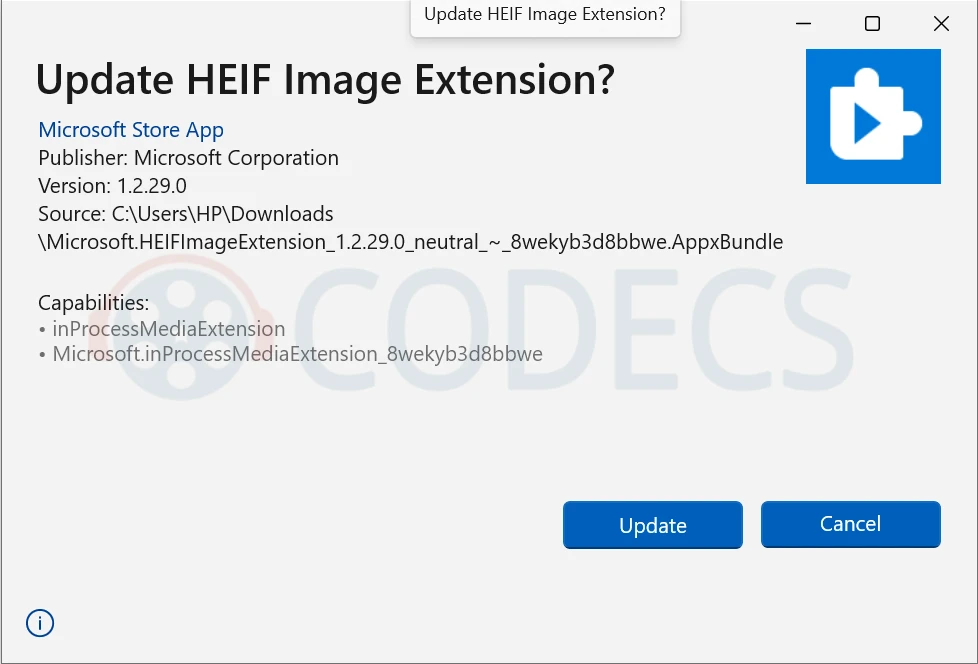
Step 1: Download HEIF Image Extensions from here or the Microsoft Store.
Step 2: Install the HEVC Video Extension using our free download guide.
Step 3: Restart File Explorer or your photo application.
Total setup time: under two minutes. No registration or Microsoft account required for the basic extensions.


How to Stream With VLC: Open a Stream URL or ...
5/5This is amazing! I could no longer afford cable so I cut the cord and started watching Hulu, Youtube, ...
Read More →Don't Open a .xmpeg File Before Reading This
3/5It's never a good sign when the potential malware you downloaded has the EXACT same filename as the example. ...
Read More →Free Popular IPTV Playlist: Where to Get Fres...
3/5How can you create a DSTV channels on IPTV?
Read More →