Download GSpot 2.70a
Direct Download Links - free, safe and fast mirrors
1.4M
all time
401KB
file size
updated
Feb 22, 2007
EXT Main LINK
GSpot 2.70a
GSpot270a.zip
EU Mirror LINK
GSpot 2.70a
GSpot270a.zip
Have you used GSpot?
Share your experience - write a review or leave a comment
What is GSpot?
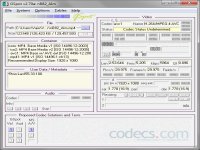
GSpot is a utility identifying video codecs and providing comprehensive information about media files. It tells you what compression method has been used on a media file and if you have the codec you need installed on your computer.


How to Download GSpot
- 1 Click the DOWNLOAD button for your preferred link (US/EU Main or Mirror). When prompted by your browser, choose "Save" and select a destination folder.
- 2 We recommend using the mirror links (EU MIRROR / US MIRROR) first - they tend to be faster and more reliable than external sources.
- 3 Having trouble downloading GSpot? If the download doesn't start, click the link again or try a different browser (Firefox/Chrome). Some security software may block downloads due to false positives.


GSpot 2.70a
The webpage only indicates that GSpot is applicable for up OS up to Windows Vista 32-bit. Can it be ...
Read More →GSpot 2.70a
Awesome little utility, now, just waiting for full .mp4 support. cheerz
Read More →GSpot 2.70a
I still don't understand how this works..i opened a file mp4v - MPEG4. What happens now? I ...
Read More →