Winxvideo AI 4.11
Shareware Developer website (opens in a new tab)
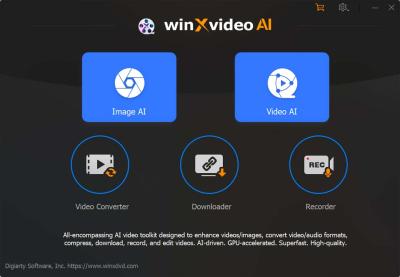
Winxvideo AI is your all-in-one solution for upscaling, stabilizing, converting, compressing, recording, and editing 4K, 8K, and HDR videos, all powered by advanced AI technology.
- Updated
- Size
- 292MB
- Downloads
- 3.0K
AI-Powered Editing Tools
One of the standout features of Winxvideo AI is its range of AI-powered editing tools. These tools automate tasks that traditionally required significant time and expertise, such as:
Scene Detection: The AI can automatically detect scene changes and split videos into segments, making it easier to edit specific parts without manually searching through footage.
Smart Cutting: By analyzing the content, Winxvideo AI can recommend where to trim or cut scenes to maintain a smooth and engaging flow.
Color Correction: The AI adjusts colors and lighting automatically to enhance video quality, ensuring that your footage looks vibrant and professional with minimal manual effort.
Seamless User Experience
Winxvideo AI is designed with user-friendliness in mind, making it accessible to both beginners and experienced editors.
The intuitive interface guides users through the editing process, with drag-and-drop functionality and straightforward controls.
Besides that, the software provides helpful tutorials and resources to assist users in mastering the platform quickly.
Customizable Templates and Effects
To further streamline the editing process, Winxvideo AI offers a vast library of customizable templates and effects. No matter if you're creating a promotional video, a vlog, or a short film, you can find a template that suits your needs and personalize it to match your vision. The AI can even suggest effects and transitions based on the style and tone of your video.
Winxvideo AI is making video editing faster, easier, and more accessible. With its powerful AI-driven tools, intuitive interface, and customizable options, it empowers creators to produce high-quality videos with less effort.
Regardless of whether you're a seasoned professional or just starting out, Winxvideo AI offers the tools you need to bring your video projects to life.
Download Winxvideo AI now and start creating like a pro!
Supported OS: Windows 7, Windows 8, Windows 8.1, Windows 10, Windows 11 (64 bit version).
User reviews (1)
IS
isidroco
24 Jul 2024
3/5Good
Need to be purchased to unlock features.
The trial version allows 5 minutes of conversion for each video.
The trial version allows 5 minutes of conversion for each video.
Reviewed on Winxvideo AI 3.1
Share your thoughts on Winxvideo AI 4.11
Thanks, it's in!
Your review will appear once it has been checked.
Related to Winxvideo AI
More free downloads to try-

AIMP
AIMP is a free audio player for Windows that plays almost every music format and adds converting, ripping and tag editing.
In common: converting, editing
-

MKVToolNix Top rated
The standard toolkit for rebuilding MKV files - merge, split, retag and extract tracks losslessly, because it rewrites the container and never the video.
In common: toolkit, videos
-

MPC-HC Most popular
MPC-HC is a free, lightweight Windows video player that handles HEVC, AV1 and HDR playback without needing a separate codec pack.
In common: hdr, videos
-

PowerDVD
PowerDVD, by CyberLink, is a versatile Windows media player offering exceptional 4K, HDR, Blu-ray, DVD, HEVC, and 360 VR video quality.
In common: hdr, videos
-

Xilisoft Video Converter
Converting between the most popular video formats has never been easier. Xilisoft Video Converter offers support for a variety of file extensions, both audio and video.
In common: converting, videos
-

Topaz Video AI
Topaz Video is a paid AI video enhancer in the video editing category, built to upscale, denoise, stabilize and smooth old or low-quality footage.
In common: editing, videos









Thanks for that info