The European Parliament just made a French privacy search engine its default - and dropped Google to do it. Here is what Qwant actually is, and how to switch to it in your own browser.

On June 4, 2026, the European Parliament set Qwant as the default search engine on its Microsoft Edge and Firefox browsers, replacing Google.
The change is automatic for the institution's 720 lawmakers plus thousands of staff, though anyone can still pick another engine manually.
It is a small switch with a loud message. Europe wants to lean less on US tech, and a French search engine just became the face of that push.
If you have never heard of Qwant, you are not alone. Here is the plain-English version of what it is, why this matters, and how to try it in the browser you already use.
What just happened
The European Parliament confirmed the move on the eve of a wider EU "Buy and Use European" announcement covering chips, cloud, and AI. The search swap is the consumer-facing piece of a much larger sovereignty strategy.
Qwant becomes the default on the Parliament's Edge and Firefox installs starting June 4, 2026. Users keep the freedom to change it back, so this is a nudge, not a lockout.
The symbolism is the point. A major EU institution chose a homegrown, privacy-first engine over the world's dominant one.
So what is Qwant, exactly?
Qwant is a search engine founded in Paris in 2013. Its whole pitch is simple: search the web without being tracked, profiled, or turned into ad inventory.
It does not store your search history or sell your personal data, and it does not build a behavioral profile to target ads at you. Because it is based in France, it operates under strict EU data-protection rules.
Results are organized into clean tabs for web, news, images, videos, and more. There is also Qwant Junior, a child-safe version with content filtering aimed at families.
Does it run on its own technology?
For years, the honest knock on Qwant was that it leaned on Microsoft Bing for a chunk of its results. Critics used that to argue it was not truly independent.
That is changing. Qwant and Germany's Ecosia jointly built a European search index called Staan, run through a venture called European Search Perspective (EUSP).
Qwant now uses this index to power features like its AI search summaries. The goal is a European search stack that does not depend on Google or Bing under the hood.
For everyday searching, most users find Qwant perfectly capable - the trade-off is less personalization in exchange for privacy.
The privacy basics, in one glance
- No search history storage and no sale of personal data.
- No behavioral ad profiling - ads are non-personalized.
- Trackers and third-party advertising cookies are blocked.
- EU-hosted and GDPR-bound, with its own European-built index (Staan).
- Optional AI features (summaries, quick answers) you can turn off entirely.
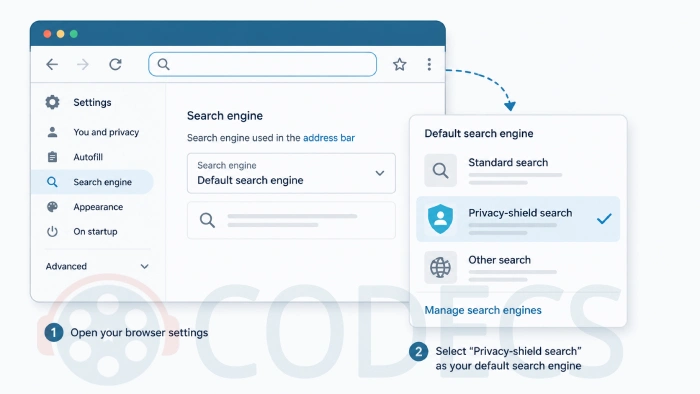
How to set Qwant as your default search engine
You do not need a new browser to use Qwant - any modern one works. The fastest route is to add it as a search engine and set it as default. Here is how, browser by browser.
In Mozilla Firefox
- Visit qwant.com once so Firefox detects it.
- Open Settings, then Search.
- Under Default Search Engine, pick Qwant from the dropdown (add it via the address-bar search options if it is not listed yet).
Firefox is the natural home for privacy-minded users, and it is the same browser the EU Parliament is rolling Qwant out on. You can grab the latest build from our Mozilla Firefox download page.
In Microsoft Edge
- Visit qwant.com once.
- Go to Settings, then Privacy, search, and services, and scroll to Address bar and search.
- Open Manage search engines, then set Qwant as the default.
Edge is the other browser the Parliament chose for the switch. If you want the current Chromium-based release, see our Microsoft Edge download page.
In Chrome or any Chromium browser
Chrome, Brave, Vivaldi, and other Chromium browsers all follow the same pattern: visit qwant.com, then open Settings and choose it under Search engine. The mechanics are nearly identical across the family.

Want the most private setup possible?
Setting a private search engine is one layer. Pairing it with a privacy-focused browser is the other.
For maximum anonymity, the Tor Browser routes your traffic through encrypted relays to hide your IP address. For a faster everyday option that blocks ads and trackers out of the box, the Brave Browser is a strong pick.
You can also browse the full web browsers category to compare every option side by side.
Should you switch?
If privacy matters to you and you mostly do everyday searches, Qwant is an easy, free thing to try - no account required for basic search.
You lose some of Google's deep personalization and edge-case accuracy, and you gain an engine that does not track you.


That doesn't sound like a good idea.
Related to coding or privacy.