X Audio Bitrate Calculator 1.1
X Audio Bitrate Calculator 1.1 is a free, portable Windows 10/11 app from the X Codec Pack team that finds the bitrate that fits a file size limit, or the size a bitrate will give you, for MP3, AAC, Opus and more.
- Updated
- Size
- 10.34MB
You have a recording just under two hours long, a 70 MB upload limit and no idea which bitrate will get you under it.
Guessing means encoding, checking the size, then encoding again.
X Audio Bitrate Calculator gives you the answer before you encode anything, in a small portable app that works offline.
It comes from xcodecpack.com, the team behind X Codec Pack. It only does arithmetic, so it never opens your audio files and never connects to the internet.
What X Audio Bitrate Calculator Actually Does
Bitrate is how much data audio uses each second, counted in kilobits per second (kbps). File size is simply bitrate multiplied by length, and the app does that sum in whichever direction you need.
Version 1.1 puts five calculators behind one row of tabs. Each one updates as you type, so there is no Calculate button.
| Tab | You enter | You get |
|---|---|---|
| Find bitrate | Length, number of tracks and the size limit | The highest bitrate that fits, the size it gives and a quality guide |
| Find file size | Bitrate and length | File size, plus size per minute and per hour |
| Capacity | Storage size, bitrate and average track length | Hours of audio and number of tracks that fit |
| Uncompressed | Sample rate, bit depth, channels and length | Exact WAV size and bitrate, with a FLAC estimate |
| Reference | Format and your own length | A size table for every bitrate step of that format |
It covers MP3, AAC (M4A), Opus, Ogg Vorbis, WMA, AC-3 and WAV. Each format has its real bitrate steps and limits, so MP3 stops at 320 kbps, Opus at 256 kbps and AC-3 goes up to 640 kbps.
If your target needs more than a format allows, the app tells you so. It never suggests a setting your encoder does not have.
A Real Example
Take that 1 hour 53 minute recording and the 70 MB limit, saved as Opus. The app answers 64 kbps, which gives a 51.96 MB file.
It also shows why not the next step up: 96 kbps would make 77.93 MB, which does not fit. The exact fit is 86.2 kbps, handy if your encoder accepts any number.
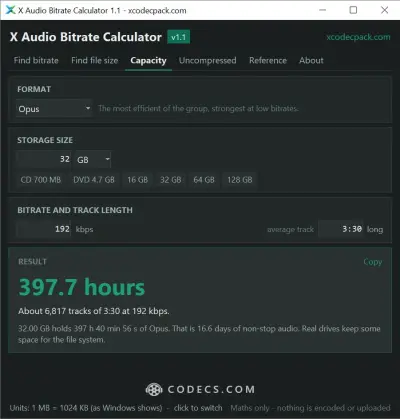
The Capacity tab works the other way round. A 32 GB card holds about 397 hours of Opus at 192 kbps, or roughly 6,800 songs of three and a half minutes.
Then Encode With the Right Tool
The calculator gives you the number, and an encoder does the work. From the same team, X Audio Converter handles MP3, FLAC and WAV, while X Opus Encoder makes Opus files.
For Apple devices, X AAC Encoder writes AAC.
If you already use foobar2000 or Audacity, just type the bitrate into their export settings.
Not sure which format to pick? Our comparison of Opus and Vorbis and the guide to AAC, AAC-LC and HE-AAC explain the trade-offs.
For MP3, our best LAME settings guide covers music, podcasts and audiobooks, and the LAME encoder is the engine behind most MP3 tools.
Small Things That Save Time
- Type durations your way: 3:30, 1:02:45, 45m or 90s all work, and a track count multiplies the result for a whole album.
- Size presets: one click fills in 10 MB, 25 MB, 100 MB, a 700 MB CD, a 4.7 GB DVD or 16 to 128 GB of storage.
- Room for tags: keep a few KB aside for tags and cover art, so the finished file still fits the limit.
- Two kinds of megabyte: click the Units line to switch between 1 MB = 1024 KB, as Windows shows sizes, and 1 MB = 1000 KB, as many websites count them.
- Keyboard shortcuts: Ctrl+1 to Ctrl+5 switch tabs, and Ctrl+Shift+C copies the result.
- It remembers you: your format, values, units and last tab are saved when you close it.
Windows App or Online Calculator
The same team runs a free online audio bitrate calculator with the same formulas. It adds extra tabs for comparing formats, a whole album, audio inside a video and streaming data use.
The Windows app keeps the five core calculators in a small window next to your encoder. It needs no internet connection and remembers your last values.
What You Need
A 64-bit copy of Windows 10 or 11, and 10.3 MB for the single portable EXE. There is nothing to install, and to remove it you simply delete the file.
Settings are kept in %APPDATA%\xcodecpack\bitrate-calculator\settings.json, so the app also runs from a USB stick or a read-only folder.
If Windows calls it unrecognised
The app is new and not code-signed, so SmartScreen may warn you. Click More info, then Run anyway, or first compare the file with the SHA-256 checksum on the developer's page.
Who Should Look Elsewhere
- You want the bitrate of a file you already have. This app only works from numbers you type, while BetterMediaInfo reads the real bitrate, length and format of any file.
- You are planning a whole video encode. DivXLand Bitrate Calculator splits a size budget between video and audio.
- You need exact FLAC sizes. Lossless files shrink by a different amount for every song, so encode with X FLAC Encoder to see the real size.
- You are on a Mac or a phone. The Windows app will not run there, but the online calculator works in any browser.
Want the music side explained first? Our guide to FLAC vs MP3 covers what lossless and lossy actually mean.
Quick questions
Is X Audio Bitrate Calculator free?
Yes, for personal and commercial use, with no ads, no account and no trial period.
Does it open or change my audio files?
No. You type the length and size yourself, and the app never reads, encodes or changes a file. To convert one, use an encoder such as X Audio Converter.
Why does Windows show a different size from a website?
Windows counts 1 MB as 1024 KB, while many websites count it as 1000 KB. Switch the Units line to match whichever limit you are working to.
Why is the answer lower than the exact fit?
Encoders only offer fixed bitrate steps, so the app picks the highest real step that fits. The exact figure is shown too, for encoders that accept any value.
What changed in version 1.1?
It added the Capacity and Uncompressed calculators, one duration box that takes 3:30, 45m or 90s, a track count, size presets and room for tags. It also brought real bitrate steps for each format, a quality guide, the 1024 or 1000 unit switch and a new layout.
Download X Audio Bitrate Calculator 1.1 and work out your next bitrate in seconds, or share how it went if you have tried it.
Be the first to review X Audio Bitrate Calculator 1.1
Thanks, it's in!
Your review will appear once it has been checked.
Related to X Audio Bitrate Calculator
More free downloads to try-

Audacity Closest match
Audacity is the free, open source audio editor most people start with, covering recording, multitrack editing, effects and export on Windows, macOS and Linux.
Mentioned in our X Audio Bitrate Calculator write-up
-

foobar2000 Top rated
foobar2000 is a free, lightweight audio player for Windows that leans on optional components and configuration instead of a fixed interface.
Mentioned in our X Audio Bitrate Calculator write-up
-

FxSound
FxSound is a free, open-source system-wide audio enhancer for Windows that lifts volume, bass and clarity in every application at once.
Popular in Audio Utilities