Download ACDSee Photo Studio 2027 30.0.0.3620
Direct Download Links - free, safe and fast mirrors
72
downloads this week
41.1K
all time
330MB
file size
updated
Sep 18, 2026
EXT Main LINK
ACDSee Photo Studio Home 2027 30.0.0.3620
acdsee-photo-studio-home-2027-0-0-3620-win-en.exe
EXT Main LINK
ACDSee Photo Studio Professional 2027 20.0.0.3719
acdsee-photo-studio-professional-2027-0-0-3719-win-en.exe
EXT Main LINK
ACDSee Photo Studio Ultimate 2027 20.0.0.4660
acdsee-photo-studio-ultimate-2027-0-0-4660-win-en.exe
EXT Main LINK
ACDSee Photo Studio Home 2026 29.1.0.3461
acdsee-photo-studio-home-2026-1-0-3461-win-en.exe
EXT Main LINK
ACDSee Photo Studio Professional 2026 19.1.0.3560
acdsee-photo-studio-professional-2026-1-0-3560-win-en.exe
EXT Main LINK
ACDSee Photo Studio Ultimate 2026 19.1.0.4501
acdsee-photo-studio-ultimate-2026-1-0-4501-win-en.exe
EXT Main LINK
ACDSee Photo Studio 2026 26.0.2.3410 - for macOS
macOS
acdsee-photo-studio-26-0-2-3410-mac-en.dmg
EXT Main LINK
ACDSee Free 2027 - new page!
acdsee_free.htm
Have you used ACDSee?
Share your experience - write a review or leave a comment
What is ACDSee?
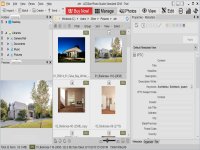
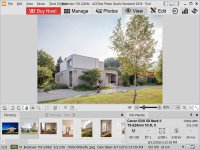
ACDSee Photo Studio 2027 allows you to view, organize, edit and share your images.
How to Download ACDSee
- 1 Click the DOWNLOAD button for your preferred link (US/EU Main or Mirror). When prompted by your browser, choose "Save" and select a destination folder.
- 2 We recommend using the mirror links (EU MIRROR / US MIRROR) first - they tend to be faster and more reliable than external sources.
- 3 Having trouble downloading ACDSee? If the download doesn't start, click the link again or try a different browser (Firefox/Chrome). Some security software may block downloads due to false positives.


