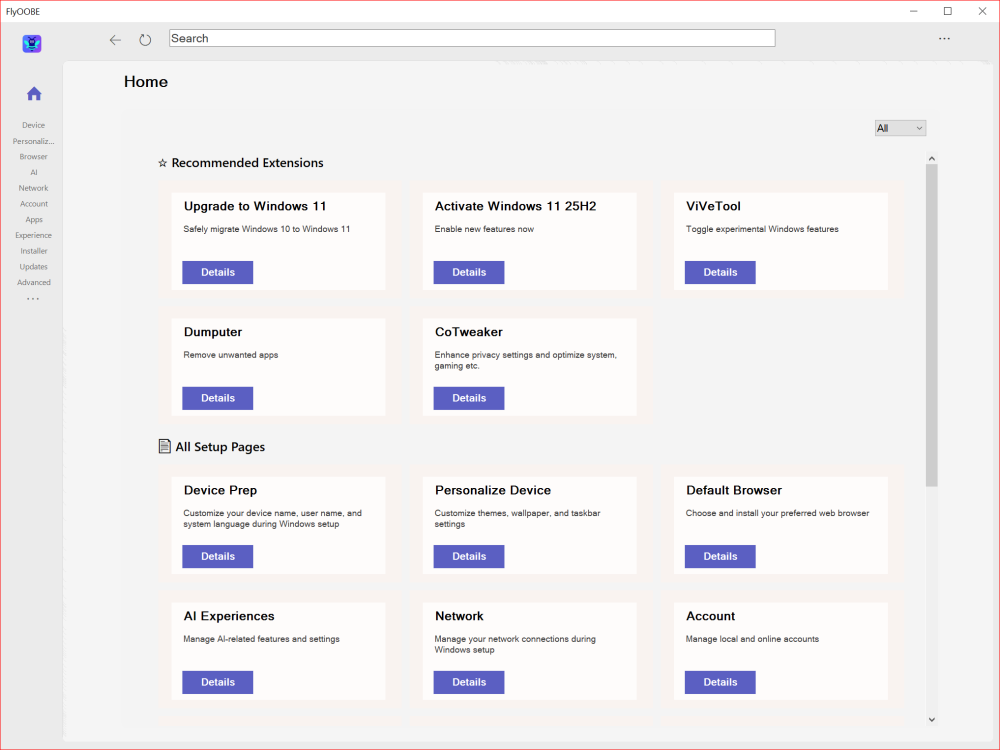
FlyOOBE 2.0 completely rebuilds the Windows 11 bypass tool with a centralized dashboard, asynchronous processing that eliminates all UI freezes, and a modernized interface that makes upgrading unsupported PCs faster and easier than ever before.
Unlike manual registry edits, FlyOOBE automates the entire process safely through built-in Microsoft mechanisms.
The tool includes upgrade assistance and post-installation optimization for complete Windows 11 control.
FlyOOBE 2.0 delivers a modernized interface that's cleaner and less overwhelming for new users.
Performance improvements include faster load times and better resource management.
The extensions engine received a complete overhaul with a new filtering system and category dropdown.
A new bee mascot icon identifies the application.
The centralized Home dashboard intelligently categorizes OOBE setup pages and extensions with keyword tag discovery.
Large-scale refactoring shifted to asynchronous processing, eliminating UI hangs during searches and loading.
A browser-style navigation system with full history stack lets you rewind through previous pages. Built-in extensions can now be uninstalled.
A native activity monitor logs system actions in real time. UI scaling on high-DPI displays has been improved.
The new metadata-based indexing system allows finding tools using simple keywords like ESU, 10, or 11.
Download FlyOOBE 2.0 →


Latest reviews
AllFree M3U Playlist for TiviMate: Legal Lists That Load Cleanl...
5/5The link isn't working. https://www.free-codecs.com/guides/free-epg-urls-for-iptv.htm
The New Fire TV Stick 4K Can't Run Kodi - Here's Which Fire ...
5/5The Vega OS shift is the biggest Firestick story of 2026. Anyone buying now needs to know: 4K Max = sideloading ...
JPEG XL Is Back in Chrome: What It Means and How to Open JXL...
5/5Brave just enabled it by default for stable users yesterday (1.97). Not specified is chromeOS will be passively gaining decode ...