A download can show you a real link, pass the signature check and still install the wrong program - here is how to catch it before it runs.
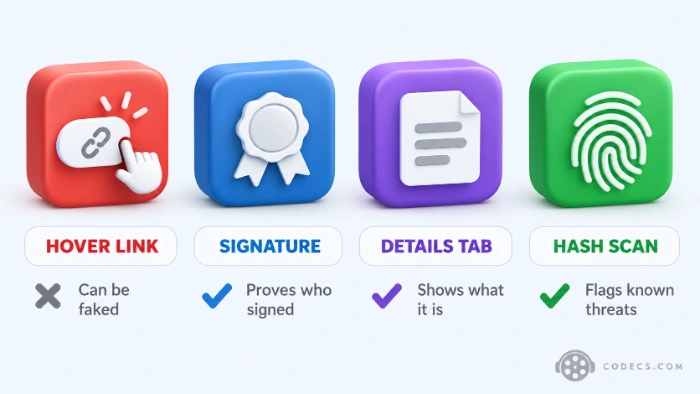
The two safety tips everyone repeats - hover over the link, then check the digital signature - both failed against a network of fake download sites uncovered this summer.
That does not make checking pointless, it just means you have to check the file you actually got rather than the page that handed it to you.
The five checks below take about a minute, cost nothing and work on any Windows PC.
- The address bar shows the developer's site or a download site you already trust.
- Properties, then Details, names the program you meant to download.
- The digital signature names the developer you expected.
- A fingerprint scan finds no known threat.
The Fake VLC Page That Passed the Classic Checks
In August 2026, Malwarebytes researchers found 41 websites posing as download pages for popular Windows software and games. Every one of them steered visitors to the same program, Download Studio.
The lures included everyday tools such as VLC, 7-Zip, paint.net and AIMP. Nobody searching for those is doing anything unusual, which is exactly why they were chosen.
The fake VLC page was the clever one. Hover over its download button and the browser showed a genuine VideoLAN address, but a script on the page took over the click and sent you somewhere else entirely.
Why the Signature Check Did Not Save Anyone
The fake page even told visitors to check the installer's digital signature before running it. The file passed, because Download Studio is validly signed by its own publisher, Grand Media, TOV.
A valid signature proves two things: who signed the file, and that nobody changed it afterwards. It does not prove you got the program you clicked on.
To be fair to Download Studio, Malwarebytes did not find that this installer was malware - the proven problem is the bait and switch. The researchers did point out that its automatic updater was abused in 2020 to push a backdoor disguised as a Malwarebytes installer, and this installer switches that updater on.
How to Tell If a Download Is Safe: Five Checks
Do these in order, before you double-click anything. The first three take seconds; the last two need a free web tool and, for the fifth, one command.
- Read the address bar, not the button. The page should be the developer's own site or a download site you already know - lookalike domains such as vlcmp[.]ru and get7zip[.]ru were part of this campaign.
- Open Properties, then Details. Right-click the downloaded file and read File description, Product name and Original filename - if you clicked Download VLC and these name something else, delete it.
- Open the Digital Signatures tab. The signer should be the developer you expected, VideoLAN in the case of VLC - a valid signature from a different company is a mismatch, not a pass.
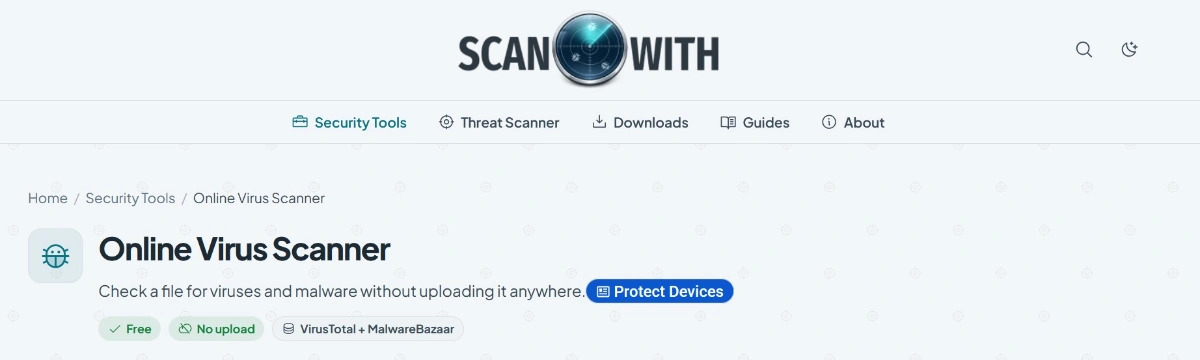
- Scan the file's fingerprint. Drop it into the ScanWith Online Virus Scanner, which checks it against VirusTotal and MalwareBazaar without uploading the file itself.
- Compare the checksum when the developer publishes one. Many open-source projects list a SHA-256 value next to each download, and the value you calculate with the command below must match it exactly.
Open Command Prompt in your Downloads folder and run this, swapping in the real file name:
certutil -hashfile file-name.exe SHA256No single check is proof on its own. The publisher writes the Details fields and a signature only names the signer, which is why the checks are stacked - a fake has to get past all of them at once.
Unknown is not the same as clean.
A scan result of Unknown file means nobody has submitted that exact file before. That is normal for a brand-new release, and it is also normal for brand-new malware, so let the other four checks decide.
Red Flags That Mean You Should Close the Tab
- The page asks you to install a download manager or helper app before you get the real file.
- A video will not play until you download a special codec or player update - real streaming sites never ask for that.
- The software does not exist for your system yet - Malwarebytes found a PC download page for GTA 6, a game with no announced PC release.
- A 'verify you are human' box asks you to press Windows + R or paste something - no real CAPTCHA works outside the browser.
- The file is a password-protected ZIP from a site you do not know, which stops scanners looking inside it.
And if the download is a cracked copy of paid software, the odds get much worse - here is what a cracked copy really costs.
Why This Is Getting Harder to Spot
Bill Gates said in an interview reported on 11 October that AI-assisted cyberattacks are the AI threat most likely to surface over the next year, and he expects "a lot of negative surprises".
Fake downloads are already part of that picture. In January 2026, McAfee researchers tracked 443 malicious ZIP files posing as drivers, game mods and AI tools, with signs that some of the code was written with AI help.
The practical upshot is simple. A fake page no longer gives itself away with broken English or a wonky logo, so judge the file, not the page.
Already Ran Something You Did Not Choose?
Do not panic, and do not open it again. Work through these in order.
- Uninstall it. Open Settings, then Apps, then Installed apps, find the program you never meant to install and remove it.
- Run AdwCleaner. AdwCleaner is Malwarebytes' free clean-up scanner for the adware, toolbars and bundled extras that installers like this leave behind.
- Run a full antivirus scan. Windows Security's Full scan is fine - a quick scan does not look everywhere.
- Change your passwords if a real threat turns up. Do it from a different, clean device, starting with email and banking.
Where to Get the Real Thing
The fake sites in this campaign copied software that free-codecs.com hosts, so here are the real pages:
- VLC Media Player - the free player that opens almost any video without extra codecs.
- 7-Zip - the free archiver for ZIP, 7z and RAR files.
- paint.net - a free image editor for Windows.
- AIMP - a free music player with a built-in equaliser.
Every one of those pages links the developer's own website, and the five checks above work on files from here exactly as they do anywhere else. That is the point - trust the checks, not the page.
More scanners and clean-up tools sit in our security tools section. On Android, the APK Checker inspects an APK file before you install it.
Quick questions
Is a file with a valid digital signature safe?
Not on its own. A valid signature proves who signed the file and that it has not been changed since, and Download Studio was validly signed while being handed to people who asked for VLC.
Does the ScanWith scanner upload my file?
No. Your browser calculates the file's SHA-256 fingerprint and only that code is sent for lookup, so the file itself never leaves your PC. It handles files up to 512 MB.
What does Unknown file mean on a scan?
It means nobody has submitted that exact file to VirusTotal or MalwareBazaar yet. Brand-new releases and brand-new malware both show up as unknown, so it is not a clean result.
Is Download Studio malware?
Malwarebytes did not establish that it is. The problem it documented is deceptive distribution, so if Download Studio is on your PC and you never chose it, uninstall it.
Can I check a link before I click it?
Yes - paste it into the ScanWith URL Scanner. Copy the address from your browser's address bar rather than from a button, because the fake sites showed one address on hover and used another on click.
Will my antivirus catch a swapped installer?
Often it will not, because a validly signed program that is not malware gives it nothing to flag. Keep it running, and use the Details and signature checks to catch the swap yourself.
The bottom line
Check the file you got, not the page that gave it to you: its name, its signer and its fingerprint.


Latest reviews
AllJPEG XL Is Back in Chrome: What It Means and How to Open JXL...
5/5Brave just enabled it by default for stable users yesterday (1.97). Not specified is chromeOS will be passively gaining decode ...
The New Fire TV Stick 4K Can't Run Kodi - Here's Which Fire ...
5/5Really interesting news - I had no idea Amazon was switching the new Fire TV Stick 4K over to ...
Free Popular IPTV Playlist: Where to Get Fresh, Legal M3U Li...
5/5Hi! Thanks for creating this list, and I have a small question: why do the channels I used to ...