OpenAI switched off the ChatGPT Atlas browser on 9 August 2026, and it is not coming back.
If you open it today, it will not browse, and no update is going to fix that.
The browsing parts of Atlas were folded into the ChatGPT desktop app and a Chrome add-on instead.
So the practical question is no longer what happened, but what you should be using now.
What Actually Happened
OpenAI announced the shutdown on 9 July 2026 and gave people about thirty days to get their things out. Atlas had been available for under ten months, having launched in October 2025, and it only ever ran on macOS.
The Windows and mobile versions that were promised at launch never shipped, not even as public test builds. If you were waiting for the Windows one, you can stop waiting.
OpenAI's own explanation is that the browser turned out to be a feature rather than a place people wanted to move into. Asking someone to change browsers is a big ask, and most people said no.
Your Bookmarks Did Not Move Themselves
Nothing transferred automatically. Bookmarks, history, open tabs and saved sessions all stayed inside Atlas, and if you did not export them before 9 August they are stuck there.
The good news is that your ChatGPT conversations were never part of Atlas. Those live in your ChatGPT account and are still exactly where you left them.
Be careful with cookie files.
If you did manage to export cookies or session files from Atlas, treat them like passwords. Anyone who gets hold of them can walk straight into the accounts you were signed in to, so do not email them around or drop them in a shared folder.
Where the Features Went
The agent-style browsing that made Atlas interesting now lives in three places. None of them is a browser you install as your main one.
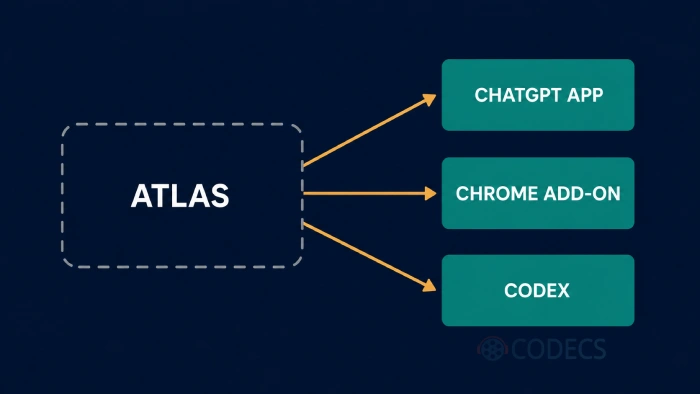
- The ChatGPT desktop app got a proper built-in browser, with tabs, downloads and the ability to sign in to sites.
- A ChatGPT extension for Google Chrome reads the page you are on and answers questions about it in a side panel.
- A cloud browser runs on OpenAI's own servers so its agents can go off and do tasks without using your machine.
Availability depends on your plan, your region and, if you use a work account, whatever your admin has enabled. That is worth checking before you assume a feature is missing.
What to Install Instead
The important part is not sentimental. A discontinued browser stops getting security patches, so staying on Atlas is the one option that is genuinely a bad idea.
If you want the ChatGPT extension, you need Google Chrome anyway, and importing your exported bookmarks file into it takes about a minute. Microsoft Edge is the same engine with Windows tie-ins and its own AI panel already built in.
For something less tied to a big AI vendor, Mozilla Firefox is the independent option and Brave Browser blocks ads and trackers out of the box.
If what you actually liked about Atlas was the interface rather than the AI, Vivaldi Browser and Zen Browser both give you far more control over tabs and layout.
The quickest route.
Install Chrome, import the bookmarks HTML file you exported from Atlas, then add the ChatGPT extension. You end up with a maintained browser and most of what you were using Atlas for.
If You Still Want an AI Browser
Atlas was not the only one, and the others are still shipping. Comet Browser from Perplexity is the closest like-for-like replacement, with the same agent-doing-things-for-you idea.
BrowserOS takes a different route, running AI agents locally in an open-source Chromium fork. That suits people who would rather their browsing did not round-trip through someone else's server.
Worth knowing the pattern before you commit, though. Arc Browser went into maintenance mode, Atlas is switched off, and what happened to the Arc team afterwards tells you how quickly this category moves.
Who Should Look Elsewhere
The tell is simple. If you were on Atlas because it was fast and tidy rather than because of the AI, a hardened traditional browser like LibreWolf Browser or a feature-rich one like Opera Browser will serve you better than chasing the next AI browser.
Anyone on Windows never had Atlas in the first place, so nothing has changed for you. Browse the full Web Browsers category and pick on the features you actually use.
Quick questions
Can I still download and use ChatGPT Atlas?
No. Atlas stopped working on 9 August 2026 and will not open, browse or run its agent features, and it no longer receives security updates.
Is ChatGPT Atlas coming back?
There is no sign of it. OpenAI moved the browsing features into the ChatGPT desktop app and a Chrome extension rather than pausing development.
Where did my Atlas bookmarks go?
They stayed inside Atlas. If you exported them to an HTML file before the shutdown you can import that into Google Chrome or any other browser, and if you did not, they are no longer reachable.
Did I lose my ChatGPT chat history?
No. Your conversations are stored in your ChatGPT account, separately from the browser, and the shutdown did not touch them.
What is the closest replacement for Atlas?
Comet Browser is the nearest equivalent if you want an AI browser, and Chrome plus the ChatGPT extension is the closest thing to the actual Atlas workflow.
Was there ever a Windows version of Atlas?
No. Atlas ran on macOS only for its entire life, and the Windows and mobile builds announced at launch were never released.


How to Stream With VLC: Open a Stream URL or ...
5/5This is amazing! I could no longer afford cable so I cut the cord and started watching Hulu, Youtube, ...
Read More →Don't Open a .xmpeg File Before Reading This
3/5It's never a good sign when the potential malware you downloaded has the EXACT same filename as the example. ...
Read More →Free Popular IPTV Playlist: Where to Get Fres...
3/5How can you create a DSTV channels on IPTV?
Read More →