An M3U file holds no video and no music. It is a plain-text list of links - which is why a 12,000-channel playlist can be smaller than a single photo.

Open one in Notepad and you can read the entire thing. That is the whole secret, and it is the part nobody explains.
Everything below follows from it: why your playlist opens instantly but plays nothing, why channel names sometimes turn into gibberish, and why the same file works in VLC, on your TV box, and in a browser.
An M3U file is a playlist - a text file listing addresses of things to play. M3U8 is the same file saved in UTF-8 text encoding. For opening a file, treat them as identical. Any player that takes one takes the other.
What is actually inside an M3U file
There are two flavors, and you have almost certainly met both.
The plain kind is as simple as it looks. One address per line, nothing else:
Music/track01.mp3Music/track02.mp3http://stream.example.com/radioThat is a complete, valid M3U file. This is the original 1990s Winamp format, and it is still what your music player exports when you save a playlist.
The extended kind is what IPTV uses. It adds an information line above each address:
#EXTM3U#EXTINF:-1 tvg-id="BBCNews.uk" tvg-logo="https://example.com/logo.png" group-title="News",BBC Newshttps://example.com/live/bbcnews/index.m3u8Four things to notice, and then you can read any playlist on the internet:
-
#EXTM3Uis the header. It appears once, at the very top, and means "this playlist has extra information in it". If it is missing, some players will treat the file as the plain kind and ignore all your channel names. -
#EXTINF:-1is the info line. The number is the duration in seconds - and -1 means "live, no fixed length", which is why every IPTV channel uses it. A music playlist would say#EXTINF:243instead. -
tvg-id,tvg-logoandgroup-titleare optional tags your player reads to match the program guide, show the channel logo, and sort channels into folders. Delete them and the channel still plays - it just looks bare. - The text after the comma is the channel name you see on screen. The next line is the actual stream address.
That is the entire format. No compression, no encryption, no magic - which is exactly why it won.
What the "8" in M3U8 actually means
This is where nearly every explanation on the web stops halfway. There are two answers, and both are true at the same time.
1. The original meaning: text encoding
M3U8 means an M3U file saved as UTF-8 text. The 8 is literally the 8 from UTF-8.
The old M3U format used whatever text encoding your computer happened to use locally. Fine for English. A disaster for everything else - Arabic, Cyrillic, Chinese and accented European names all came out scrambled on someone else's machine.
UTF-8 handles every alphabet on earth, so M3U8 became the sane default. If channel names in your list show up as é or Ñ or a row of question marks, that is this problem, and saving the file as UTF-8 fixes it.
2. The modern meaning: HLS streams
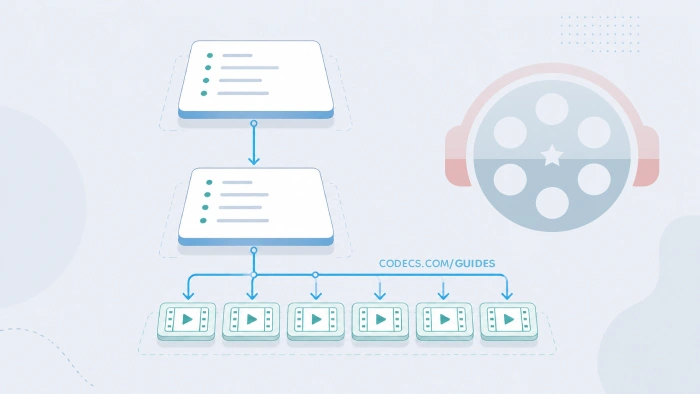
The .m3u8 extension is also the manifest format for HLS - HTTP Live Streaming, the delivery method behind most live video on the internet today.
An HLS manifest is still just a text playlist. But instead of listing channels, it lists video chunks - a few seconds of footage each - plus the available quality levels.
Your player reads it, grabs the chunks in order, and switches quality as your connection changes.
So both are happening at once. An IPTV playlist is often an .m3u8 file containing channels, where each channel points at another .m3u8 file containing video chunks. Same extension, two completely different jobs, one nested inside the other.
The practical takeaway: for opening a file, M3U and M3U8 are interchangeable. Do not let anyone sell you a "converter" between them. Renaming the file changes nothing that matters.
Where M3U files come from
The format is older than IPTV by about a decade, which is why "m3u file" means different things to different people:
- IPTV playlists - the big one today. A list of live TV channels, usually delivered as a URL rather than a file.
- Music playlists - saved from Winamp, foobar2000, VLC or a ripped CD. Often full of relative paths like
Music/track01.mp3, which is why they break the moment you move the folder. - Internet radio - a handful of station URLs in a text file.
- Anything that exports a playlist - the format is so simple that plenty of tools use it as a lowest-common-denominator export.
How to open an M3U file
First, just read it. Open the file in a text editor - Notepad on Windows, TextEdit on Mac, anything at all. If your system refuses, make a copy and rename it to .txt.
Thirty seconds of reading tells you what a player never will: whether the file has real addresses in it, roughly how many, and whether it is a live IPTV list or an old music playlist pointing at folders that no longer exist.
On Windows, Mac or Linux, VLC Media Player is the answer, and it is free with no ads. For a downloaded file: Media, then Open File. For a link: Media, then Open Network Stream, paste the URL, press Play. Open View, then Playlist to see the channels.
Windows opening your playlist in the wrong app? It sometimes hands .m3u files to Media Player or Groove Music, which choke on live stream URLs. Right-click the file, choose Open with, then Choose another app, pick VLC, and tick Always use this app. That one setting solves a surprising share of "my M3U will not open" complaints.
In a browser, with nothing installed, paste the URL or drop the file into our free Web Player and the channel list appears on the left. Nothing is uploaded anywhere - the file is read on your own device. It is the quickest way to check a playlist on a work laptop, a Chromebook, or any machine where installing software is not an option.
On a TV, phone or streaming box, the app depends on the device, and the differences are real - remote support, program guide, ads. Our guide to the best free IPTV players for M3U playlists has the right pick for each screen, plus the steps to load your list in it.
Your M3U opens but nothing plays. Now what?

Almost every M3U complaint is one of these five, and only one of them is actually the file's fault:
| What you see | What is really going on |
|---|---|
| Nothing plays at all | The file is fine; the source is dead. Public streams go offline constantly. Try a different list before you blame the app. |
| Some channels work, some do not | Completely normal for any large free list. A healthy list has a handful of dead entries. If half of it fails, the source itself is stale. |
| Channel names look like gibberish | Encoding, as above. Save the file as UTF-8. |
| It opens in Notepad instead of playing | File association, not corruption. Set VLC as the default app for .m3u files. |
| Picture but no sound, or the reverse | A codec gap on your device, not a playlist problem. The Codec Finder will tell you exactly what is missing. |
Test the list before you load it. Run any playlist through our free M3U Checker - it tests each stream, marks it Online, Reachable, Timeout or Offline, and lets you export only the ones that answered. It takes a minute and saves an evening.
Can I write my own M3U file?
Yes, in Notepad, in about a minute:
- Type
#EXTM3Uon the first line. - Add an
#EXTINF:-1,Channel Nameline, then the stream address on the line below it. Repeat for each channel. - Save it as playlist.m3u, choosing UTF-8 encoding if your editor offers the choice.
- Double-click it. Done.
That is genuinely all there is to it. No tool required, no special software, no format to learn beyond what you read above.
Is an M3U file legal?
The format itself is as neutral as a .txt file - it is a list of addresses and nothing more. What matters is what the addresses point at.
The line to watch. Playlists of free-to-air channels - the news, public TV, music and weather channels that broadcasters put online for free themselves - are entirely legal to use. Playlists of paid sports or pay-TV channels that someone is redistributing without permission are not, whatever the site offering them claims.
If you want lists that stay on the right side of that line, our guide to free popular IPTV playlists covers the sources worth trusting and how to spot a dead one.
Quick questions
Is M3U8 better than M3U?
For non-English channel names, yes - UTF-8 encoding keeps them readable. Otherwise there is no difference in quality or capability. It is a text encoding, not a format upgrade.
Do I need to convert M3U to M3U8?
No. Any player that opens one opens the other. If names look scrambled, re-save the file as UTF-8 in a text editor - that is the only "conversion" that ever helps.
If your app insists on a different playlist format entirely, the free X M3U Converter turns an M3U into PLS, XSPF, WPL or ASX right in your browser.
Why is my M3U file only 2 KB?
Because it holds no video. A 2 KB playlist pointing at hundreds of hours of live TV is working exactly as designed.
Can an M3U file contain a virus?
Not on its own - it is plain text, and text does not execute. The risk is never the file, it is what you install to open it. Stick to known players and you have nothing to worry about.
My music M3U stopped working after I moved the folder. Why?
It is full of relative paths like Music/track01.mp3, which only work from the original location. Open it in a text editor and you will see the broken paths immediately.


Free Popular IPTV Playlist: Where to Get Fres...
5/5Thank you ♥️
Read More →Best Way to Get VidMate APK - Fast, Free, and...
5/5The demand for feature-rich video editing applications continues to grow across the digital content industry. Filmora Mod APK is ...
Read More →How to Download HEVC Video Extension for Free
5/5its works! thank you all!
Read More →