Eclipsa Audio is a free, open 3D sound format from Samsung and Google, built to do what Dolby Atmos does without the licence fee - and right now the easiest place to hear it is YouTube on a recent Samsung or LG TV.
Under the brand name it is IAMF, an open standard from the Alliance for Open Media, the same group that gave us the AV1 video codec.
On a Windows PC the one tool that already understands it is FFmpeg, and your usual media player almost certainly does not yet.
Here is what Eclipsa Audio actually is, how it stacks up against Atmos, where you can hear it today, and what to do with a file that has it inside.
What Eclipsa Audio Actually Is
Eclipsa Audio is the consumer name for IAMF, which stands for Immersive Audio Model and Formats. Think of it as a wrapper and a set of instructions rather than a new way of squeezing sound.
The actual audio inside an IAMF track is encoded with codecs you already know - Opus, AAC, FLAC or plain uncompressed PCM. IAMF adds the layout on top: which sounds go left, right, behind and above you, plus loudness and mixing instructions for different speaker setups.
That layered design is the clever part. One file can carry a full 3D mix and a plain stereo mix at once, so a TV with height speakers renders the whole thing and a phone with two tiny speakers just plays the stereo layer. Nothing breaks on hardware that does not understand it.
The format itself is royalty-free, so anyone can make, send or play Eclipsa Audio content without paying a licence. The Eclipsa name and logo are a separate certification programme run by HDR10+ LLC, and device makers pay an annual fee to get their TVs and soundbars tested and badged.
Free for content, not for hardware. Creators and viewers pay nothing. Manufacturers pay for certification, which is why "Eclipsa Audio" appears on a spec sheet as a badge rather than as a checkbox every cheap TV ticks.
Eclipsa Audio vs Dolby Atmos
Both do the same job: place sounds in three dimensions, including above your head, and adapt the mix to whatever speakers you have. The differences are almost all about money and reach.
| What differs | Eclipsa Audio | Dolby Atmos |
|---|---|---|
| Licence | Royalty-free open standard (IAMF) | Proprietary, licence fee per device |
| Who controls it | Alliance for Open Media spec, HDR10+ LLC certification | Dolby |
| Content today | YouTube uploads, Samsung TV Plus shows | Netflix, Disney+, Apple TV+, Prime Video, cinemas, games, music |
| Devices today | Samsung TVs and soundbars from 2025, all LG 2026 TVs and some 2025 LG models, Google TV on Android 16, Android 16 phones | Almost every mid-range and premium TV, soundbar, phone and receiver |
| Making it | Free plugins for Pro Tools, Reaper and Premiere Pro, plus FFmpeg | Dolby's own tools, usually through a paid renderer |
| PC playback | FFmpeg only, for now | Windows Dolby Access app, many players pass it through |
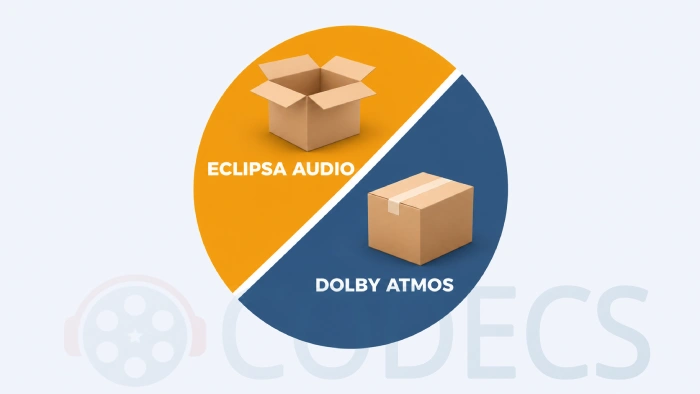
Honest summary: Atmos has the content and the installed base, Eclipsa has the price and the openness. If you buy a TV in 2026 it will almost certainly support Atmos, and it may support Eclipsa too. Very little you watch will offer you a choice between them.
Where Eclipsa is likely to win first is user-made video. A YouTube creator can mix in 3D with a free plugin and upload it, with no licence to sign. That was never possible with Atmos at that price, which is to say free.
Where You Can Hear It Today
Samsung's whole 2025 TV range supports Eclipsa Audio, from the entry-level Crystal UHD sets up to the Neo QLED 8K models, along with its 2025 soundbars. As of this writing Samsung is also the only manufacturer on the official Eclipsa certified products list.
LG joined in March 2026. Every 2026 LG TV, OLED and LCD alike, plays IAMF through its own speakers and passes it over HDMI to a soundbar, and a firmware update adds it to the 2025 C5, CS5, G5 and QNED9M ranges. LG has not paid for the badge, so the track shows on screen as "IAMF" rather than "Eclipsa Audio", but it is the same thing.
The main content source on those sets is Samsung TV Plus, the free ad-supported streaming service. Samsung has been adding filmed musicals and concerts mixed in Eclipsa Audio, and it says K-pop concerts, classical performances, films and sport are next.
The engineering behind that is more interesting than the marketing. In a Samsung Newsroom interview, the team describes recording a live show in a 280-seat venue, converting it to Eclipsa Audio, streaming it through a TV Plus channel and checking that the room and the crowd came back the way they sounded in the hall.
They also had to solve a problem only a free streaming service has: the adverts are stereo. Switching between a 3D show and a stereo ad in the same session without a click or a sync slip took its own set of rules. And if your TV does not support Eclipsa, TV Plus simply sends you stereo.
Beyond Samsung, YouTube has accepted Eclipsa Audio uploads since 2025 and keeps an official Eclipsa Audio playlist you can use to test a set. Google TV devices from Hisense, Sony, Philips and TCL get support with Android 16, phones get it with Android 16 as well, and Google has said Chrome will follow.
Best result at home. Samsung's own tip is to pair the TV with a Samsung soundbar. The TV speakers alone do a decent job of the width, but a soundbar with up-firing drivers is what makes the height layer audible.
How to Play an Eclipsa Audio File on a PC
An Eclipsa Audio file is usually an ordinary MP4 with an IAMF audio track inside, though you will also meet standalone .iamf files. The video plays anywhere. The audio is the problem.
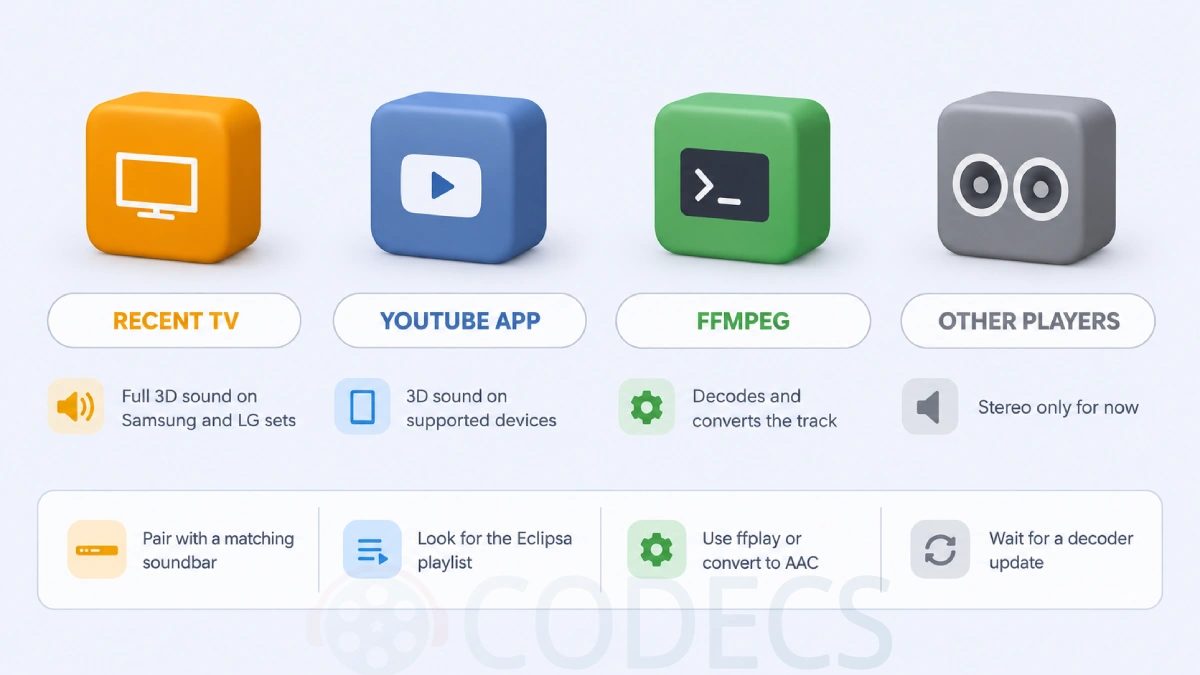
FFmpeg has decoded and encoded IAMF since version 7.0, and the current builds handle it without any extra libraries. That gives you two ways in. The bundled ffplay will play the file directly, mixed down to your speakers, and ffprobe will tell you whether a silent file actually contains an IAMF track.
The more useful move is to convert the audio once so any player can open it. This keeps the video untouched and replaces the IAMF track with plain stereo AAC:
ffmpeg -i input.mp4 -c:v copy -c:a aac -ac 2 output.mp4
Swap -ac 2 for -ac 6 if you want a 5.1 mixdown for a surround setup. You lose the height information either way, but you keep everything else.
VLC Media Player does not decode IAMF in its stable release yet. There is a decoder in the development builds, so it is coming, but on the VLC most people have installed an Eclipsa file plays video with silence or falls back to whatever stereo layer the file carries.
The same goes for MPC-HC, PotPlayer and the DirectShow players that lean on the K-Lite Codec Pack. Its LAV Filters are built on FFmpeg's libraries, so IAMF support should arrive there once LAV picks up the decoder, but the current LAV changelog does not mention it.
Video plays, no sound. That is the classic symptom of an unrecognised IAMF track. Run the file through the Codec Finder or ffprobe before you assume the download is broken, then use the FFmpeg command above.
Who Should Look Elsewhere
The tell is on your TV's spec sheet. If it does not list Eclipsa Audio or IAMF, and it is not a Samsung from 2025 on, an LG from 2026 on, or a Google TV running Android 16, you will hear stereo from Eclipsa content no matter what you do. That is fine - it is designed to degrade gracefully - but there is nothing to install to change it.
If you are mixing sound for a film or album that needs to land on Netflix, Apple Music or a cinema screen, Dolby Atmos is still the format those services accept. Eclipsa is the right choice for YouTube and for anything you distribute yourself.
And if you just want a video file with a strange audio track to play on your PC today, skip the waiting and convert it with FFmpeg. Five seconds of command line beats months of watching changelogs.
Quick questions
Is Eclipsa Audio free?
Yes for creators and viewers. The IAMF format is royalty-free and the creation plugins and FFmpeg cost nothing. Only device makers pay, for certification and the right to use the Eclipsa badge.
Is Eclipsa Audio better than Dolby Atmos?
Technically they do the same job, and early listening tests put them close. Atmos has far more content and far more devices. Eclipsa has no licence fee and open tools, which matters most for YouTube creators.
Which TVs support Eclipsa Audio?
All Samsung TVs and soundbars from 2025 on, every 2026 LG TV plus the 2025 C5, CS5, G5 and QNED9M after a firmware update, and Google TV sets from Hisense, Sony, Philips and TCL once they are on Android 16. Samsung is still the only brand on the official certified list.
Can VLC play Eclipsa Audio?
Not in the stable release. A decoder exists in VLC's development builds. Until it ships, use FFmpeg's ffplay or convert the audio track to AAC with the command in this guide.
Does YouTube support Eclipsa Audio?
Yes. YouTube has accepted uploads with Eclipsa Audio tracks since 2025 and lists it in its recommended upload settings. On a device without support you hear the stereo version automatically.
Do I need a soundbar to hear the difference?
Not strictly, but it helps a lot. TV speakers can manage the width. The height layer, which is the point of 3D audio, needs up-firing or ceiling speakers, and Samsung recommends one of its own soundbars.
Eclipsa Audio is worth knowing about, and for now FFmpeg is the only thing on a PC that speaks it.
Download FFmpeg and try the mixdown command on an Eclipsa file, or tell us what your TV made of it if you have already heard one.


Latest comments
AllTo view major football league live
Guide: Free Popular IPTV Playlist: Where to Get Fresh, Legal M3U Links in 2026 20 commentsThe link isn't working. [link]
Guide: Free M3U Playlist for TiviMate: Legal Lists That Load Cleanly 1 commentThe Vega OS shift is the biggest Firestick story of 2026. Anyone buying now needs to know: 4K Max = sideloading works, plain 4K = ...
News: The New Fire TV Stick 4K Can't Run Kodi - Here's Which Fire Stick Still Can 3 comments