A program you have used for months suddenly refuses to open. The dialog blames a Qt platform plugin - and tells you to reinstall, which usually does not help.
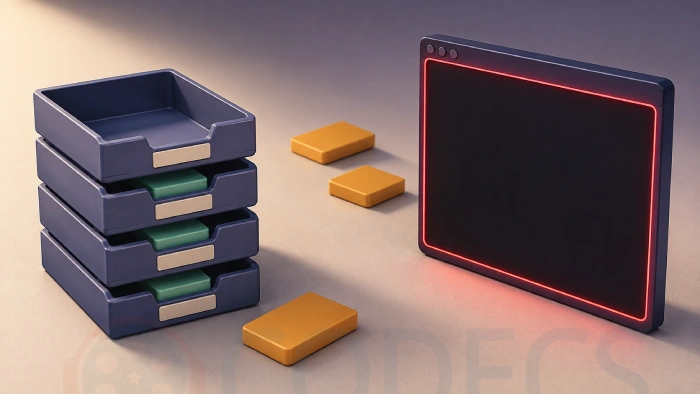
The full wording is "This application failed to start because no Qt platform plugin could be initialized. Reinstalling the application may fix this problem."
It looks like a corrupted installation, and it almost never is.
In nearly every case one small file is in the wrong place, and finding out where it actually sits tells you which of three fixes you need.
Open the folder containing the program's .exe and search it for qwindows.dll - where it turns up tells you which fix you need. Loose in the main folder means your unzip flattened the archive, so re-extract it properly; missing entirely means your antivirus quarantined it. Correctly inside platforms means the install itself is mismatched, so uninstall fully and install fresh.
What the error actually means
Qt is a toolkit that a great many desktop programs are built with, and on Windows it cannot draw a single window without one particular plugin file. That file is qwindows.dll, and it has to live in a folder called platforms sitting beside the program's executable.
Qt looks in exactly that location and nowhere else useful. If the file is not there it gives up before anything appears on screen, which is why you get a bare dialog rather than a program with something wrong inside it.
So this is a location problem, not a corruption problem. That distinction is the whole guide.
Step one: find out where the file actually is
Open the folder that contains the program's executable, put qwindows.dll into the search box in the top right of the window, and wait for it to finish.
- Inside a folder called platforms. That is correct, so the problem is a mismatched or damaged install - go to the reinstall section below.
- Loose in the main folder, next to the executable. Your unzip program flattened the archive, and this is the most common cause on any portable build.
- Not found at all. Your antivirus has almost certainly quarantined it, because Qt plugin files are a well-known false positive.
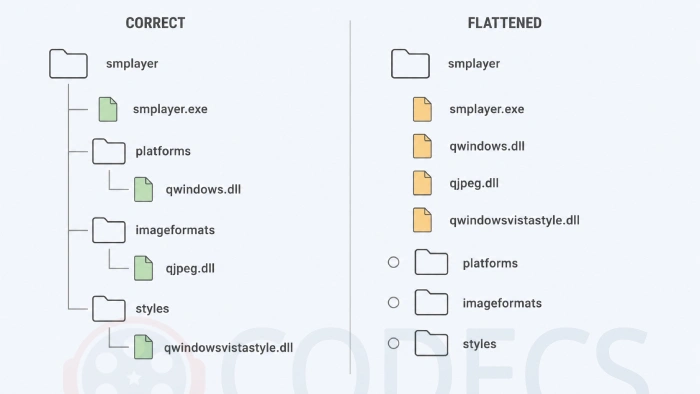
A healthy Qt program folder looks like the left-hand column. Compare it against your own before you change anything.
- The program's .exe sits in the main folder, with the Qt library files beside it.
- platforms\qwindows.dll sits one level down, inside its own folder. This is the one that causes the error when it goes missing.
- imageformats, styles and iconengines each hold their own plugins the same way - qjpeg.dll, qwindowsvistastyle.dll and qsvgicon.dll.
If it is loose in the main folder
The giveaway is a row of empty folders - platforms, imageformats, styles, iconengines - with a heap of loose DLL files sitting beside them.
If you extracted with 7-Zip, one setting causes almost all of these. Its file manager has a Flat View mode that lists every folder from every level in a single list, and extracting while it is on discards the paths and writes everything into one directory.
It is easy to have switched on without realising, because the address bar still shows the archive root. The tell is folders that should be nested appearing as siblings - a conf.d next to fonts, or a cs next to docs.
Flattening does not only misplace files, it destroys some. Where two folders each hold a file of the same name, the second one written silently overwrites the first. We measured one flattened extract of a portable media player: 248 files in the archive arrived as 203 on disk - forty-five gone, with no warning at any point.
Nothing needs downloading again. Close the archive manager, right-click the archive in Explorer, and use the Extract to ...\ option, which keeps the full structure and has no settings to get wrong.
If you would rather stay in the file manager, switch off Flat View in the View menu first, then use Extract rather than Copy and check the path mode reads Full pathnames. WinRAR keeps full paths by default unless someone has changed it.
Moving the files by hand works, but only as a stopgap. Putting qwindows.dll into platforms will get the program open, and the other plugins go into the folders named after them. That still leaves you with whatever the flattening deleted, so re-extracting properly is the only version that gives you the whole program.
If it is missing entirely
Open your antivirus and look at its quarantine or protection history. Qt plugin files trip heuristic detection often enough that this is routine rather than unlucky, and the file will usually be sitting there with a recent timestamp.
Restore it, then add the program's folder to your exclusions so the next update does not repeat the process. If your antivirus deleted rather than quarantined it, reinstalling the program restores it - but add the exclusion first, or you will be back here in a week.
If it is in the right place and it still fails
Now a reinstall is genuinely the answer, but do it properly. Uninstall first, delete anything left behind in the program folder, then install fresh - installing a new version on top of an old one leaves mismatched Qt libraries in place, and that fails in exactly this way.
One rarer cause is worth knowing if that does not do it. Another Qt application's folder sitting on your system PATH can shadow this program's own libraries, and the version mismatch produces the same dialog.
The same applies to the QT_PLUGIN_PATH environment variable, which some development tools set globally and never clean up. If either exists on your machine, removing the entry settles it.
What we are deliberately not telling you to do
Three fixes dominate the search results for this error and none of them address either common cause.
- Running sfc /scannow. That checks Windows system files, and qwindows.dll is not one - it ships inside the program's own folder, so the scan cannot see it.
- Installing Windows updates. Nothing Microsoft ships puts a Qt plugin into a third-party program's folder, and no Windows update has ever removed one.
- Copying a platforms folder out of a Python installation. This one circulates widely and is advice for developers debugging their own builds - dropping a mismatched Qt version into a finished program usually makes things worse.
The tell that you are reading generic advice: if it does not begin by asking where the file is, it is guessing.
Which programs this affects
Any Qt-based Windows program can fail this way, and quite a few of the ones people use daily are built with it. If you arrived here from one of these, the steps above are the whole fix.
- Media - SMPlayer, and the portable build in particular, since that is where flattened extracts happen.
- Video and containers - MKVToolNix, Shotcut and Kdenlive.
- Images and books - nomacs and Calibre.
- Downloads - qBittorrent.
The wording of the dialog is identical in all of them, because it comes from Qt rather than from the program, so a fix that works for one works for all of them.
How to tell whether this advice is still current
Version numbers will move and this page does not depend on them, but two things could change underneath it.
The folder name is the first. Qt has used platforms for the plugin directory across Qt 5 and Qt 6, so if a future release renames it, the diagnostic still holds - you are looking for where qwindows.dll is versus where the program expects it, and the program's own folder will show you the pattern.
The second is 7-Zip. Flat View forcing a flat extract has been raised with its developers repeatedly and there is a standing request to change it, so if a future version starts preserving paths from Flat View, that cause simply stops occurring - the other two do not change.
Quick questions
Will reinstalling fix it?
Only if the file is already in the right folder. If your unzip flattened the archive or your antivirus removed the file, reinstalling repeats the same result, which is why so many people report trying it twice.
Where should qwindows.dll be?
In a folder called platforms, sitting directly beside the program's executable. Not in the main folder, not in Windows, and not anywhere else on the system.
Why did my portable version extract into a pile of loose files?
Almost always 7-Zip's Flat View being switched on, which discards folder paths during extraction. Re-extract using the right-click menu in Explorer instead, and note that a flattened copy is also missing any files that collided on the way out.
Can I just copy the file into the platforms folder myself?
Yes, and the program will start. It is a stopgap rather than a repair though, because a flattened extract has also lost files elsewhere in the folder that you will not notice until something else breaks.
Does this affect programs other than media players?
Yes. The dialog comes from Qt rather than from any one program, so ebook managers, torrent clients, video editors and image viewers built with Qt can all produce it, and the same fix applies to all of them.






Best Way to Get VidMate APK - Fast, Free, and...
5/5The demand for feature-rich video editing applications continues to grow across the digital content industry. Filmora Mod APK is ...
Read More →Free Popular IPTV Playlist: Where to Get Fres...
2/5where can i goet fox news M3u* link please someone post here
Read More →How to Download HEVC Video Extension for Free
5/5its works! thank you all!
Read More →