There is no DaVinci Resolve for Android, there is one for iPad, and the gap between those two facts is what a lot of fake apps are currently living in.
This follows our articles on Photopea and PotPlayer for Android, and the answer has the same shape.
Blackmagic Design has never released an Android version, and nothing suggests one is coming.
What has appeared instead is a steady supply of apps borrowing the name.
Where DaVinci Resolve actually runs
DaVinci Resolve is Blackmagic Design's professional editing and colour grading suite, from the same company as Blackmagic Camera for Android - which is worth noting, because it shows they are perfectly willing to build for Android when the app suits it.
Resolve runs on Windows, macOS and Linux, and since December 2022 on iPad as well. That iPad version is the part most articles miss, and it is the one that makes the Android absence look deliberate rather than accidental.
Why iPad and not Android
The usual explanations - phones are not powerful enough, touchscreens are too small - do not survive contact with the fact that an iPad version exists and works.
The reason Blackmagic's own people give is more specific. Resolve runs its entire image pipeline on the GPU, and Android has no single consistent way for an application to get full GPU access across the range of chips and drivers in the ecosystem. Apple ships one graphics stack across a small hardware range; Android does not.
So this is an engineering constraint rather than a market decision, which also means it could change if Android's graphics story consolidates. Nothing indicates that is imminent.
What the fake apps look like
Search for a Resolve APK and you will find listings that look plausible until you read the details.
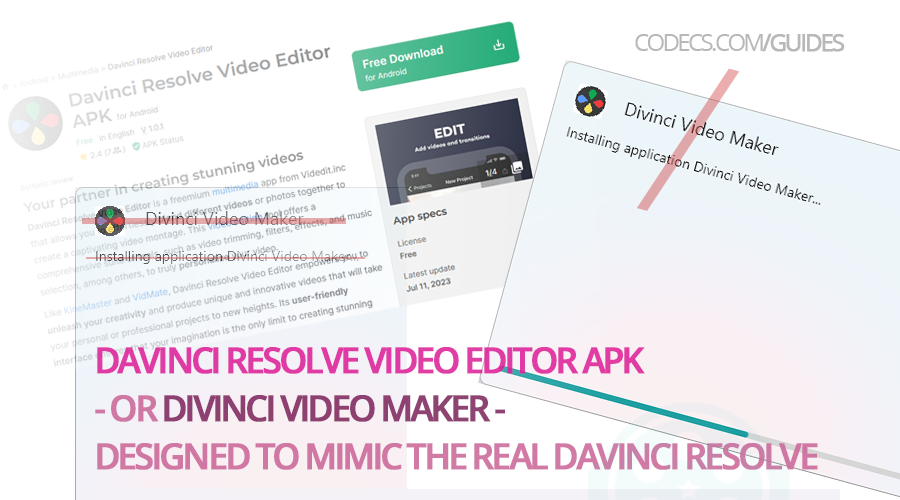
The example above was listed as a DaVinci Resolve video editor APK, but the app underneath carried a different name entirely and shipped as a file whose spelling did not match the product it claimed to be. Nothing about it delivered Resolve's features, because there was nothing of Resolve in it.
That pattern is the whole game: a real product's name attached to something else, aimed at people searching for a version that does not exist.
The risk is not just disappointment. An APK from an untrusted source can carry malware, harvest data from the device, or bury the phone in ads, and an app impersonating professional software is not a promising place to start trusting a stranger's binary.
How to check an APK you already downloaded
Advice to "be careful with APKs" is not much use on its own, so here is how to actually inspect one before you install it.
- Read what the file really is. Drop it into our APK Checker, which reports the true package name, version and signature in the browser without uploading anything.
- Check the package name against the developer. A genuine app from a company uses that company's own package namespace - a mismatch there is the single clearest tell.
- Check whether it will even run. The Play Store Check catches the licence checks that stop some apps launching on devices without Play services.
Our news pieces on how to install an APK safely and why some APKs refuse to open cover the wider ground.
What to use instead on Android
Wanting to edit video on a phone is a perfectly reasonable thing to want, and there are real apps that do it well.
- CapCut. The one most people land on, free, and genuinely capable for social-length edits - CapCut for Android is hosted here.
- KineMaster. A long-standing multi-track mobile editor with a free tier, available through the Play Store.
- Adobe's Premiere on mobile. Premiere Rush has been retired, and Adobe's replacement is Premiere on iPhone, with an Android version stated to be in development.
Adobe Premiere Rush is no longer an option. Adobe stopped offering it for download in September 2025 and the app reaches end of life in September 2026, so any guide still recommending it as a mobile editor is out of date. Several still do. We covered the shutdown in Adobe is retiring the app that replaced Premiere Clip.
None of these is Resolve, and none pretends to be. If you need Resolve specifically, the desktop version is free and the iPad version exists.
Quick questions
Is there any way to run DaVinci Resolve on Android?
Not natively, and no APK claiming otherwise is genuine. Remote desktop into a machine that runs it is the only real route, and it is a poor experience on a phone.
Why does the iPad version exist but not an Android one?
Resolve runs everything on the GPU, and Android has no consistent way to give an app full GPU access across its range of hardware. Apple ships one graphics stack across a small device range.
Is DaVinci Resolve free?
The standard version is, on desktop and iPad. The Studio version is a one-time purchase that adds higher-end features.
How do I tell a fake APK from a real one?
Check the package name and signature rather than the listing title, since the listing is the part the counterfeiter controls. A browser-based APK inspector reads both in seconds.
Is Blackmagic likely to release an Android version?
Nothing has been announced, and the technical obstacle is structural rather than a matter of effort. It is not impossible, but there is no sign of it.
Can I at least open Resolve project files on Android?
No. Project files depend on the application that created them, so without Resolve there is nothing to open them with.
If a download promises DaVinci Resolve for Android, that is the tell - the product does not exist on the platform, so the file is always something else.
Download DaVinci Resolve for the platforms it actually supports, or leave a comment if you have run into one of these fake listings and want it flagged.
Genuine mobile apps sit in the Android APK section, and desktop options under video editors.


Latest comments
AllTo view major football league live
Guide: Free Popular IPTV Playlist: Where to Get Fresh, Legal M3U Links in 2026 20 commentsThe link isn't working. [link]
Guide: Free M3U Playlist for TiviMate: Legal Lists That Load Cleanly 1 commentThe Vega OS shift is the biggest Firestick story of 2026. Anyone buying now needs to know: 4K Max = sideloading works, plain 4K = ...
News: The New Fire TV Stick 4K Can't Run Kodi - Here's Which Fire Stick Still Can 3 comments