Sixteen versions in forty-one years, and only one of them still gets security updates.
Windows 1.0 shipped in November 1985 and could not even overlap two windows on the screen.
Windows 11 is the only version Microsoft still supports properly today.
This page lists every consumer release with its date and what it changed, then answers the question most people actually arrive with: is the one you are running still safe?
To check your own PC rather than read the history, hold the Windows key and press R, type winver and press Enter. The box that opens names your version and build. Then skip to the support table further down.
The Early Years, 1985 to 1995
These releases are historical interest only. Nothing from this era can run a current browser, receive a security patch, or safely touch a network.
| Version | Released | What it introduced |
|---|---|---|
| Windows 1.0 | Nov 1985 | A graphical shell sitting on top of MS-DOS. Windows could only be tiled side by side, never overlapped |
| Windows 2.0 | Dec 1987 | Overlapping windows at last, keyboard shortcuts, and the first versions of Word and Excel for Windows |
| Windows 3.0 | May 1990 | The first genuine hit. Program Manager, File Manager, 16 colours and proper use of memory above 640KB |
| Windows 3.1 | Apr 1992 | TrueType fonts, the multimedia extensions that made sound cards standard, and Minesweeper |
| Windows for Workgroups 3.11 | Nov 1993 | Built-in networking and file sharing, which is what put Windows into offices |
| Windows 95 | Aug 1995 | The Start button, the taskbar, long file names, plug and play, and 32-bit applications |
Windows 95 is the dividing line. The desktop it introduced is recognisably the one you are looking at now, thirty-one years later.
The Windows Most People Remember, 1998 to 2013
This is the stretch that put a PC in most homes, and it contains both the best-loved release and the two least-loved ones.
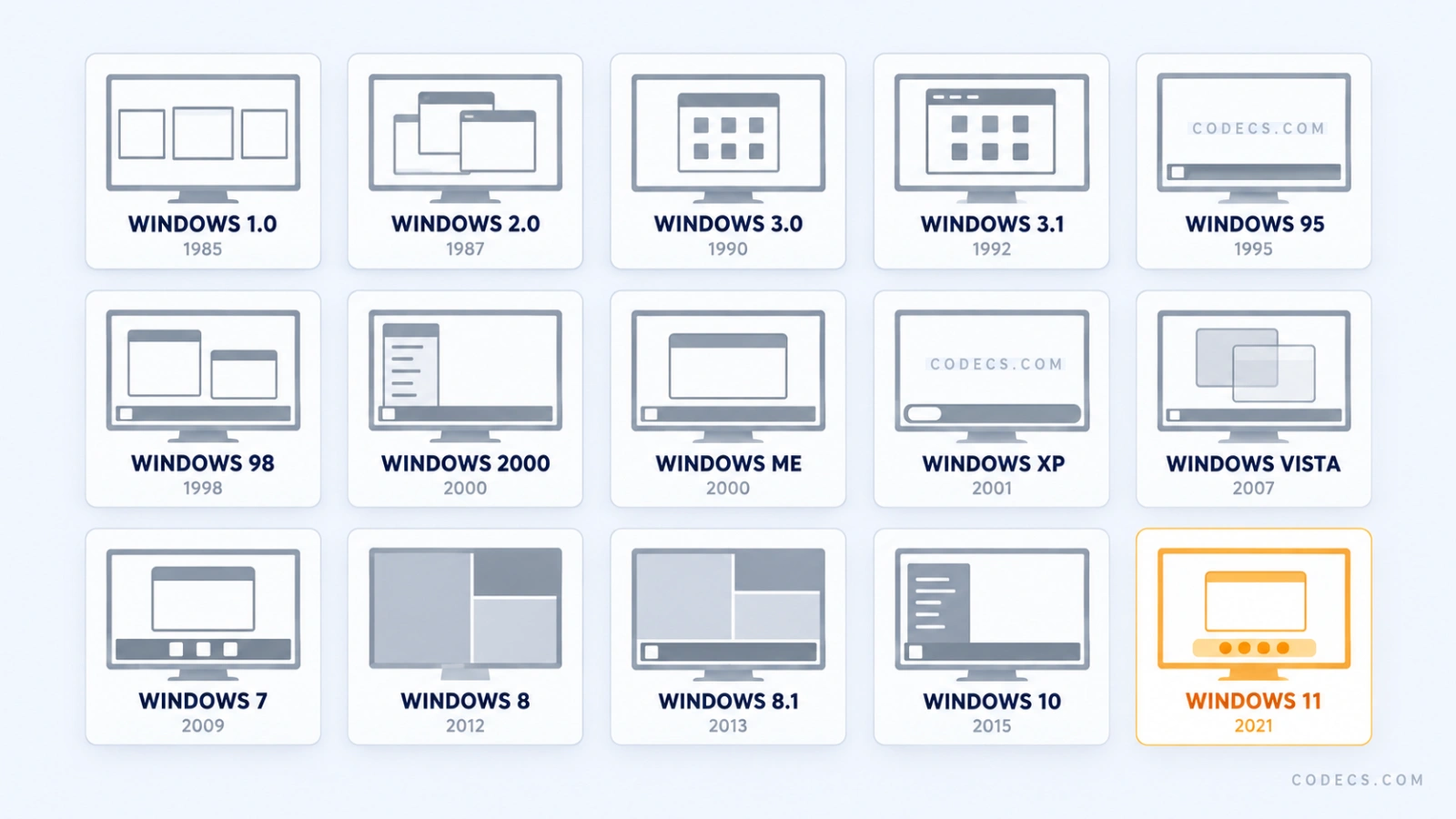
Want the big version? Download the full-size timeline to keep, print or share - it is one image, no sign-up, and it reads cleanly at full width.
| Version | Released | What it introduced |
|---|---|---|
| Windows 98 | Jun 1998 | Proper USB support, Internet Explorer built into the desktop, and multi-monitor. Second Edition followed in 1999 |
| Windows 2000 | Feb 2000 | The business line, not the home one. Built on the NT kernel, with NTFS and Active Directory |
| Windows Me | Sep 2000 | System Restore and Movie Maker, on the last release still built over MS-DOS. Widely and fairly disliked |
| Windows XP | Oct 2001 | Home and business finally merged onto the NT kernel. Supported for twelve and a half years, a record nothing since has matched |
| Windows Vista | Jan 2007 | The Aero glass look, User Account Control, and hardware demands most machines of the day could not meet |
| Windows 7 | Oct 2009 | Vista fixed. The redesigned taskbar with pinned programs, libraries, and far lighter on the same hardware |
| Windows 8 | Oct 2012 | A full-screen tile interface and no Start button, on desktops that had no touchscreen to use it with |
| Windows 8.1 | Oct 2013 | The Start button back, booting straight to the desktop, and most of the tile interface made optional |
Windows 8 is the only release Microsoft has ever effectively withdrawn support from early. Its updates stopped in January 2016, three years before 8.1's, because moving to 8.1 was free and expected.
Windows 10, July 2015
The Start menu came back, the tiles were folded into it, and the whole thing was given away free to anyone running Windows 7 or 8.1.
Microsoft called it the last version of Windows and meant it, at the time. The plan was to keep updating one operating system forever rather than selling a new one every three years.
That plan lasted six years. Windows 10 reached its final feature update, 22H2, and then stopped receiving security patches on 14 October 2025.
It is still the most common version running on older hardware, and the upgrade to Windows 11 is still free if the machine qualifies.
Windows 11, October 2021
The taskbar moved to the centre, corners went round, and for the first time in twenty years Windows told a large number of working PCs that they were not welcome.
The requirements are the story of this release. A TPM 2.0 security chip, Secure Boot, 4GB of RAM and a processor on Microsoft's approved list, which ruled out most machines built before roughly 2018.
Snap Layouts, a redesigned File Explorer and Copilot are the visible additions. Android app support arrived and was then withdrawn in March 2025, so it is no longer a reason to choose it.
Five years in, it has settled down a great deal, and we covered what it is like to use now after this September's update.
The Windows 11 Version Numbers, and Why They Matter
Windows 11 gets one feature update a year, named for the year and the half it lands in, and each one carries its own support clock.
This catches people out. Being on Windows 11 is not enough on its own - an old feature update stops receiving patches while the machine still says Windows 11 on the About page.
| Feature update | Released | Home and Pro updates end |
|---|---|---|
| 21H2 | Oct 2021 | 10 October 2023 |
| 22H2 | Sep 2022 | 8 October 2024 |
| 23H2 | Oct 2023 | 11 November 2025 |
| 24H2 | Oct 2024 | 13 October 2026 |
| 25H2 | Sep 2025 | 12 October 2027 |
| 26H2 | Due this autumn | Not published yet |
Moving between them is quick. Because 24H2, 25H2 and 26H2 share the same underlying platform, the upgrade arrives as a small enablement package and needs one restart rather than a full reinstall.
There is also a 26H1, and you can safely ignore it. It exists only for a handful of new Snapdragon and NVIDIA machines on a different platform, and it is not something an ordinary PC can or should install.
Which Versions Still Get Security Updates
This is the table to check your own machine against. Everything below Windows 10 has been unpatched for years, whatever still appears to work.
| Version | Status in 2026 | Safe to keep using? |
|---|---|---|
| Windows 11, 25H2 | Current, fully supported | Yes. Patched until October 2027 |
| Windows 11, 24H2 | Updates stop on 13 October 2026 | Only until then. Move to 25H2, it takes one restart |
| Windows 11, 23H2 and older | Ended November 2025 | No. Update the feature version, not the whole PC |
| Windows 10, 22H2 | Ended October 2025, security-only extension available | Only with the extension enrolled, and only until October 2027 |
| Windows 8.1 | Ended January 2023 | No |
| Windows 7 | Ended January 2020, paid extension ended January 2023 | No |
| Vista, XP and older | Long ended | No. Keep them off the internet entirely |
The Windows 10 extension is not support. It delivers critical security fixes and nothing else - no feature updates, no bug fixes, no technical help - and it stops on 12 October 2027 with no further extension announced. If your hardware cannot take Windows 11, that is your deadline to plan around, and one option is to install Windows 11 on an unsupported PC instead.
What to Do If You Are Still on Windows 10
Most people in this position have a machine that works perfectly well and no obvious reason to replace it. There are four sensible routes and one bad one.
- Check whether the PC qualifies. Open Settings, then Windows Update - if the free upgrade is available, it is offered there by name.
- Back up before you touch anything. An upgrade that goes wrong on the only copy of your files is a bad day, so make a full system image first.
- Take the upgrade if it is offered. It is still free, it keeps your files and programs in place, and it is the shortest path to a patched machine.
- Enrol in the security extension if you cannot upgrade yet. It is free if you let Windows sync your settings, or 1,000 Microsoft Rewards points, or a one-off 30 US dollars, and it covers up to ten devices.
- Do not simply carry on unpatched. An unsupported Windows on the internet is the single most reliable way to end up with something you did not install.
A fresh Windows 11 arrives with a good deal you did not ask for. Our guide to FlyOOBE strips the clutter out of a fresh install in a few minutes, including the AI features most people never open.
Making an Older PC Useful Again
A machine too old for Windows 11 is not scrap. It is a machine that needs a different job.
Running ChromeOS Flex from a USB drive turns a fifteen-year-old laptop into a fast, supported browsing machine without touching the Windows install underneath it.
If it is staying on Windows and its job is playing video, the thing it usually needs is the right codec pack rather than a newer operating system.
And if the old machine being replaced is a phone or tablet rather than a PC, our Android version history answers the same support question for that side of the house.
Quick questions
How do I check which version of Windows I have?
Hold the Windows key and press R, type winver and press Enter. The box names the edition, the feature version such as 24H2, and the build number, which is more useful than the version name on its own.
Is Windows 10 still safe to use in 2026?
Only with Extended Security Updates enrolled, and only until 12 October 2027. Without them it has had no security patches since October 2025, so newly discovered flaws stay open permanently.
Will there be a Windows 12?
Nothing has been announced. Microsoft is shipping one Windows 11 feature update a year and has given no indication of a new numbered release, so treat every Windows 12 article you see as speculation.
Why is there no Windows 9?
Microsoft never gave a full explanation, saying only that the jump from 8 was big enough to skip a number. The widely repeated technical theory is that older software checking for a name starting with Windows 9 would have mistaken it for 95 or 98.
Can I still install Windows 7 or XP?
They will install on old hardware and activation servers for them have largely gone. More to the point, neither has had a security patch for years, so if you need one for a specific piece of equipment, keep that machine off the internet.
My PC says it cannot run Windows 11. What are my options?
Three, in order of sense: enrol in the security extension and plan a replacement before October 2027, move the machine to a lighter operating system, or install Windows 11 on the unsupported hardware and accept that Microsoft does not guarantee updates for it.
The bottom line
Check winver rather than trusting the version name, and treat 12 October 2027 as the real deadline if you are still on Windows 10.
If you are planning a move either way, tell us which version you are on and how long you want to keep the machine.


Latest comments
AllI used [link] on tivimate with the Usa m3u Playlist. I cannot get the guide to work.
Team replied Guide: Free EPG URLs for IPTV: TV Guide Links That Still Work 2 comments[link] Epg is not working on this one.
Team replied News: Free USA IPTV Playlist: The American TV That Is Really Free 1 commentSi mund te shikoj te gjitha kanalet e DigitAlb dhe Tring me url pa pagese ne Iptv Player?
Team replied Guide: Free Popular IPTV Playlist: Where to Get Fresh, Legal M3U Links in 2026 20 comments