Windows Media Player plays more than people think and less than they hope. Here is every file type and codec it handles on Windows 11 and 10, which ones need a free extension, and which ones need a codec pack or a different player.
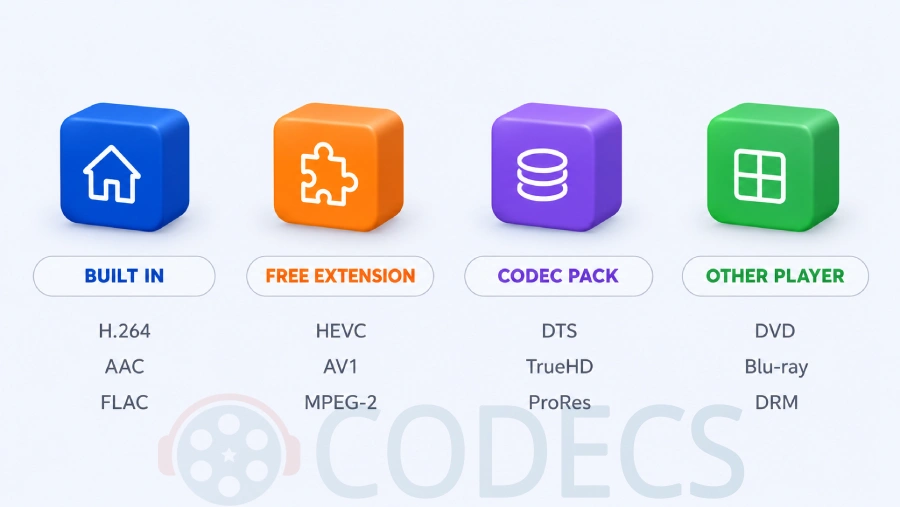
The short version: MP4, MOV, MKV, AVI, WMV and every common music format play out of the box, HEVC and AV1 need a free extension, and surround audio and disc formats need a codec pack or another player.
The tables below are built from Microsoft's own codec lists as of May 2026 and apply to Windows Media Player 12 - the version on Windows 7 through 11 - and to the newer Media Player app on Windows 11.
The original 2004 list for Windows XP is kept at the end for anyone still running it.
Two players, one name
Windows 11 has both the classic Windows Media Player Legacy and the newer Media Player app, and they do not support exactly the same things. The new app uses only the Media Foundation decoders in Windows plus the Store extensions; the Legacy player uses those too, and can also fall back to DirectShow decoders such as the ones a codec pack installs.
In practice that means a codec pack widens what the Legacy player opens but does nothing for the new app, while a Store extension helps both. Where the two differ below, the table says so.
File types Windows Media Player opens
A file extension names the container, not the codec inside it, so a container being supported does not guarantee every file in it plays. The second and third tables cover the codecs.
| File type | Plays in Windows Media Player? | If it does not |
|---|---|---|
| MP4, M4V, MOV, 3GP, 3G2 | Yes, if the video inside is H.264 or MPEG-4 - HEVC needs the free extension | Install the HEVC extension, see the video table |
| MKV | Yes on Windows 10 and 11 - the same codec rules apply | Codec pack for the Legacy player, or VLC |
| AVI | Yes for DivX, Xvid, DV, Motion JPEG and uncompressed video | Codec pack for anything older or odder |
| WMV, WMA, ASF, WM | Yes - Microsoft's own formats | Only DRM-protected files fail, and nothing fixes that |
| MPG, MPEG, M2TS, TS, VOB | MPEG-1 yes, MPEG-2 only with the free MPEG-2 Video Extension | Install the extension, or use VLC |
| WebM | Usually - the VP8 and VP9 decoders are built in, but the Legacy player may refuse the extension | VLC, or a codec pack for the Legacy player |
| FLV, RM, RMVB, OGV | No | Codec pack for the Legacy player, or VLC |
| MP3, AAC, M4A, FLAC, WAV, AIFF, WMA, MIDI | Yes | Only DRM-protected purchases fail |
| OGG, OPUS | Vorbis in OGG with the free Web Media Extension; Opus is not on Microsoft's list | Codec pack or VLC |
| DVD and Blu-ray discs | No, not since Windows 8 | VLC plays unprotected DVDs; Blu-ray needs a dedicated player |
Video codecs
Built in means Windows ships the decoder and both players use it. Free extension means a small Microsoft Store app that both players pick up once installed.
| Video codec | Status | What to install |
|---|---|---|
| H.264 / AVC | Built in | Nothing |
| MPEG-4 Part 2, DivX, Xvid | Built in | Nothing for most files; a codec pack for old or unusual AVI encodes |
| HEVC / H.265 | Free extension | HEVC Video Extensions from Device Manufacturer, the free version of the paid Store listing |
| AV1 | Free extension | AV1 Video Extension, included in the Media Foundation Codecs bundle |
| VP8, VP9 | Built in | Nothing; the free VP9 Video Extension exists for systems that lack it |
| MPEG-1 | Built in | Nothing |
| MPEG-2 | Free extension | MPEG-2 Video Extension, included in the Media Foundation Codecs bundle |
| WMV 7, 8, 9, VC-1 | Built in | Nothing |
| H.263, DV, Motion JPEG | Built in | Nothing |
| Theora | Free extension | Web Media Extension |
| ProRes, DNxHD, Indeo, RealVideo | Not included | Codec pack for the Legacy player, or VLC |
Audio codecs
| Audio codec | Status | What to install |
|---|---|---|
| MP3, MP2, AAC, HE-AAC | Built in | Nothing |
| FLAC, ALAC, WAV / PCM | Built in | Nothing |
| WMA, WMA Pro, WMA Lossless, WMA Voice | Built in | Nothing |
| AMR, GSM 6.10, ADPCM, G.711 | Built in | Nothing |
| AC-3 / Dolby Digital | Built in before Windows 11 24H2; removed from clean 24H2 and later installs | Codec pack for the Legacy player, or VLC |
| Vorbis | Free extension | Web Media Extension |
| DTS, DTS-HD, TrueHD, E-AC-3, Opus | Not included | Codec pack for the Legacy player, or VLC |
How to fill the gaps
For the free-extension rows, the Media Foundation Codecs bundle installs every Microsoft extension at once, and the HEVC Video Extensions from Device Manufacturer covers H.265 on its own without the Store charge.
For the "not included" rows, the K-Lite Codec Pack adds LAV Filters, which decode DTS, TrueHD, E-AC-3, Opus, ProRes and the legacy video codecs for Windows Media Player Legacy and every other DirectShow player.
If you only need the file to play and do not mind which app opens it, VLC Media Player decodes everything in all three tables on its own, including unprotected DVDs.
The player is not always the problem. If a file that should play by these tables still fails, the decoder may be damaged or unregistered rather than missing - that is a different fix, covered in How to Reinstall Default Codecs in Windows 11 and 10.
Subtitles and a few other limits
The Media Player app on Windows 11 loads external SRT subtitle files; Windows Media Player Legacy does not load subtitle files at all. For subtitles in the classic player, K-Lite's bundled MPC-HC or VLC are the practical answer.
Neither player opens DRM-protected video such as iTunes purchases or downloads from streaming services, and no codec changes that. Neither plays Blu-ray discs, and DVD playback was removed from Windows Media Player in Windows 8.
Still on Windows XP? The original list
Windows Media Player 9, 10 and 11 on Windows XP supported the following codecs, though not all were installed by default. Several were pulled from Microsoft's codec server on demand, and that server no longer exists, so a codec pack is now the only way to add the missing ones.
- Cinepak, ClearVideo, Intel Indeo 3.0 and 5.0, Intel I.263, Intel RAW YVU9, Vivo H.263, Microsoft Screen Video, Streaming Animation Support
- Microsoft MPEG-4 Video v1, v2 and v3, Microsoft MPEG-4 Standard Video, Windows Media Video v7 and v8, Windows Media Audio
- Fraunhofer IIS MPEG Layer-3 (MP3), Intel Audio Codec, Lernout and Hauspie, Microsoft Network Audio, Sharp G.726, Sipro ACELP.net, Vivo Siren, VivoActive Audio, Voxware MetaSound and MetaVoice
Quick questions
Does Windows Media Player play MP4 files?
Yes. Windows Media Player 12 and the Media Player app both play MP4 with H.264 video and AAC audio out of the box. An MP4 that fails is almost always HEVC from a phone or camera, which needs the free HEVC extension.
Does Windows Media Player play MKV?
On Windows 10 and 11, yes, as long as the codecs inside are ones Windows has. MKV files with HEVC need the extension; MKV files with DTS or TrueHD audio need the K-Lite Codec Pack in the Legacy player, or VLC.
Does Windows Media Player play HEVC or H.265?
Only after you install the HEVC extension. The Store version costs money; the HEVC Video Extensions from Device Manufacturer is the same decoder for free and works on any PC.
Why does my video play with no sound?
The audio is usually AC-3, DTS or E-AC-3 surround. AC-3 was dropped from clean installs of Windows 11 24H2, and the other two were never included. The K-Lite Codec Pack or VLC restores all of them.
Can Windows Media Player play DVDs?
Not on Windows 8, 10 or 11 - Microsoft removed DVD playback when Windows 8 shipped. VLC plays unprotected DVDs for free, and an MPEG-2 extension is not enough on its own because the disc menus and copy protection also need handling.
Does a codec pack help the new Media Player app?
No. The Windows 11 Media Player app only uses Media Foundation decoders and Store extensions, so DirectShow codec packs have no effect on it. They do help Windows Media Player Legacy and other classic players.
Windows Media Player covers the everyday formats; one free pack covers the rest.
Download the K-Lite Codec Pack to fill every "not included" row above in one install, or tell us which format tripped you up if you have hit one that is not listed.


EAC3 Audio Not Supported in MX Player? Fix It
4/5EAC3 Audio Not Supported in MX Player? Fix It
Read More →Free Popular IPTV Playlist: Where to Get Fres...
4/5Bonjour je peux avoir le lien M3U. Les codes playlist 2026 des chaînes en français et africainses
Read More →Best Way to Get VidMate APK - Fast, Free, and...
5/5The demand for feature-rich video editing applications continues to grow across the digital content industry. Filmora Mod APK is ...
Read More →