An AI agent swarm is a team of AI programs that split up a job and work on it at the same time - and in 2026, both attackers and defenders are using them.
The good news for home users is that the defences that stop a swarm are the same simple habits that stop ordinary attacks.
This guide explains what a swarm is in plain words, what has already happened, and the five things worth doing on your Windows PC today.
No technical background needed.
What an AI Agent Actually Is
A chatbot answers questions. An AI agent goes further - it is given a goal and then takes actions on its own to reach it, such as opening web pages, filling in forms, clicking buttons or running programs.
You may already have one. ChatGPT, which you can also install as a desktop app, has an agent mode, browsers are adding AI that can act on pages for you, and Windows 11 has been testing agents that work inside your PC.
So What Is a Swarm?
A swarm is many agents working together, each doing one piece of the job. One maps out a target, another looks for weak spots, a third tries passwords, and they share what they find - all at machine speed, around the clock.
Think of it less like one burglar and more like a crowd quietly trying every door and window of a street at once. No single agent is very clever, but together they do not get tired or bored.
Why This Is in the News Now
On October 1, Armadin, a new company from Kevin Mandia, raised $255.5 million at a $2.5 billion valuation. Mandia founded Mandiant, the security firm Google bought in 2022, and Armadin uses swarms of agents to attack its own customers' systems around the clock, so weak spots get found and fixed before real attackers find them.
The attacking side is not theory either. In July 2026, near-autonomous AI agents broke into 85 accounts across Taiwanese government bodies, including the nuclear safety agency, according to research reported by The Register. The agents guessed common passwords at scale and searched public lists of known software flaws for ways in.
The takeaway: swarms mostly win with old tricks done very fast - weak or reused passwords, software that was never updated, and people or programs that trust the wrong instructions.
How a Swarm Gets Into a Home PC
For a normal user, there are three doors worth knowing about. None of them is new, but a swarm can try all three far faster than any person.
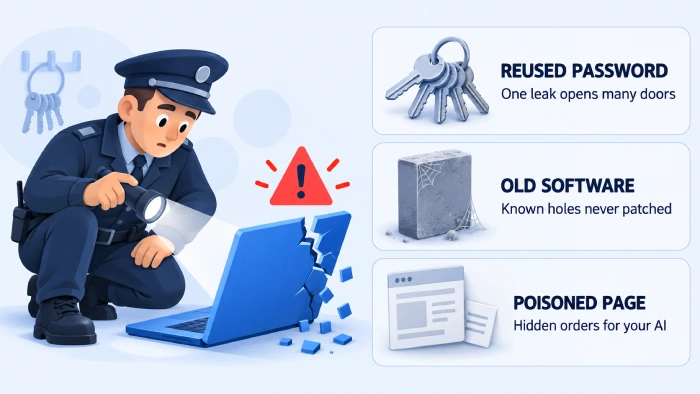
- Reused passwords. One leaked password gets tried on hundreds of other sites in minutes.
- Old software. Agents search public flaw lists and look for apps that never got the fix.
- Poisoned pages and files. Hidden text on a web page or in a document can give orders to an AI helper reading it - this is called prompt injection.
Prompt injection is the new one. Microsoft itself warns that malicious content in a document or on screen can override an agent's instructions and lead to data being sent out or malware being installed.
Five Things to Do on Your PC Today
- Use a different password everywhere. Let your browser's password manager create and remember them, and switch on two-step sign-in or passkeys for email and banking.
- Keep Windows and your apps updated. Swarms target flaws that already have fixes, and Windows 11 24H2 stops getting updates on October 13.
- Keep AI agent features on a short leash. In Windows 11, the agent switch lives under Settings, System, AI Components - it is off by default, and if you turn it on, set each agent's file access to Ask every time.
- Never let an AI agent act on pages or files you do not trust. Watch what it does, and stop it if it heads somewhere you did not ask for.
- Clear out junk that watches your browser. Run AdwCleaner to remove adware, hijacked search settings and toolbars you never meant to install.
Do not want AI on your PC at all? Our guide on removing Copilot and other extras with FlyOOBE shows how to take it out of a fresh Windows 11 setup.
Should You Worry About AI in Your Browser?
Browsers are adding AI that reads pages for you, and some of it can now act on them too. Firefox, for example, now runs its Smart Window on Mistral AI.
Reading and summarising is low risk. The risk rises when an AI is allowed to click, type, buy or send on your behalf, so keep those powers for sites you already trust.
Quick questions
What is an AI agent swarm?
It is a group of AI agents that split one big task into pieces and work on them at the same time, sharing what they learn. They can be used to attack systems or, as with Armadin, to test defences before attackers do.
Can an AI swarm hack my home PC?
Swarms mostly go after organisations, but they use the same doors that work on home users: reused passwords, outdated software and tricked AI helpers. Close those three and you are much harder to get into.
What is prompt injection?
It is hidden text in a web page, email or file that tries to give orders to an AI reading it. A person would ignore it, but an AI agent may follow it unless it is built to refuse.
How do I turn off AI agents in Windows 11?
Open Settings, then System, then AI Components, and turn off Experimental agentic features. It is off by default, and only an administrator can switch it on.
Does antivirus stop AI agents?
It stops the malware an attack might drop, but it cannot stop someone logging in with your leaked password. Unique passwords and two-step sign-in matter more here.
What does Armadin do?
Armadin, started by Mandiant founder Kevin Mandia, runs swarms of AI agents that attack a company's own systems around the clock, so the weak spots get fixed first.
AI swarms are fast, not magic - unique passwords, updates and a cautious hand on AI agents still shut the doors they use.
Start with a quick scan from AdwCleaner, or tell us which AI agents you already let near your PC.


How to Stream With VLC: Open a Stream URL or ...
5/5This is amazing! I could no longer afford cable so I cut the cord and started watching Hulu, Youtube, ...
Read More →Don't Open a .xmpeg File Before Reading This
3/5It's never a good sign when the potential malware you downloaded has the EXACT same filename as the example. ...
Read More →Free Popular IPTV Playlist: Where to Get Fres...
3/5How can you create a DSTV channels on IPTV?
Read More →