1. Choose Start > Control Panel and click Add hardware, then click Next from Add Hardware Wizard.
Click "Yes, I have already connected the hardware" then click Next button, again.
2. Choose Add a new hardware device at the bottom of the list and click Next.
Select "Install the hardware that I manually select from a list (Advanced)", and click Next.
3. Select "Sound, video and game controllers" from "Common hardware types" list and click Next.
Select "(Standard system devices)" from "Manufacturer" and click Have Disk... button.
4. Click Browse in the Install From Disk dialog box and open the folder C:WindowsSystem32
Find mmdriver.inf file, select it and click Open then click OK in the Install From Disk dialog box. If you see a warning about logo compatibility, just click "Continue Anyway".
5. Now you should finally see a list of audio codecs.
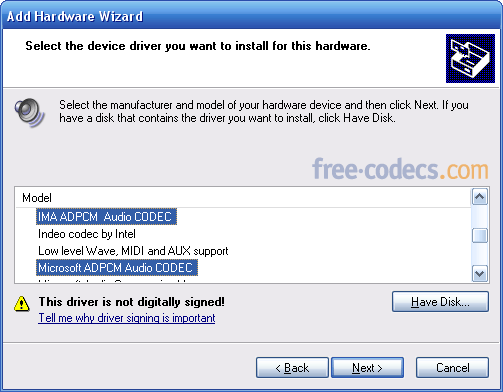
Amongst the other items, you should find Microsoft ADPCM Audio Codec and IMA ADPCM Audio Codec. You need to install them one by one, so select either of these and click Next. This should re-install the codec (take care, you may need your Windows XP CD).
6. Reboot
- All default audio codecs are in the same list with Microsoft ADPCM Audio Codec and IMA ADPCM Audio Codec; just go to step 5 and select them.
- If you want to (re)install video codecs go to step 3, Select "(Standard system devices)" from "Manufacturer" and "Video Codecs" from "Model" then follow the instructions.
The following table lists the codecs included with Windows:
| Manufacturer | Model |
| DSP Group | TrueSpeech Software Audio Codec |
| Intel | Indeo R3.1 Video Codec Indeo R3.2 Video Codec |
| Microsoft Audio codecs | ADPCM Audio Codec CCITT G.711 A-Law and u-Law Audio Codec GSM 6.10 Audio Codec IMA ADPCM Audio Codec |
| Microsoft Video codecs | RLE Video Codec Video 1 Video Codec |
| Radius | Cinepak Video Codec |



How to play FLAC files in Windows Media Playe...
Nothing works!!!!!
Read More →How to Download HEVC Video Extension for Free
我是一名中国用户,这是我第二次成功在文章指导下下载插件,这篇文章很实用!简单易懂! 我使用的是Windows 11 家庭中文版,操作系统版本 26200.8246。 2026.4.25我已成功下载并使用!感谢发布者,谢谢您!
Read More →Best Way to Get VidMate APK - Fast, Free, and...
Thank you for providing this helpful article
Read More →