Wintoys 3.0.10.0
Wintoys 3.0.10.0 is a free Windows 11 and 10 toolkit that uninstalls unwanted apps, switches off ads and AI features, cleans junk files and runs the built-in repair tools from one window, a polished alternative to Bloatynosy and Winslop.
- Updated
- Size
- 66.59MB
- Downloads
- 2
Wintoys is a free Windows 11 and 10 app that collects the useful settings Microsoft scatters across Control Panel, the Settings app and the command line into one tidy window.
It removes apps you never asked for, switches off ads and AI features, clears junk files and runs the built-in repair tools without you typing a single command.
Version 3.0.10.0 is a major update, with an AI components switch that can free gigabytes of RAM on Copilot+ PCs and settings that finally stay in sync with Group Policy.
What Wintoys Actually Does
Every option comes with a short explanation of what it changes, often with a link to Microsoft's own documentation. That makes it a good fit for people who want a cleaner Windows but do not want to run a script they cannot read.
- Home: live CPU, memory and disk use, plus your Windows build, TPM version and Secure Boot status at a glance.
- Uninstaller: removes regular programs and Store apps, including some Windows apps that have no uninstall button of their own.
- Services: lists background services, explains each one and marks the ones most people can safely turn off.
- Optimizations: power plans, visual effects, hardware-accelerated GPU scheduling and a quick Windows performance benchmark.
- Health: a storage cleaner, Windows repair tools, memory diagnostics, a battery report and System Restore, each one click away.
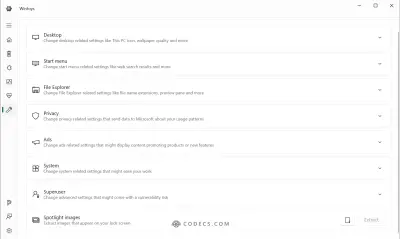
- Tweaks: privacy, ads, desktop and system settings, from turning off tips in Settings to showing file extensions.
What Is New in Wintoys 3.0
The headline feature is a new AI components switch on the Optimizations page. On Copilot+ PCs, Windows can keep AI models loaded in memory even when you never use Recall or AI search, and the developer reports his laptop dropping from 11 GB to 5 GB of RAM use after turning it off.
- Artificial intelligence section: turn off Recall, Click to Do, Writing tools in Notepad and the agentic search experience. It only appears on PCs that have these features, which mostly means laptops with an NPU (a chip built for AI tasks).
- Configuration mode: settings that Windows also treats as policies now go through Group Policy, so they are no longer quietly undone at the next policy refresh. Settings you changed in older versions only sync after you apply them again.
- New privacy options: device search history, notifications on the lock screen, online tips in Settings and communication with unpaired devices.
- Clearer undo: the restore dialog now lists every setting you changed, and a setting that fails to apply switches back to its old value on its own.
- Renamed pages: Performance is now Optimizations and Applications is now Uninstaller.
- Smaller touches: Ctrl+F search on the Uninstaller and Services pages, a storage cleaner that also counts hidden system files, and a new Ukrainian translation.
Is Wintoys Really Free?
Yes. Every tweak, cleaner and repair tool is free, with no ads, no pop-ups and no nag screens.
Version 3.0 adds Wintoys+, an optional one-time add-on behind the pizza button in the menu. It unlocks profiles, which save all your settings to a small JSON file so you can apply them to another PC, or a fresh Windows install, in one click.
Wintoys is closed source, which matters to some people. If you would rather read the code, Bloatynosy and Win11Debloat are open-source alternatives.
What You Need to Run It
Wintoys works on Windows 10 version 21H2 or newer and on Windows 11. It asks for administrator rights when it starts, because most of its settings change the whole system.
Our download is the official 64-bit .msix package, 66.6 MB, which is the same file the Microsoft Store installs. Double-click it and Windows' App Installer takes care of the rest.
Windows says a framework is missing?
Wintoys needs Microsoft's Windows App Runtime 2, which the Store adds automatically but a manual install may not. Get the x64 installer from the Windows App SDK downloads page, or install Wintoys from the Store instead, which also keeps it updated.
There is nothing else to install, because the .NET runtime is already built into the package. To remove Wintoys later, right-click it in the Start menu and choose Uninstall, like any other modern app.
Before You Change Anything
Wintoys shows a System Restore shortcut on its welcome screen, and it is worth using. A restore point takes a minute and lets you roll back settings if a tweak does not suit your PC.
Uninstalled apps do not come back with Restore.
Settings can be reset, but removed apps have to be reinstalled. Make a full copy first with our guide to backing up Windows 11 for free or create a system image.
Take care with services too. Turn off one or two at a time, restart, and check that Wi-Fi, printing and sound still work before you go further.
More Ways to Clean Up Windows
To strip out bloat while Windows is being set up, see our guide to debloating Windows 11 with FlyOOBE. If you would rather install a slimmed-down Windows from the start, Tiny11 Builder creates the install image for you.
For smaller, lighter tweakers, try Winslop or CrapFixer.
Only want a tidier Start menu? Our guide to cleaning up the Windows 11 Start menu uses Windows' own settings.
Wintoys can switch off Windows AI features, but the Copilot assistant itself is now a separate app. If you want to keep using it instead, the Copilot app installs on its own.
Who Should Look Elsewhere
For deep junk cleaning across many apps and browsers, a dedicated cleaner like BleachBit or FluentCleaner goes further.
Programs that leave folders and registry entries behind are better handled by Revo Uninstaller Free.
If you need detailed hardware readings, such as temperatures and voltages, use HWiNFO or CPU-Z.
For drivers, our guide on updating PC drivers safely explains which ones are worth touching.
On a work or school PC that your organization manages, leave policy settings alone, because they may break company rules. To add handy Windows features rather than remove them, Microsoft's free PowerToys is the better pick.
Quick questions
Is Wintoys safe?
It changes documented Windows settings, explains each one first and keeps a list of everything you changed so you can restore it. Make a restore point before big changes, because uninstalled apps cannot be restored.
Is Wintoys free?
Yes, all tweaks and tools are free with no ads. The optional Wintoys+ add-on only unlocks profiles for copying your settings to another PC.
Does Wintoys work on Windows 10?
Yes, on Windows 10 version 21H2 or newer. Options that only exist on Windows 11, such as the AI settings, are hidden on Windows 10.
Why does the downloaded file not open?
The .msix package needs Windows App Runtime 2. Install it from Microsoft's Windows App SDK downloads page, or get Wintoys from the Microsoft Store, which adds it automatically.
How do I undo a change?
Open the restore settings dialog in Wintoys to see every setting you changed and reset it. For bigger problems, roll back with the System Restore point you made first.
Download Wintoys 3.0.10.0 and take back control of Windows, or tell us how you got on if you already use it.
Available files
- Wintoys 3.0.10.0 x64Windowsx64Installer66.6 MB
- Wintoys 3.0.10.0WindowsARM64Installer64.8 MB
Be the first to review Wintoys 3.0.10.0
Thanks, it's in!
Your review will appear once it has been checked.
Popular in Other Tools
More free downloads to try-

DirectX Most popular
DirectX is the Windows graphics, sound and input layer for games and video; the June 2010 runtime adds the DLLs older games still need.
Popular in Other Tools
-

uTorrent
uTorrent is the original lightweight BitTorrent client for Windows, free to use but ad-supported, with paid upgrades that remove the adverts.
Popular in Other Tools
-

qBittorrent
qBittorrent serves as a versatile tool for downloading and creating torrents, offering a compelling alternative to popular uTorrent.
Popular in Other Tools