Your PC keeps telling you virus protection is switched off, and Microsoft has now confirmed the warning is simply wrong.
Since early August, Windows Security has been throwing up a "Turn on virus protection" pop-up saying Microsoft Defender Antivirus is off.
It is not off.
Microsoft has confirmed the alert is a bug in a recent Defender update, and it has no fix ready.
The notification is wrong, clicking it changes nothing, and Defender has been protecting you the whole time. Verifying that takes about twenty seconds, and the steps are below.
What Is Actually Going On
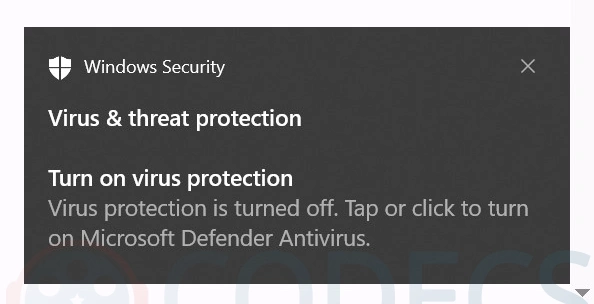
This is the alert, word for word: "Virus protection is turned off. Tap or click to turn on Microsoft Defender Antivirus."
In its Windows release health notes, Microsoft says notifications may claim Defender is turned off "even though the antivirus is functioning correctly and all settings show it as active".
The company opened the entry on 28 August and it still reads Confirmed, with no patch date attached. The fix is promised in a future Defender update, which is as specific as Microsoft has been willing to get.
Because the fault sits in Defender rather than in Windows itself, it reaches almost everything - Windows 11 23H2, 24H2, 25H2 and 26H1, Windows 10, and Windows Server going back to 2012. Anything running current Defender definitions can see it.
Two details make it more irritating than the average bug. The alert reappears after you dismiss it, and it ignores your notification settings entirely, so Do Not Disturb will not silence it.
How to Check Defender Is Really Running
Do not simply assume the alert is the known bug. Spend twenty seconds confirming it, because the one thing worse than a false alarm is a real one you waved away.
- Open Windows Security from the Start menu and select Virus & threat protection.
- Click Manage settings and confirm Real-time protection is switched on.
- For a second opinion, open Command Prompt and run sc query WinDefend - a healthy machine reports STATE : 4 RUNNING.
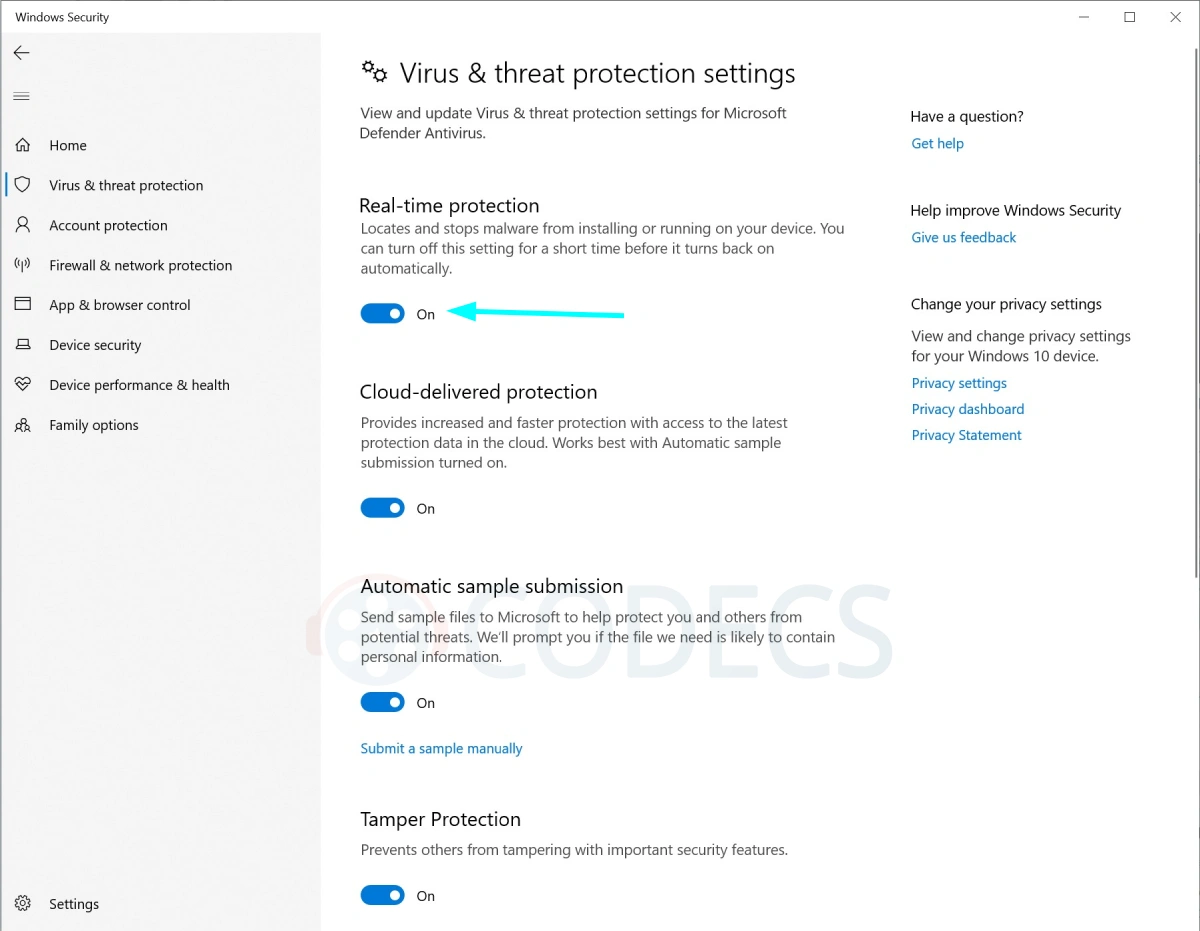
This is what a machine showing the false alert looks like underneath - real-time protection, cloud-delivered protection and tamper protection all reading On.
Note the "Windows 10 device" wording in the sidebar, a reminder that this is not a Windows 11 problem.
If you want the complete picture in one line, run this in Command Prompt or Terminal. No administrator rights needed.
powershell -command "Get-MpComputerStatus | Select-Object AntivirusEnabled,RealTimeProtectionEnabled,AMServiceEnabled"
Three lines come back. If all three say True, Defender and its real-time protection are active and you can ignore the pop-up until Microsoft patches it.
Why This Bug Is Worse Than It Looks
The reason to care. Fake security warnings are one of the oldest tricks in malware, and they usually ask you to turn Defender off or install something to "fix" it. A genuine Windows alert that cries wolf trains people to click through the real ones.
So treat the habit as the risk, not the pop-up. Verify with the steps above, then leave the alert alone rather than hunting for a third-party tool to make it stop.
If you would rather layer something on top of Defender while this plays out, our free antivirus and privacy tools are a safer starting point than whatever a search result recommends.
It has been a noisy few weeks for Windows generally, between Copilot helping itself to 3.3 GB of Windows 10 drives and the new opt out of backup button for OneDrive.
Quick questions
Is my PC actually unprotected?
Almost certainly not. Microsoft has confirmed Defender keeps working normally while the notification appears, but run the check above to be sure.
Does clicking the notification fix anything?
No. It opens the Windows Security home screen and nothing changes, because nothing was switched off in the first place.
Can I stop the pop-up appearing?
Not reliably. The alert bypasses Windows notification settings, so turning notifications off or enabling Do Not Disturb will not silence it.
Which versions of Windows are affected?
Any version running current Defender updates, including Windows 11 23H2 through 26H1, Windows 10 21H2 and 22H2, the LTSC editions, and Windows Server from 2012 onward.
When will Microsoft fix it?
No date has been given. Microsoft says a resolution will arrive in a future Defender update, and the issue has been open since 28 August 2026.
Should I install another antivirus because of this?
Not for this reason alone. Defender is working, and installing a second real-time scanner alongside it usually causes more problems than it solves.
The scale of the bug was first documented by Windows Latest, whose testing pushed Microsoft into confirming it.
A wrong warning is still worth checking, and now you know how in twenty seconds.
Browse our free antivirus and privacy tools if you want something alongside Defender, or leave a comment telling us whether the alert has hit your machine.


Free Popular IPTV Playlist: Where to Get Fres...
5/5Thank you ♥️
Read More →Best Way to Get VidMate APK - Fast, Free, and...
5/5The demand for feature-rich video editing applications continues to grow across the digital content industry. Filmora Mod APK is ...
Read More →How to Download HEVC Video Extension for Free
5/5its works! thank you all!
Read More →