You do not need a special IPTV app to watch an M3U playlist. VLC opens any M3U link in three clicks, plays Xtream Codes logins too, and it is probably already installed - here is the whole setup, plus the one setting that stops the buffering.

An IPTV playlist is a text file full of stream addresses, and VLC treats it like any other playlist.
That means no account, no ads and nothing to install if VLC is already on your computer.
What VLC does not give you is a TV-style programme guide, and we will be honest about where that matters.
Open VLC Media Player, press Ctrl+N, paste your playlist link, press Play, then press Ctrl+L to see the channel list. If you have an Xtream Codes login instead of a link, jump to the Xtream section below. If channels keep stalling, raise network caching - one setting, covered further down.
Load an M3U link in VLC on Windows, Mac or Linux
This is the normal case: your provider or a public source gave you a web address ending in .m3u or .m3u8, or a long address with get.php in it. Do not download it - paste it straight in.
- Open VLC and go to Media, then Open Network Stream. The shortcut is Ctrl+N on Windows and Linux, Cmd+N on a Mac.
- Paste the playlist address into the box. Check there is no space before or after it - VLC is strict about that.
- Press Play. The first channel in the list starts, which can take a few seconds on a large list.
- Press Ctrl+L (View, then Playlist) to open the playlist panel and see every channel by name.
On a Mac the playlist lives under Window, then Playlist. Everything else is the same, and the same VLC download page serves the Windows build, with the Mac build one link away.
Open a downloaded .m3u file instead
If the playlist arrived as a file, double-click it - VLC is usually the default app for .m3u files once it is installed. If something else opens instead, use Media, then Open File inside VLC and pick the file.
The playlist panel fills in exactly as it does for a link. One difference worth knowing: a file is a snapshot, so when the provider updates the list you will not see the changes until you download it again.
Xtream Codes login instead of an M3U link?
Many providers hand out a server address, a username and a password rather than a playlist link. VLC has no login form for that, but the same login can be turned into a normal M3U address in two ways.
The quick way is our free URL to M3U converter. Enter the server, username and password, and it gives you a playlist link you can paste into VLC exactly as in the steps above.
The manual way is to build the address yourself. Replace the three placeholders with your own details and paste the result into Open Network Stream:
http://SERVER:PORT/get.php?username=USER&password=PASS&type=m3u_plus&output=ts
The m3u_plus part keeps the channel names and groups. The output=ts part asks for the stream format VLC handles best. If a provider's channels refuse to start, change output=ts to output=m3u8 and try again.
Find your channels in the playlist panel
With a big list, the playlist panel is where you will spend your time. Ctrl+L shows and hides it, and the search box at the top filters the list as you type - type "news" and only the news channels remain.
Double-click any channel to switch to it. The N and P keys jump to the next and previous channel without touching the mouse, which is the closest VLC gets to a channel-up button.
Once you have a list you like, Media, then Save Playlist to File (Ctrl+Y) keeps a copy on your computer. Next time, open that file instead of pasting the link again.
No programme guide. VLC's Tools, then Program Guide window only fills in for broadcast tuner streams. It does not read the guide data an IPTV playlist points at, so you will see channel names but never what is on now or next.
Stop the buffering: the one setting worth changing
Live streams stall in VLC for one main reason: it only stores about one second of video ahead of what you are watching. On a busy or distant server that is not enough, so the picture freezes, catches up and freezes again.
The fix is to give VLC a bigger buffer. Three to five seconds is the sweet spot - channels take slightly longer to start and stop stuttering.
To change it for one stream, click Show more options in the Open Network Stream window and raise the Caching value to 3000 or 5000.
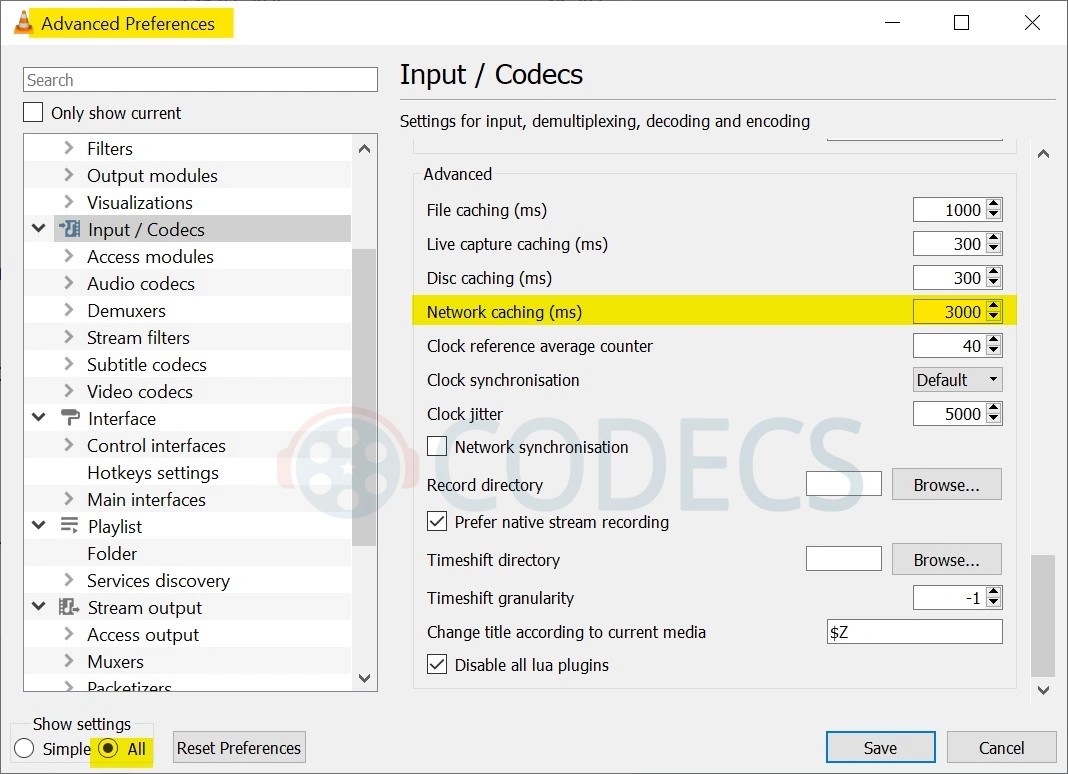
To change it for every stream, go to Tools, then Preferences, and click All under Show settings in the bottom-left corner - the number is not on the Simple screen. Click Input / Codecs in the left tree, scroll to the Advanced group, set Network caching (ms) to the same number, Save and restart VLC.
Prefer to stay in Simple mode? On the Simple Input / Codecs screen, set Default caching policy to High latency or Higher latency instead. It is the same fix in coarser steps, and it is one click.
If a channel still stutters after that, the server is overloaded and no setting on your side will fix it. Pick the same channel from a different source in your list.
When a channel will not play
Free and paid streams both go down, so a dead channel is normal and rarely means you did anything wrong. Here is what each failure actually means, starting with the most common.
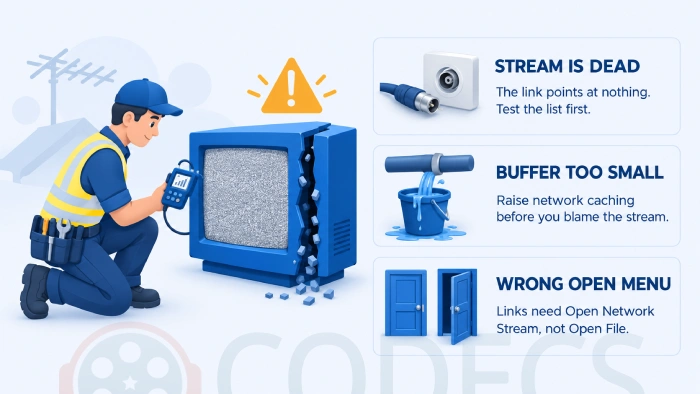
- "Your input can't be opened" on one channel. That stream is offline or locked to another country - move on, and run the list through the M3U Checker to strip the dead ones out in one go.
- The same message on every channel. Either you used Open File on a link, or a firewall or antivirus is blocking VLC - our guide to fixing the "unable to open the MRL" error walks through each cause in order.
- Sound but a black picture. Turn off hardware decoding: Tools, then Preferences, then Input / Codecs, set Hardware-accelerated decoding to Disable, and restart VLC.
- The picture stutters every few seconds. That is the buffer - go back one section and raise network caching.
- The channel list is empty after Play. Give a very large list a moment and press Ctrl+L again - if it stays empty, the link is returning a web page rather than a playlist, which opening it in a browser will show.
Record a live channel to a file
A small bonus most IPTV apps charge for. Go to View, then Advanced Controls, and a red Record button appears next to Play. Click it once to start and once to stop, and the recording lands in your Videos folder.
It saves the stream as it arrives, with no re-encoding, so the quality is exactly what you watched and the file is ready the moment you stop.
VLC as an IPTV player on Android and iPhone
The phone apps take the same links. In VLC for Android, open the More tab, paste the address into the New stream box (older builds call it Open Network Stream) and tap the play arrow. On iPhone and iPad, it is the Network tab, then Open Network Stream.
The channel list is harder to browse on a phone than on a desktop, and there is still no guide. It is fine for checking a list or watching one channel; for evening viewing on a TV box, a dedicated player does the job better.
Who should look elsewhere
The tell is simple: if you want to see what is on next, flip through channels with a remote, or have your list sorted into Sports, News and Movies folders, VLC is the wrong tool. It shows a flat list of names and nothing else, on purpose.
For a cable-box style guide on a TV device, see our roundup of the best free IPTV players. The same playlist works in every one of them, so nothing you set up here is wasted.
No playlist yet?
VLC is only as good as the list you feed it. Our guide to free popular IPTV playlists covers the public, legal sources that are actually maintained, and how to test one before you commit an evening to it.
Quick questions
Can VLC play IPTV without an M3U file?
Yes. Paste a playlist link or a single stream address into Media, then Open Network Stream. The file version is only needed when that is how the list was given to you.
Does VLC support Xtream Codes?
Not with a login form, but yes in practice. Build the get.php address shown above, or convert the login with the URL to M3U tool, and paste the result in as a normal playlist link.
Why does IPTV keep buffering in VLC?
VLC holds only about one second of video ahead by default. Raise Network caching to 3000-5000 ms in Tools, Preferences, All, Input / Codecs - or set Default caching policy to Higher latency on the Simple screen. If it still stalls, the server is the bottleneck.
Does VLC show an EPG for IPTV?
No. The Program Guide window only works for broadcast tuner streams. For a guide, use a dedicated IPTV player and load the same playlist there.
Half my channels say "unable to open the MRL". Is VLC broken?
Almost never. Those streams are dead or region-locked. Run the list through the M3U Checker and keep only the channels that answer.
Is watching IPTV in VLC legal?
VLC is just a player. What matters is the playlist - free-to-air lists from public sources like the ones in our playlists guide are fine, while lists reselling pay-TV are not.
Paste the link, press Play, press Ctrl+L, raise the buffer once - that is VLC as an IPTV player, and it costs nothing.
Download VLC Media Player if it is not already on your machine, or tell us how your playlist behaved if you have tried this already.


EAC3 Audio Not Supported in MX Player? Fix It
4/5EAC3 Audio Not Supported in MX Player? Fix It
Read More →Free Popular IPTV Playlist: Where to Get Fres...
4/5Bonjour je peux avoir le lien M3U. Les codes playlist 2026 des chaînes en français et africainses
Read More →Best Way to Get VidMate APK - Fast, Free, and...
5/5The demand for feature-rich video editing applications continues to grow across the digital content industry. Filmora Mod APK is ...
Read More →