ChromeDriver is one small file and takes about two minutes to set up, so when Selenium still refuses to start, the problem is almost never the download - it is a version mismatch between the driver and the Chrome already on your machine.
Before you download anything, check which Selenium version your project uses.
If it is 4.6 or newer, Selenium already fetches the matching driver for you and you may not need this page at all.
If it is older, or you want a pinned local copy for a build server, the rest of this guide gets you there in the right order.
Open Chrome and type chrome://version in the address bar. Take the first number you see, before the first dot, and get the ChromeDriver build carrying that same number from the ChromeDriver download page.
Check Your Chrome Version Without Triggering an Update
Every guide tells you to open the three-dot menu and click Help, then About Google Chrome. That works, and it has a trap in it.
The About screen starts checking for updates the moment it opens, so a browser that was sitting on one version can quietly move to the next one while you are reading the number off the screen. You then download a driver for a Chrome you no longer have.
Use the address bar instead. Typing chrome://version shows the same version string on a page that does not run an update check, and it also prints the executable path and the profile folder, both of which you will want later.
The number that matters is the first one. A version reading 152.0.7977.65 is Chrome 152, and 152 is the only part that has to match your driver.
Note the platform too, because it decides which archive you need. On a Mac, Apple Silicon machines take the arm64 build and older Intel Macs take the x64 build.
How Version Matching Actually Works
ChromeDriver and Chrome are released together, from the same source tree, on the same schedule. The rule that follows from that is short.
Chrome 152 needs ChromeDriver 152. Chrome 153 will need ChromeDriver 153.
The three numbers after the major version can differ without breaking anything, so ChromeDriver 152.0.7977.65 will happily drive a Chrome 152.0.7977.40. Cross the major version boundary and Selenium refuses to open a session at all.
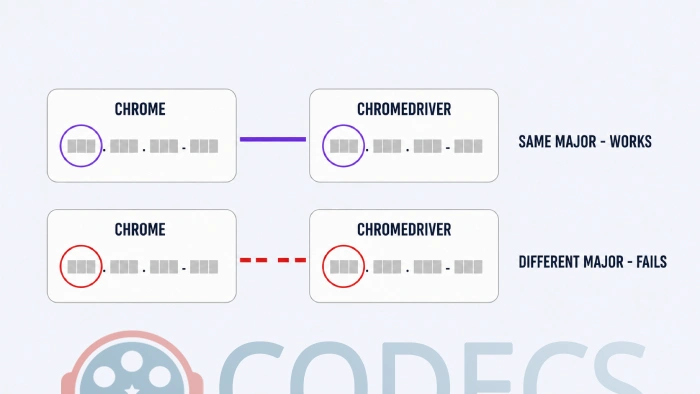
This is why tests that passed on Friday fail on Monday. Chrome updated itself over the weekend and your driver did not.
Download the Matching Driver
There are two sensible sources, and they serve the same binaries.
- Read your major version from chrome://version and note whether you are on Windows, Linux, macOS Intel or macOS Apple Silicon.
- Take the build from the ChromeDriver download page, which tracks Chrome's stable channel and lists which driver goes with which browser version.
- Or go to Google's Chrome for Testing availability dashboard, find the Stable row, and copy the chromedriver URL for your platform.
- Unpack the archive. Windows gives you chromedriver.exe, macOS and Linux give you a file called chromedriver with no extension.
Windows can open the archive on its own, though 7-Zip and PeaZip are both free and handle it without arguing if the built-in extractor stalls.
There is no installer and nothing to register. It is a single executable that runs from wherever you leave it.
Where to Put the File
Most guides stop at the download, which is exactly where people get stuck. You have three options and they suit different situations.
- In the project folder. Simplest for a single project, and you point Selenium at it explicitly.
- Somewhere on your PATH. Selenium finds it with no configuration - good if you have several projects on one machine.
- In a versioned folder per Chrome release. More work, but it lets you keep drivers for two or three Chrome versions side by side.
Pointing at it explicitly is the option worth learning, because it is the one that survives a machine you do not control. In Python that means importing Service from selenium.webdriver.chrome.service, building it with Service(executable_path="./chromedriver.exe"), and passing that into webdriver.Chrome(service=service).
A freshly unzipped driver is not executable, so run chmod +x chromedriver before your first test. On macOS the file is also quarantined by Gatekeeper, which reports that the developer cannot be verified - clear it with xattr -d com.apple.quarantine chromedriver rather than by disabling Gatekeeper.
You May Not Need to Download It At All
Selenium 4.6 and every version since ships with Selenium Manager, which looks at the Chrome installed on the machine, downloads the matching driver, and caches it. It runs the first time a test starts and you do not configure it.
In practice that means a plain webdriver.Chrome() with no Service object and no path just works. The Selenium Manager documentation covers the details.
It is not a reason to skip the manual download everywhere, though. Manager needs network access on that first run, which build agents often do not have, and it decides your driver version for you rather than letting you pin it.
The usual split is Manager on developer laptops and a pinned local driver in continuous integration. That gives you convenience where you want it and reproducibility where you need it.
Stopping Chrome From Breaking It Again
A matched pair stays matched only until Chrome updates, which on a normal install is every four weeks and without asking. There are three ways round that and they suit different setups.
The cleanest is to stop testing against the browser you also browse with. Google Chrome Portable runs from its own folder, does not update itself behind you, and lets you keep two or three Chrome versions on one machine at once.
Point ChromeDriver at the portable executable through the browser binary option in ChromeOptions and your tests use that build regardless of what the installed Google Chrome does. Chromium works the same way and takes the same driver, which is useful if you need an open-source build for a compliance review.
The second option is to pin both versions in your build configuration and update them together as a deliberate change. It is more discipline and fewer surprise red builds.
The third is to test against tomorrow's Chrome on purpose. Google Chrome Dev installs alongside your stable browser and gives you weeks of warning before a change lands for everyone.
The Errors You Will Actually Hit
Four messages account for most of the traffic on this subject, and each one names its own cause if you read it closely.
| What you see | What it means | What to do |
|---|---|---|
| SessionNotCreatedException: this version of ChromeDriver only supports Chrome version X | Your driver and browser are on different major versions | Re-read chrome://version and download the driver carrying that major number |
| WebDriverException: chromedriver executable needs to be in PATH | Selenium cannot find the file where it looked | Pass an explicit path through a Service object, or move the file onto your PATH |
| DevToolsActivePort file doesn't exist | Chrome's sandbox cannot start, almost always inside a container | Add --no-sandbox and --disable-dev-shm-usage to ChromeOptions |
| Permission denied, or a Gatekeeper warning about an unverified developer | The unzipped file is not executable, or macOS quarantined it | Run chmod +x chromedriver, then clear the quarantine attribute |
The first one is worth reading rather than skimming. It prints the exact Chrome version your driver expects, which tells you immediately whether the browser moved or the driver did.
Older Versions, and the 115 Boundary
Google changed how ChromeDriver is published at version 115, so where you look depends on how far back you need to go.
For 115 and newer, the known good versions with downloads JSON file lists every build and every platform. Search it for your major version followed by a dot and take the chromedriver URL for your platform.
For 114 and below, the old ChromeDriver storage index still holds the legacy binaries in per-version folders.
Nothing below 115 is maintained. Those builds get no security fixes and no compatibility work, so treat them as a way to keep an old suite limping rather than as a setup worth choosing.
Drivers for the Other Browsers
ChromeDriver is one of several, and they all speak the same W3C WebDriver protocol. Swapping browsers in an existing Selenium suite is usually a different driver class and not much else.
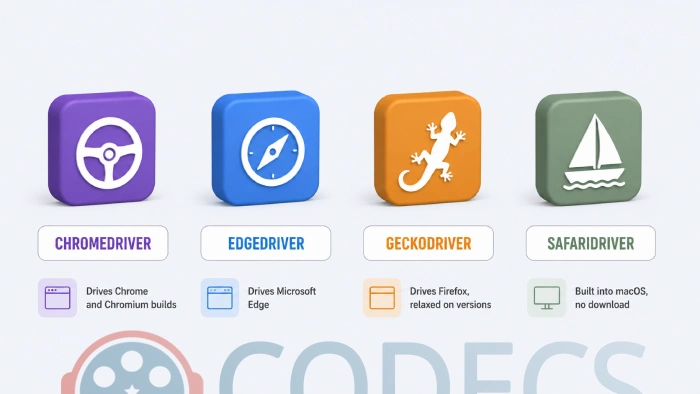
- ChromeDriver drives Google Chrome, and the same binary drives Chromium builds on the matching major version.
- EdgeDriver drives Microsoft Edge, which is Chromium underneath and follows its own version numbering.
- GeckoDriver drives Mozilla Firefox, and is far more relaxed about version pairing than ChromeDriver is.
- SafariDriver ships inside macOS already, so there is nothing to download for it.
Several other browsers are Chromium underneath and can be driven with ChromeDriver as well, provided you point it at their executable and the major versions line up.
- Brave Browser tracks Chromium closely, so its version number tells you which driver to fetch.
- Opera Browser uses its own numbering, so check its About screen for the Chromium version rather than the Opera one.
- Vivaldi Browser prints its Chromium version in the About panel next to its own.
The full web browsers category lists what each one is built on, which is the quickest way to tell whether a browser takes ChromeDriver or something else.
Who Should Look Elsewhere
ChromeDriver drives a real browser, which is its strength and also its cost. If your tests only need to read a page's HTML and never click anything, a plain HTTP request will do it in a fraction of the time.
The tell is your own test code. If nothing in it waits for an element, fills a field or clicks a button, you are paying for a browser you are not using.
The other case is Playwright and Puppeteer, both of which manage their own browser binaries and never make you match a version by hand. If you are starting a new project rather than maintaining a Selenium one, that trade is worth looking at before you commit.
Quick questions
Do I still need to download ChromeDriver manually?
Not on Selenium 4.6 or newer, where Selenium Manager fetches it for you on the first run. You still want a pinned local copy on build servers, which are often offline and always want reproducible runs.
Which ChromeDriver version do I need?
The one whose first number matches your Chrome's first number. The three numbers after it can differ without causing problems.
Is there a 32-bit ChromeDriver?
No. Google stopped publishing 32-bit builds years ago, so a 32-bit Windows test machine needs a 64-bit operating system before ChromeDriver will run on it at all.
Why do my tests break every few weeks?
Chrome updates itself roughly every four weeks and your driver does not follow. Either let Selenium Manager resolve the driver at run time, or run your tests against a portable Chrome that does not update on its own.
Can ChromeDriver run without a visible browser window?
Yes, by adding the headless argument to ChromeOptions. Inside Docker you will usually need the no-sandbox and disable-dev-shm-usage flags alongside it.
Is ChromeDriver the same thing as Chrome WebDriver?
They are the same download. ChromeDriver is the executable and WebDriver is the protocol it implements, so searches for either land on the same file.
If you take one thing from this page, take the habit of reading chrome://version before you download anything - it turns a recurring mystery into a thirty-second check.
Download ChromeDriver and see whether your suite starts cleanly, or tell us how you got on if you have fought this one before.


Latest comments
AllXMediaRecode gives only the option to Copy (No convert) in Audio Mode drop down. I am trying to convert/recode the EAc3 ...
Guide: How to Convert EAC3 Audio to AC3 or AAC With XMedia Recode 1 commentTo view major football league live
Guide: Free Popular IPTV Playlist: Where to Get Fresh, Legal M3U Links in 2026 19 commentsThe link isn't working. [link]
Guide: Free M3U Playlist for TiviMate: Legal Lists That Load Cleanly 1 comment