Dia AI Browser 1.6.0
Dia is The Browser Company's Chromium-based browser for Windows and Mac, with an AI assistant that answers questions about your open tabs and connected work apps, free to use as a browser while the AI features need a paid plan.
- Updated
- Size
- 1.9MB
- Downloads
- 222
Dia is a free web browser from The Browser Company, the team behind Arc, with an AI assistant built into every tab.
The browser itself costs nothing, but the AI features now need a paid plan.
Dia 1.6.0 is the Windows build on our download page, released on 5 November 2026, a little over two weeks after Dia first came to Windows.
The Browser Company has belonged to Atlassian, the company behind Jira and Trello, since October 2025. That shows in Dia, which is now aimed at people who spend their whole working day in a browser.
What Dia Actually Does
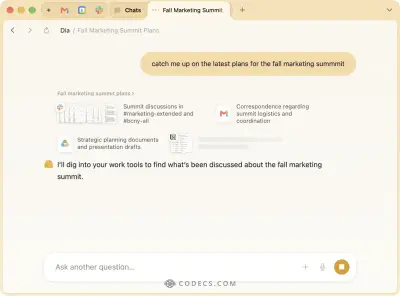
- Chat with your tabs - ask about the page you are on, several open tabs or a piece of selected text, without copying anything into a chatbot.
- Skills - save the prompts you use often and run them again with a click.
- Connected work apps - Dia can pull in context from tools such as Slack, Notion, Teams and Google Workspace, and its Morning Brief sums up your calendar and inbox.
- A tidy browser - profiles for work and home, split view, tab groups and a built-in ad and tracker blocker.
- Chromium underneath - sites behave as they do in Chrome, and setup can bring over your bookmarks, passwords and extensions from Chrome or Edge.
What Is Free and What Costs Money
| Plan | Price in October 2026 | What you get |
|---|---|---|
| Free | $0 | The full browser with profiles, tab groups, split view, ad blocking and sync, but no AI features |
| Better Answers | $10 a month | The AI assistant, the Morning Brief and connected apps, with usage limits |
| Better Days | $100 a month | Everything above with 20 times more requests |
If you cancel a paid plan, Dia keeps working as a free browser. Prices change, so check Dia's plans page before you subscribe.
What Is New in Dia 1.6.0 for Windows
- Focus Mode - hides the sidebar or top tabs to give pages more room, with the controls showing on hover.
- Dia Sync - keeps Dia in step between Windows and Mac and merges matching profiles.
- Keyboard fixes - shortcuts no longer get in the way of AltGr typing on international keyboards, and F11 now toggles full screen.
- Arc-style tab order - a setting opens new sidebar tabs at the top, the way Arc did.
- Newer engine - Dia moves to Chromium 156.
Is the Windows Version Ready?
Dia reached Windows on 6 October 2026 after a small beta, and the Windows version is still catching up with the Mac one. At launch its own setup screen called it an early build that had not yet been security tested.
Updates have arrived every week since then, but it is still young. If you need a browser you can rely on for banking today, keep your current one installed alongside it.
Setup asks you to sign in with an email address and offers to connect your work accounts. You can skip the connections and add them later.
Coming From Arc?
Arc stops working on Windows and Mac on 22 December 2026, and Dia is the replacement its makers point to. Dia imports your Arc passwords, bookmarks, extensions and history, turns Spaces into Profiles and Folders into Tab Groups.
Our news story on Arc shutting down on 22 December shows how to save your tabs first and compares the other options.
Who Should Look Elsewhere
If you loved Arc's sidebar but do not want AI in your browser, Dia's free plan works, but a browser built for it may suit you better:
- Zen Browser - vertical tabs, workspaces and split view on Firefox, with no AI.
- Vivaldi - vertical tabs, workspaces and tab stacks, and it keeps your Chrome extensions.
- Brave - strong ad blocking and privacy defaults.
If you want AI help in the browser without a monthly fee, Microsoft Edge has Copilot built in. Comet from Perplexity is the other big AI browser on Windows.
If you prefer open source, BrowserOS is an open-source Chromium fork built to run AI agents.
OpenAI's browser did not last, as our story on ChatGPT Atlas being gone explains. For more choices, browse our full list of free web browsers.
Curious what Chromium-based browsers share and what Google adds on top? Our guide to Chromium vs Chrome explains the difference.
Quick Questions
Is Dia free?
The browser is free. The AI assistant needs a paid plan, starting at $10 a month in October 2026.
Is Dia available for Windows?
Yes, since 6 October 2026. The latest version for Windows is on our download page, along with the Mac version.
Who makes Dia?
The Browser Company of New York, which made Arc and has been owned by Atlassian since October 2025.
Does Dia work with Chrome extensions?
Yes. Dia is built on Chromium, and setup can import the extensions you already use in Chrome or Edge.
What happens to Arc?
Arc stops working on 22 December 2026. Dia can import your Arc data before then.
Download Dia AI Browser 1.6.0 and see whether it suits the way you work, or tell us how you got on if you have used it before.
Available files
- Dia AI Browser 1.6.0WindowsInstaller1.9 MB
- Dia AI Browser 1.57.0 - for macOSmacOSDMG699.9 MB
Be the first to review Dia AI Browser 1.6.0
Thanks, it's in!
Your review will appear once it has been checked.
Related to Dia AI Browser
More free downloads to try-

Google Chrome Most popular
Google Chrome is Google's free, fast web browser, offered here as a full offline installer for Windows 10 and 11 in 64-bit and 32-bit.
In common: browser, web
-

ChromeDriver
The standalone WebDriver server Selenium uses to drive real Chrome, in stable, beta and dev builds so you can match whichever Chrome you have installed.
Popular in Web Browsers