You downloaded an XAPK, tapped it, and Android did nothing at all - here is why, and the two routes that actually install it.
An XAPK is not a broken APK, and there is nothing wrong with your download.
It is a bundle of several files pretending to be one, and Android has no idea what to do with a bundle.
Unpacking it takes one small app and about a minute.
Install an app that understands split bundles, open the XAPK with it, and let it put each piece where it belongs.
If you would rather not install anything extra, check whether the same app is also offered as a plain .apk and take that file instead.
What Is Actually Inside an XAPK
An XAPK is a ZIP archive with a different extension on it, invented by APKPure and later copied by other download sites. It is not an Android format, not a Google format, and it appears nowhere in Android's own documentation.
Rename a copy to .zip, open it, and you will usually find some mixture of these.
- A base APK. The app itself, and the only piece that resembles a normal download.
- Split APKs. Extra pieces named things like config.arm64_v8a, config.xxhdpi and config.en, holding the code, graphics and language your specific phone needs.
- An OBB data file. The big one, used by games for maps, textures and audio, which has to land in an exact folder or the game will not start.
- A manifest.json. A short list telling the installer what the other pieces are and which app they belong to.
The reason all this exists is a size ceiling. Google Play accepts a plain APK upload of up to 100 MB of compressed download, and an app bundle of up to 200 MB, so anything bigger has to be split into parts or shipped with separate data files.
Why Tapping It Does Nothing
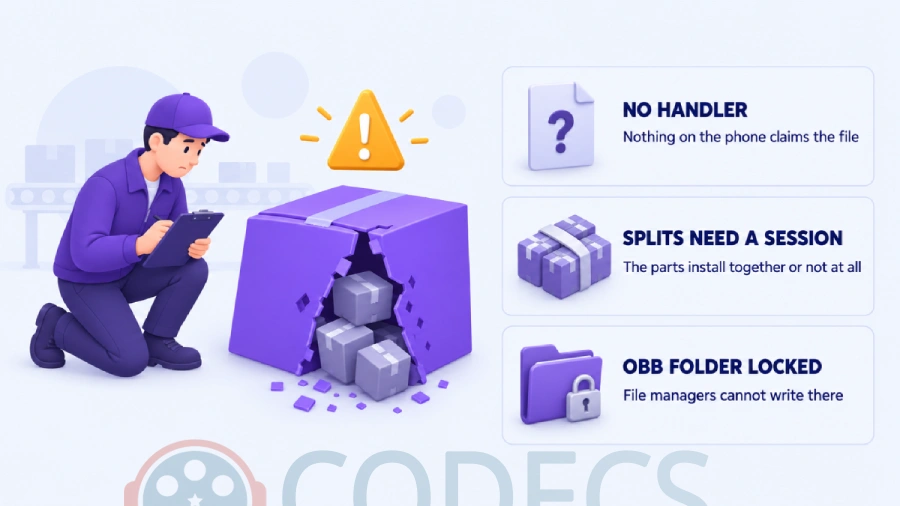
Three separate things are in the way, and knowing which one you have hit tells you which route to take.
Android has no handler for the extension. Nothing in the system claims .xapk, so your file manager either opens a "no app can perform this action" message or quietly does nothing at all.
Split APKs cannot be installed one at a time. Android has supported splits since Android 5.0, but only as a single grouped transaction - the base and its config pieces have to go in together, and no stock screen on the phone offers that.
The OBB folder is off limits. On Android 11 and newer, ordinary file managers can no longer write into Android/obb, which is exactly where the data file has to go.
Renaming it to .apk does not work. It is the most repeated tip about XAPK files and it fails every time, because the extension was never the problem - the installer opens the file, finds an archive full of other archives instead of an app, and reports a parsing error.
Route One: Install It on the Phone
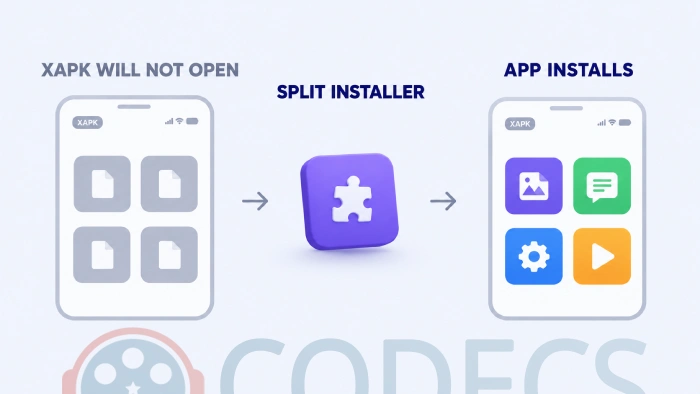
This is the route almost everyone should take, because the installer hands the split parts to Android as one transaction instead of leaving you to do it.
- Check the file first. Drop the XAPK into our APK and XAPK analyzer, which unpacks the bundle in your browser and shows you the package name, the permissions and what is inside before any of it reaches your phone.
- Get a split-aware installer. Package Manager is the smallest one that does the job, and App Manager is the one to take if your file carries OBB game data, since it handles that part too.
- Allow installs for that app. Open Settings, then Apps, then Special app access, then Install unknown apps, find the installer in the list and turn it on.
- Open the XAPK with the installer rather than with your file manager. Use the installer's own file picker, or long-press the file and choose Open with.
- Read the permission screen and confirm. Android installs the whole set at once, and an installer that handles OBB data puts that in place too.
The permission in step three is granted per app, so it is worth switching off again afterwards. Android will ask once more the next time that installer needs it.
Route Two: Install It From a Computer
If you would rather not add an installer app to the phone, a computer can do the same grouped install over USB. It takes longer to set up and it is the more reliable of the two on Android TV boxes and Fire tablets, where file managers are scarce.
- Rename a copy of the XAPK to .zip and extract it into an empty folder on the computer.
- Turn on USB debugging on the phone, under Settings and Developer options, then connect it and accept the prompt.
- Install every APK in one command with adb install-multiple base.apk split_config.arm64_v8a.apk split_config.xxhdpi.apk, naming each file the extraction produced.
- Copy any OBB folder across to Android/obb/ on the phone, keeping the folder name exactly as it was, which is the app's package name.
Why the file names matter. The pieces have to be listed in the same command because Android treats them as one install, and dropping a config split changes nothing you can see until the app opens with missing graphics or the wrong language.
XAPK, APKS and APKM Are Not the Same Thing
Four extensions turn up on Android download sites and only one of them installs by tapping it. They are all ZIP archives underneath, so an installer that handles one usually handles the rest.
| Extension | Who made it | What is inside | Installs by tapping |
|---|---|---|---|
| .apk | Google, part of Android | One complete app | Yes |
| .xapk | APKPure | Base APK plus splits, OBB data or both | No, needs an installer |
| .apks | Google's bundletool, used by Split APKs Installer | A set of splits generated from an app bundle | No, needs an installer |
| .apkm | APKMirror | Splits for every device configuration in one file | No, needs APKMirror Installer |
The practical difference is small. Pick an installer that reads all four, and the extension on the file stops mattering.
The Errors You Will Actually Hit
"There was a problem parsing the package" nearly always means the file was renamed to .apk, or the download was cut short. Check the file size against the download page before assuming anything worse.
"App not installed" usually means a copy of the same app is already on the phone, signed by somebody else. Uninstall the existing one first, remembering that its data goes with it.
"Downloading additional resources" that never finishes is the OBB file sitting in the wrong place, or missing entirely. The folder under Android/obb/ has to be named exactly after the app's package.
"Get this app from Play Store" is different, because the install worked and the app is refusing to run. That is Google's PairIP protection checking your account on every launch, and our Play Store dependency check reads the file and tells you about it beforehand.
Who Should Skip the XAPK Entirely
The tell is on the download page itself. Where both files are offered for the same app, the plain APK is the easier download for almost everyone, and the XAPK is only worth taking if you already run an installer that handles bundles.
Our InShot download page is a good example of the choice, listing a full-density APK alongside the split bundle and saying plainly which is which. The rest of the Android section follows the same pattern.
One more thing worth knowing before you start collecting installer apps. From 30 September 2026 Android begins requiring apps to be registered to a verified developer in Brazil, Indonesia, Singapore and Thailand, with the rest of the world following through 2027, and the same checks that apply to a plain APK will apply to the pieces inside a bundle.
It is not a ban and it does not arrive everywhere at once, but it is the reason to prefer sources that publish real version numbers. Our guide to installing an APK safely covers what changes and what stays the same.
Quick questions
Can I just rename an XAPK to APK?
No. The extension is not what stops it installing - an XAPK holds several files where the installer expects one app, so renaming it produces a parsing error instead of an install.
Do I need APKPure to install an XAPK?
No. APKPure invented the format, but open-source installers such as Package Manager and App Manager read it too, and so does the adb route from a computer.
There seem to be two apps called Split APKs Installer - which is which?
There are, and neither is the one to reach for now. The original has not been updated since 2021, and a newer commercial app with the same name is ad-supported and needs Google Play to launch, which defeats the point on a device without it.
Is an XAPK less safe than an APK?
The format itself changes nothing, because the same app is inside either way. What matters is where the file came from and whether it has been repackaged, which is what our APK and XAPK analyzer is for.
Why is the app asking to download extra data after I install it?
The OBB file did not reach the right folder. It has to sit under Android/obb/ in a folder named after the app's package, and on Android 11 and newer most file managers cannot write there at all.
Can I install an XAPK on Android TV or a Fire Stick?
Yes, and the computer route is usually the easier one, since these devices rarely have a file manager. Check first whether the app needs Google Play to launch, because most of these boxes do not have it.
Will a sideloaded XAPK update itself?
Only if the app has its own updater built in. Google Play updates the apps it installed, so anything you installed yourself has to be replaced by hand with a newer file.
An XAPK is a parcel with several things in it, and the only thing you were missing was something willing to open it.
Run the file through the APK and XAPK analyzer before you install anything, or tell us how you got on if you have wrestled with one of these before.


EAC3 Audio Not Supported in MX Player? Fix It
4/5EAC3 Audio Not Supported in MX Player? Fix It
Read More →Free Popular IPTV Playlist: Where to Get Fres...
4/5Bonjour je peux avoir le lien M3U. Les codes playlist 2026 des chaînes en français et africainses
Read More →Best Way to Get VidMate APK - Fast, Free, and...
5/5The demand for feature-rich video editing applications continues to grow across the digital content industry. Filmora Mod APK is ...
Read More →