Download MKVToolNix 102.0
Direct Download Links - free, safe and fast mirrors
55
downloads this week
915.9K
all time
31MB
file size
updated
Sep 14, 2026
EXT Main LINK
MKVToolNix 102.0
x64
mkvtoolnix-64-bit-102.0-setup.exe
EXT Main LINK
MKVToolNix 102.0 - portable
x64
mkvtoolnix-64-bit-102.0.7z
EXT Main LINK
MKVToolNix 102.0
mkvtoolnix-32-bit-102.0-setup.exe
EXT Main LINK
MKVToolNix 102.0 - portable
mkvtoolnix-32-bit-102.0.7z
EXT Main LINK
MKVToolNix 102.0 - for Linux (AppImage)
Linux
MKVToolNix_GUI-102.0-x86_64.AppImage
EXT Main LINK
MKVToolNix 102.0 - for MacOS - external link
macOS
mkvtoolnix-for-mac.htm
Have you used MKVToolNix?
Share your experience - write a review or leave a comment
What is MKVToolNix?
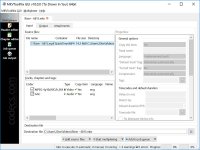
MKVToolNix is the free open-source toolkit for rebuilding MKV files, letting you merge, split, retag and extract tracks without re-encoding, because it rewrites only the container and leaves the video and audio streams untouched.

How to Download MKVToolNix
- 1 Click the DOWNLOAD button for your preferred link (US/EU Main or Mirror). When prompted by your browser, choose "Save" and select a destination folder.
- 2 We recommend using the mirror links (EU MIRROR / US MIRROR) first - they tend to be faster and more reliable than external sources.
- 3 Having trouble downloading MKVToolNix? If the download doesn't start, click the link again or try a different browser (Firefox/Chrome). Some security software may block downloads due to false positives.


MKVToolNix 56
the swiss army knife for Mkv files. just awesome!
Read More →MKVToolnix 8.4
Perfect. I love this site.
Read More →MKVToolnix 7.5
Great tool! I was unable to extract a subtitle. On the "Extract" says he is not yet functional WHO
Read More →