Avi2Dvd 0.6.4
Avi2DVD is an all in one tool that converts the most common video formats to DVD with minimum effort.
- Updated
- Size
- 35.4MB
- Downloads
- 441.1K
No longer developed
Avi2Dvd is no longer updated by its developer - the last version here is from 2011. It may still run, but it gets no fixes for newer Windows versions or formats.
Maintained alternatives that may do the same job:
The input file formats supported by Avi2Dvd are AVI, MKV, OGM, WMV and MP4.
What you get is high-quality files for VCDS, SVCD or DVD.
This application supports multiple audio streams and three external subtitles.
Moreover, it can work with DV-AVI movies, which means it can manage AVI videos captured with your own camera.
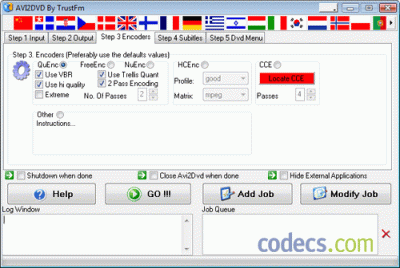
The encoders that Avi2Dvd can work with are QuEnc, FreeEnc, NuEnc and CCE. Regarding the final result, your DVD will look a lot like a professional one, since you can create chapters, audio and subtitle buttons.
A project in Avi2Dvd looks like this: you load the file you want to convert, you select the audio stream, you choose the output type (DVD, SVCD or VCD), you select one of the encoders, you hit the Go button and after conversion is complete, you can burn the output files. Nevertheless, before being able to burn your files to a DVD, you need to be patient.
Converting files to DVD format lasts around an hour and meanwhile, most of the computer resources are used by Avi2Dvd. Fortunately, the application works efficiently and quality losses are minimal.
The most interesting part of the entire process is creating DVD menus. Here you can play with various elements such as subtitles, audio, text, images and buttons and the result can be an original and very attractive menu.
In spite of the long conversion time and the high CPU usage, Avi2Dvd delivers very good results and it represents an option for anyone needing to convert their movies to DVD.
User reviews (18)
PS
Pail Snibbins
14 Mar 2011
2/5Poor
There were a ton of bugs in the last version, and the changelog is tiny. I think the only real change was to update the paypal link.
Reviewed on Avi2Dvd 0.6.2
KR
Krap
9 Dec 2010
1/5Poor
Crappy software, didn't even read my avi file, even if i named it aaa.avi
Reviewed on Avi2Dvd 0.6.1
MR
mrshroom
30 Jun 2010
5/5Excellent
It works fine, if you need audio just make sure there are NO special characters. I just put the move at X:\\movie.mkv and it worked fine.
Reviewed on Avi2Dvd 0.6.1
Share your thoughts on Avi2Dvd 0.6.4
Thanks, it's in!
Your review will appear once it has been checked.
Related to Avi2Dvd
More free downloads to try-

DVDFab Closest match
DVDFab delivers comprehensive DVD and Blu-ray copying with built-in decryption, format conversion, and 1:1 disc cloning capabilities.
In common: codecs, audio, video
-

PgcEdit
PgcEdit lets you modify the parameters and navigation commands of pre-authored DVD structures.
In common: codecs, audio, video
-

PowerDVD Most popular
PowerDVD, by CyberLink, is a versatile Windows media player offering exceptional 4K, HDR, Blu-ray, DVD, HEVC, and 360 VR video quality.
In common: codecs, audio, video
-

AnyDVD
AnyDVD & AnyDVD HD are software tools used for removing protection from DVD and Blu-ray discs.
In common: codecs, audio, video
-

DVD Rebuilder
Backing up your DVDs is extremely simple with DVD Rebuilder.
In common: codecs, audio, video
-

CloneDVD 2
CloneDVD 2 is creating high quality DVD backups, regardless of what you are copying, the main title or the entire DVD.
In common: codecs, audio, video