Nokia Suite 3.8.54
Nokia Suite, once called Nokia Ovi Suite, is the final 2014 Windows app for backing up and syncing Nokia Symbian and Series 40 phones, with the older Nokia PC Suite still here for the handsets that came before it.
- Updated
- Size
- 101MB
- Downloads
- 92.0K
No longer developed
Nokia Suite is no longer updated by its developer - the last version here is from 2014. It may still run, but it gets no fixes for newer Windows versions or formats.
Maintained alternatives that may do the same job:
Nokia Suite, first released as Nokia Ovi Suite, was Nokia's free Windows companion app for its Symbian and Series 40 phones.
Version 3.8.54 from late 2014 was the last one ever released, and Microsoft, which took over Nokia's phone business, ended phone software updates through it at the end of 2015.
It can still back up and copy files from an old Nokia handset, but it does nothing for Lumia, Android or iPhone owners.
What Nokia Suite Actually Does
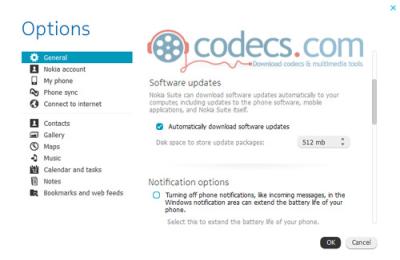
Plug in a supported Nokia and the Suite syncs contacts, calendar, messages, photos, videos and music with your PC. It also makes full phone backups, restores them, and lets the PC go online through the phone's data connection.
In its prime it also installed phone software updates, apps from the Nokia Store and offline maps. The store and the update service have since been switched off, so today the useful parts are the offline ones - backup, sync and copying files.
Which Phones It Covers
Nokia Suite was built for Symbian phones, including S60 3rd and 5th Edition and Symbian^3 models, and for Series 40 feature phones. It does not work with Lumia phones or with the newer Asha models.
Very old Nokia handsets that predate the Suite need its predecessor, Nokia PC Suite, which is just as frozen.
The tell that this is the wrong tool takes ten seconds. If your phone's settings mention Windows Phone, Android or iOS, Nokia Suite will not see it at all.
Getting Old Files Off a Nokia
Most readers now want one thing from an old Nokia - the photos, videos and voice notes still on it. Nokia Suite will copy those, and many models also offer a Mass storage or file transfer mode that lets you copy files in File Explorer without installing anything.
Videos from Nokia phones are usually 3GP files. VLC Media Player plays them as they are.
To turn them into MP4 files that phones and editors accept, use 3GP Converter.
A Known Side Effect
Readers have reported that Nokia Suite installs its own video decoders, which can take over MP4 and H.264 playback in other players. Uninstalling the Suite removes them.
If you need to keep it installed, Win7DSFilterTweaker lets you choose which decoders Windows prefers. Pairing that with LAV Filters gives you a clean, maintained decoder set.
What to Use Instead
There is no direct replacement, because Nokia's Symbian and Series 40 platforms are gone. What you need depends on the phone you carry now:
- Samsung Smart Switch - Samsung's free PC app for backing up a Galaxy phone and moving data to a new one.
- 3uTools - a free iPhone and iPad manager for file transfers and local backups, with no Apple ID needed.
The rest of the phone tools we carry, current and legacy, are in our Mobile Devices category.
Quick questions
Is Nokia Suite still supported?
No. 3.8.54 was the final version, and Microsoft ended phone software updates through Nokia Suite at the end of 2015.
Does Nokia Suite work with Lumia phones?
No. Lumia phones run Windows Phone and were never supported by Nokia Suite.
Is Nokia Suite the same as Nokia Ovi Suite?
Yes. Nokia renamed Ovi Suite to Nokia Suite in 2011, and it replaced the older Nokia PC Suite.
Can I still update my Nokia phone's software with it?
No. The update servers it relied on were shut down, so it can only back up, sync and copy files now.
How do I play videos copied from an old Nokia?
Most are 3GP files, and VLC Media Player plays them without extra codecs.
Download Nokia Suite 3.8.54 if you still need it, or tell us what you used it for if you have history with it.
User reviews (2)
HA
hanker
24 Apr 2012
2/5Poor
Another problem arises when using other codecs like ffdshow. Nokia Suite installs its own (*very* bad) codes.
You can get rid of them using this little batch (BAT. Note that it has to be run with administrator privileges.
- - - - - - - - - - - - -
@echo Really running me as Administrator?
@pause
regsvr32.exe /u "C:Program Files (x86)Common FilesNokiaCodecsEzdMP4MuxFilter.dll"
regsvr32.exe /u "C:Program Files (x86)Common FilesNokiaCodecsEmzMP3SourceFilter.dll"
regsvr32.exe /u "C:Program Files (x86)Common FilesNokiaCodecsEzdH264DecTFilter.dll"
regsvr32.exe /u "C:Program Files (x86)Common FilesNokiaCodecsEmzAACDecFilter.dll"
regsvr32.exe /u "C:Program Files (x86)Common FilesNokiaCodecsEmzMp4Source.dll"
regsvr32.exe /u "C:Program Files (x86)Common FilesNokiaCodecsEmzDecMP4_H263.dll"
regsvr32.exe /u "C:Program Files (x86)Common FilesNokiaCodecsNokiaH264HPMPDecTFilter.dll"
regsvr32.exe /u "C:Program Files (x86)Common FilesNokiaCodecsNokiaDecMP4ASP_H263.dll"
@pause
- - - - - - - - - - - - -
Greetings from Germany
René
You can get rid of them using this little batch (BAT. Note that it has to be run with administrator privileges.
- - - - - - - - - - - - -
@echo Really running me as Administrator?
@pause
regsvr32.exe /u "C:Program Files (x86)Common FilesNokiaCodecsEzdMP4MuxFilter.dll"
regsvr32.exe /u "C:Program Files (x86)Common FilesNokiaCodecsEmzMP3SourceFilter.dll"
regsvr32.exe /u "C:Program Files (x86)Common FilesNokiaCodecsEzdH264DecTFilter.dll"
regsvr32.exe /u "C:Program Files (x86)Common FilesNokiaCodecsEmzAACDecFilter.dll"
regsvr32.exe /u "C:Program Files (x86)Common FilesNokiaCodecsEmzMp4Source.dll"
regsvr32.exe /u "C:Program Files (x86)Common FilesNokiaCodecsEmzDecMP4_H263.dll"
regsvr32.exe /u "C:Program Files (x86)Common FilesNokiaCodecsNokiaH264HPMPDecTFilter.dll"
regsvr32.exe /u "C:Program Files (x86)Common FilesNokiaCodecsNokiaDecMP4ASP_H263.dll"
@pause
- - - - - - - - - - - - -
Greetings from Germany
René
Reviewed on Nokia Suite 3.4.27 beta
RI
Richo
2 Sep 2011
1/5Poor
Tried on several occasions to download latest nokia ovi suite. No problem the installing side of ovi. Once installed ovi in my computer a problem arises, namely after using ovi and shut down computer whether at the end of the day is not important. When i boot up my computer for use my screen resolution on intel (r)graphics changes from 32 bit to 8 bit.
It is easy to get back from 8 bit to 32 bit but every time i boot up the same thing happens. So in order to avoid this i cannot run Nokia Ovi Suite with windows 7 in my computer all be with it That I have a reasonable Notebook namely Toshiba A665 4GB Ram, 1GB Graphics 500GB HDD. Any ideas anyone.
Once i uninstall ovi everything is back as it was prior to ovi installation.....
It is easy to get back from 8 bit to 32 bit but every time i boot up the same thing happens. So in order to avoid this i cannot run Nokia Ovi Suite with windows 7 in my computer all be with it That I have a reasonable Notebook namely Toshiba A665 4GB Ram, 1GB Graphics 500GB HDD. Any ideas anyone.
Once i uninstall ovi everything is back as it was prior to ovi installation.....
Reviewed on Nokia Suite 3.1.1.80
Share your thoughts on Nokia Suite 3.8.54
Thanks, it's in!
Your review will appear once it has been checked.
Related to Nokia Suite
More free downloads to try-

3uTools Closest match
3uTools is a free all-in-one iPhone and iPad manager for Windows and Mac that handles files, backups and firmware without iTunes.
Mentioned in our Nokia Suite write-up
-

VLC Media Player Most popular
VLC Media Player is the free, open-source player that opens almost any video or audio file with no codec pack to install.
Mentioned in our Nokia Suite write-up
-

VirtualDub2 Top rated
VirtualDub2 is the portable, frame-accurate end of the video editors category, built for filtering and re-encoding single files rather than assembling a timeline.
In common: category, built
-

VisualSubSync
VisualSubSync is the waveform-first subtitle editor of the subtitle tools category, built for timing lines by eye against the audio rather than by nudging timecodes.
In common: category, built
-

Topaz Video AI
Topaz Video is a paid AI video enhancer in the video editing category, built to upscale, denoise, stabilize and smooth old or low-quality footage.
In common: category, built