Adobe AIR 51.4.1.2
Adobe AIR 51.4.1.2 is the free runtime that Windows apps and games packaged as .air files need before they will start, now maintained by Wipro after HARMAN, and it uses the Edge WebView2 Runtime for web content.
- Updated
- Size
- 6MB
- Downloads
- 189.6K
- This week
- 99up 123% on the week beforeSee the Top 20 downloads this week
Adobe AIR is the free background runtime that some Windows apps and games need before they will start.
You rarely install it for its own sake - usually an app or a setup file tells you AIR is missing.
Install it once, and every AIR app on the PC can use it, with updates arriving through the same installer.
What Adobe AIR Actually Does
AIR is to certain apps what a game engine is to a game: the shared machinery underneath. Developers write their app once in ActionScript, the language behind the old Flash, and AIR runs it as a normal desktop program with no browser involved.
Apps that rely on the shared runtime arrive as .air files. Double-click one with AIR installed and it installs like any other program; without AIR, Windows has no idea what to do with it.
Many AIR apps today ship with their own private copy of the runtime built in, so they never ask for this download. If an app does ask, this is the file it wants.
Who Makes It Now
Adobe built AIR, then handed it over to HARMAN, which took over development and support from 2020. Adobe's own AIR 32 runtime was retired after that.
In December 2025 HARMAN sold the business unit that ran AIR, HARMAN Connected Services, to Wipro. The official AIR website has since moved from airsdk.harman.com to airsdk.wxlift.com, and the runtime downloads are now provided by Wipro.
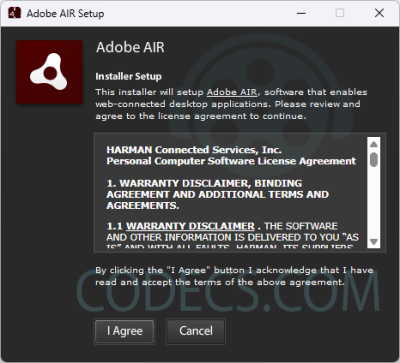
Nothing changes for you as a user. The runtime is still free for end users under the licence you accept during setup, and the version here is the current one from that site.
Which File to Pick
- Adobe AIR 51.4.1.2 for Windows - AdobeAIR.exe, about 6 MB. It updates any older AIR runtime already on the PC, so there is no need to uninstall first.
- Adobe AIR 51.4.1.2 for macOS - AdobeAIR.dmg. On a Mac, uninstall AIR 32 or older before installing it, because Apple's notarisation rules forced the files into new locations.
The Windows installer on our mirror matches the SHA-256 checksum published on the AIR website, and the Mac file links straight to the official download.
What Changed in Recent Versions
The biggest change happened a while ago and still surprises people. Modern AIR no longer carries its own copy of the WebKit browser engine, and on Windows it now uses Microsoft's Edge WebView2 Runtime to show web content inside apps.
WebView2 is already part of current Windows 10 and 11. On an older or stripped-down system, installing it is the first fix to try when an AIR app opens with blank web panels.
The 51.4.1.2 release itself is mostly maintenance. On the Windows side, the built-in video decoder now accepts resolutions up to 8K; the remaining fixes target macOS, iOS and Linux apps.
If an Older App Breaks After Updating
A few older apps were written for the WebKit engine and misbehave on the new runtime - pages render oddly, or features that relied on WebKit stop working.
For those, the AIR website still offers runtime 33.1.1.744, the last build that includes the original WebKit. Uninstall the current runtime first, then install that one, and leave it alone until the app's developer updates.
Only do this if an app needs it. The older runtime gets no new fixes, so keep the current 51.x build unless a specific app refuses to work without WebKit.
For Developers: The SDK Is a Separate Download
This page is the runtime, the part end users install. Building AIR apps needs the AIR SDK, which comes from the same website and is licensed separately by Wipro.
The SDK moves faster than the shared runtime. Its latest release, 51.5.1.1, came out on 27 October 2026, while the shared runtime offered to end users is still 51.4.1.2.
AIR Is Not Flash Player
The two share a history, which causes a lot of confusion. Flash Player was the browser plug-in, and it is gone - browsers removed it and Adobe ended it at the end of 2020.
AIR never ran in a browser, so the Flash shutdown did not touch it. If you are cleaning old Flash remains off a PC, the Adobe Flash Player Uninstaller does that without affecting AIR.
If You Came Looking for Adobe Media Player
Adobe Media Player was itself an AIR app, which is why this page sits among the media players. Adobe discontinued it long ago.
If what you actually need is to play FLV or other video files, a modern player does the job without AIR at all.
- VLC Media Player - opens FLV and almost everything else, nothing to configure
- MPC-HC or MPC-BE - lighter players with the decoders built in
- PotPlayer or GOM Player - all-in-one players with their own codecs
- K-Lite Codec Pack - if you want Windows Media Player and other apps to open the file too
Not sure what a file contains? Our free Codec Finder tells you in the browser, and the full media players category has the rest.
Who Should Look Elsewhere
The tell is whether anything has asked you for AIR. If no app has, and you have no .air file waiting to install, you do not need this runtime.
It is also not a way to play old Flash games in a browser or open SWF files - that needs a Flash emulator, not AIR.
Quick questions
Is Adobe AIR free?
Yes, the runtime is free for end users. You accept the licence during setup, and only developers who build AIR apps deal with the separate SDK licence.
Is Adobe AIR still supported?
Yes. HARMAN took it over from Adobe in 2020, and since HARMAN sold that business unit to Wipro, the runtime and SDK have been published from airsdk.wxlift.com.
Do I need to uninstall the old version first?
Not on Windows - the installer updates any existing AIR runtime in place. On a Mac, uninstall AIR 32 or earlier before installing the new version.
Is it safe to install?
Yes. Our Windows installer matches the official checksum, and AIR apps must carry a digital signature that identifies the publisher before they install.
Can I uninstall Adobe AIR?
Yes, from Installed apps in Windows Settings. Any app that depends on the shared runtime will stop starting until you install it again.
Will Adobe AIR play Flash games or SWF files?
No. AIR runs apps packaged for it, not SWF files from the web, and it does not bring back the Flash browser plug-in.
Download Adobe AIR 51.4.1.2 if an app is asking for it, or tell us how you got on if you have used it before.
Available files
- Adobe AIR 51.4.1.2WindowsInstaller6.0 MB
- Adobe AIR 51.4.1.2 - for macOSmacOSDMG15.6 MB
User reviews (3)
NF
Nana Fred Gyansie
13 Sep 2018
5/5Excellent
Adobe Media Player is the best.
Reviewed on Adobe AIR 31.0.96
L_
L_H_
19 May 2011
3/5Good
The player in direct link, or official mirror, is a version 1.7 of itself. I have the Creative Suite CS5 and it really contain the version 1.8 of player (Build 600929):http://www.4shared .com/file/K1If5YJL/adobe_media_player.html.
The player was descontinued, and would be good to have a copy of the latest version, for it is considered an good or best player, same in low definition videos quality. Support the following formats: MOV, MP4, MP4V, M4V, 3GP, 3GPP2, 3G2, F4V, FLV, and SWF natively. The performance is variable, depending of the processor.
Adobe makes their programs based in processor Intel (I can run this it program in one AMD Athlon XP, same being an CS5 integrant program - based in Intel SSE2 instruction). The version in this site is the 1.7, and it not enter in this notice. Read more in wikipedia.
The player was descontinued, and would be good to have a copy of the latest version, for it is considered an good or best player, same in low definition videos quality. Support the following formats: MOV, MP4, MP4V, M4V, 3GP, 3GPP2, 3G2, F4V, FLV, and SWF natively. The performance is variable, depending of the processor.
Adobe makes their programs based in processor Intel (I can run this it program in one AMD Athlon XP, same being an CS5 integrant program - based in Intel SSE2 instruction). The version in this site is the 1.7, and it not enter in this notice. Read more in wikipedia.
Reviewed on Adobe AIR 1.8
HO
houston
9 Dec 2009
5/5Excellent
its so slow and useless.... adobe air - jesus christ! ;/
Reviewed on Adobe AIR 1.7
u have no idea what you talking about, what so ever. dumb
Share your thoughts on Adobe AIR 51.4.1.2
Thanks, it's in!
Your review will appear once it has been checked.
Related to Adobe AIR
More free downloads to try-

Adobe Flash Player Closest match
Adobe Flash Player was discontinued in December 2020. Get modern alternatives for playing Flash content and learn why you should uninstall Flash Player for security.
Mentioned in our Adobe AIR write-up
-

MPC-BE
MPC-BE is a free, open-source Windows media player with its own built-in decoders, so most files play without a codec pack.
Mentioned in our Adobe AIR write-up
-

VLC Media Player
VLC Media Player is the free, open-source player that opens almost any video or audio file with no codec pack to install.
Mentioned in our Adobe AIR write-up
-

MPC-HC
MPC-HC is a free, lightweight Windows video player that handles HEVC, AV1 and HDR playback without needing a separate codec pack.
Mentioned in our Adobe AIR write-up
-

Gom Player
A free Windows media player with built-in codecs, automatic subtitle matching and a paid ad-free edition alongside it.
Mentioned in our Adobe AIR write-up
-

Windows Media Player 11
The player Microsoft already put on your PC, covering everyday music and video playback without installing anything else.
In common: media, player










thank you