"Class not registered" is Windows telling you that a program asked for a component that is not on its list, and the fix everyone copies from old forum posts only works if you run it one specific way.
The error turns up as plain "Class not registered", or as the same thing wearing a number, 0x80040154.
Most guides tell you to register a file called quartz.dll and stop there.
That does fix one narrow version of this, but only from an administrator Command Prompt, which is the part that almost always gets left out.
What the error actually means
Windows keeps a register of the small building blocks that programs borrow from each other - decoders, dialogs, preview handlers, all of it. When a program asks for one by name and the register has no entry for it, Windows gives up with this message.
So the error is never really about the program you were using. It is about a missing entry, and the useful question is which entry and why it went missing.
On a media file that usually means a decoder is gone or half-removed. Our walk through the four stages every video goes through covers where that fits in the chain.
Start here, and run the command properly
If videos stopped playing in more than one player at once, this is the first thing to try. It takes about twenty seconds.
- Press the Windows key and type cmd.
- Right-click Command Prompt in the results and choose Run as administrator.
- Type regsvr32 quartz.dll and press Enter.
- Read the dialog that appears, then close the Command Prompt and try your file again.
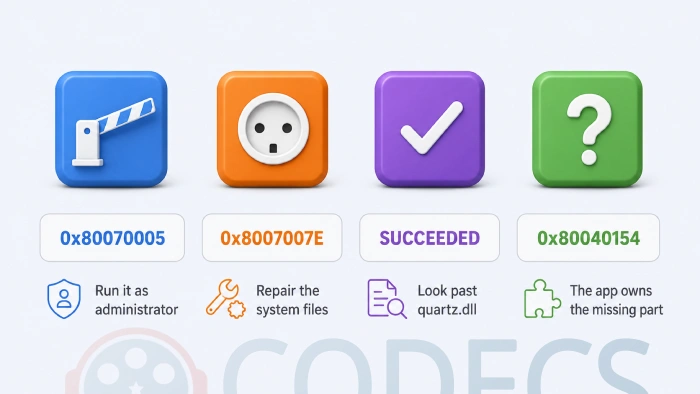
Administrator is not optional. Registering a component writes to a protected part of the registry, so a normal Command Prompt is refused with error 0x80070005. The old advice to use Start and then Run cannot elevate at all, which is why so many people have tried this fix and watched it fail.
What the dialog is telling you
The message you get back is a diagnosis in itself, so read it rather than clicking it away.
| What you see | What it means | What to do next |
|---|---|---|
| 0x80070005 | Access denied - the Command Prompt was not running as administrator | Close it, reopen it with Run as administrator, try again |
| 0x8007007E | The file, or something it depends on, could not be found | Skip to the system repair steps further down |
| Succeeded | quartz.dll is registered, and it probably always was | Read the next section - the missing entry is somewhere else |
| Still 0x80040154 in the app | The component belongs to the program, not to Windows | Reinstall that program or the codec pack it relies on |
It said succeeded and nothing changed
This is the most common outcome, and it is not a failure. On a healthy Windows install quartz.dll is already registered, so the command succeeds and changes nothing.
At that point the missing entry is one of these three, in rough order of likelihood.
- A codec pack that was only half removed. Windows still holds entries pointing at filter files that are no longer on the drive - reinstalling a maintained pack over the top rewrites them.
- The wrong architecture. On 64-bit Windows the plain command registers the 64-bit copy, so a 32-bit program needs C:\Windows\SysWOW64\regsvr32.exe quartz.dll instead.
- Damaged Windows files. Run sfc /scannow in the same administrator Command Prompt, then DISM /Online /Cleanup-Image /RestoreHealth if it reports anything it could not repair.
If you want to see what is actually registered before changing anything, RadLight Filter Manager lists every filter on the machine, and there are more of that kind under Codec Identifiers.
The quicker route, if this is only about video
Chasing individual registry entries is satisfying but slow, and for a playback problem there is a shortcut that fixes the cause and the symptom together.
The shortcut. Installing a current codec pack rewrites every filter registration it owns, which clears out the stale entries left behind by whatever was uninstalled badly. The K-Lite Codec Pack is the usual choice, and K-Lite Codec Pack Basic is the decoder-only version if you do not want another player installed.
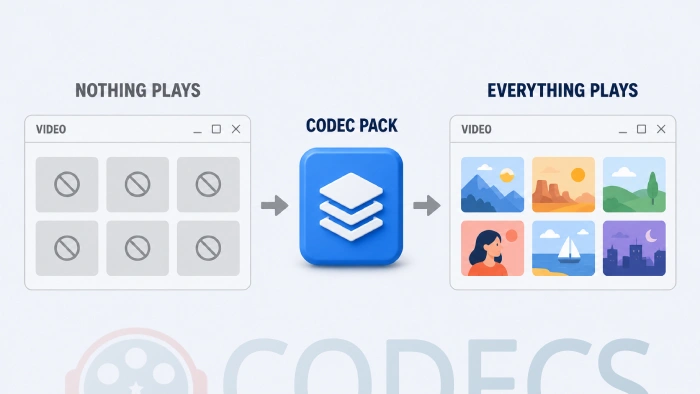
The other route is to stop relying on the shared register at all. Players like GOM Player carry their own decoders internally, so a broken system registration cannot reach them.
If you are weighing up players, MPC-BE and MPC-HC compared covers the two most people end up choosing between.
When it has nothing to do with video
Plenty of people land here with this error in File Explorer, in a Save As dialog, or when clicking a link. Registering quartz.dll will do nothing for any of those, and it is worth saying so plainly rather than letting you assume you mistyped something.
Those cases are still the same underlying fault - a missing register entry - but a different entry, owned by a different program.
- File Explorer or the taskbar. Open Task Manager, find Windows Explorer, choose Restart - then run the two system repair commands above if it comes back.
- A Save As or Open dialog inside an office suite. Use that program's own repair option from Installed apps rather than touching Windows.
- Clicking a link. Go to Settings, then Apps, then Default apps, and set your browser again from scratch.
- Only one user account affected. Make a second local account and sign into it - if the error is gone there, the profile is damaged rather than the system.
What this error is not
A file that will not play is not always a registration problem, and it is worth ruling the simple things out before running commands.
If one specific file fails while everything else is fine, you are probably missing a decoder rather than a registration - HEVC recordings from phones and cameras are the usual culprit, and the HEVC Video Extension handles those. There is a guide on how to get the HEVC Video Extension free if you would rather not pay for it.
Our Codec Finder reads a file and tells you exactly what is inside it, and the Codec Troubleshooter walks the common playback faults in four steps. Both run in the browser with nothing to install.
To test whether a file is readable at all before blaming Windows, drop it into the MP4 Player and see if it plays there.
Registering something other than quartz.dll
Sometimes the entry you need belongs to a specific decoder rather than to Windows, and you have the file but nothing has registered it.
The command is the same shape, run from the same administrator Command Prompt, with the full path to the file in place of the name. Our guide on registering a filter file by hand covers the syntax, the uninstall switch and where the files have to live, and there are helper tools for it under Fix and Repair Tools.
For background on why Windows has two separate media systems that can each fail this way, see what Media Foundation is.
Quick questions
Is it safe to run regsvr32 quartz.dll?
Yes. It re-registers a file Windows already ships with and does not download, replace or delete anything - on most machines it simply confirms what was already true.
Why did it say the operation succeeded but nothing works?
Because quartz.dll was never the missing piece on your machine. The entry Windows cannot find belongs to something else, which is what the sections above work through.
What is error 0x80070005 when I run the command?
Access denied. The Command Prompt was not running as administrator, and no amount of retyping will change that - close it and reopen it with Run as administrator.
Does this happen on Windows 11 as well?
Yes, and the steps here are written for Windows 10 and 11 rather than the old Start and Run route, which cannot request administrator rights.
Will a codec pack fix it?
For a playback problem, usually - installing one rewrites the filter registrations that a badly uninstalled pack left dangling. For an error in File Explorer or a Save As dialog it will not help at all.
Do I need to restart afterwards?
Not for the registration itself, though closing and reopening the program that failed is worth doing. A restart only matters after the system repair commands.
Work down the list rather than across it, and stop at the first thing that changes the error.
Download the K-Lite Codec Pack if this turned out to be a playback problem, or tell us which step worked for you so the next person reading this gets there faster.
Still not sure what you are missing? Start with what codecs you actually need, or read up on codecs and containers if the file itself looks suspicious.


Don't Open a .xmpeg File Before Reading This
3/5It's never a good sign when the potential malware you downloaded has the EXACT same filename as the example. ...
Read More →Free Popular IPTV Playlist: Where to Get Fres...
3/5How can you create a DSTV channels on IPTV?
Read More →How to Download HEVC Video Extension for Free
5/5Does anyone have the HEVC Video Extensions as an .exe file and can provide a download link?
Read More →