save2pc light 4.4.1
save2pc Light 4.4.1 is the free edition of FDRLab's save2pc that downloads YouTube videos to Windows as AVI, MPEG or FLV files, while HD and other sites need a paid edition or a free tool such as yt-dlp.
- Updated
- Size
- 14.8MB
- Downloads
- 136.3K
save2pc Light is a small, free Windows program that saves YouTube videos to your PC.
You paste a video link, pick a format, and it downloads and converts the clip in one go.
It is the free edition of a paid family, so it is worth knowing what Light leaves out before you install it.
What save2pc Light Actually Does
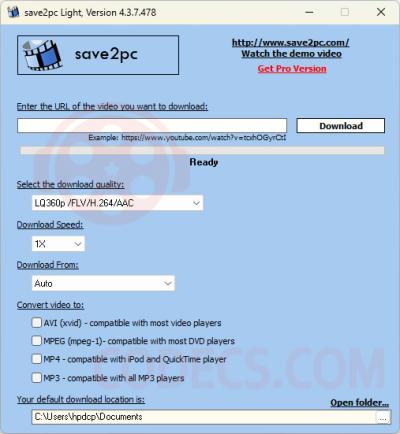
Copy the address of a YouTube video, paste it into the save2pc window and press download. The program finds the video file behind the page and saves it to a folder you choose.
Light can save the clip as AVI for Windows players, as MPEG for older DVD players, or as the original FLV without conversion. Everything happens in one small window, so there is little to learn.
Light Versus the Paid Editions
save2pc comes in four editions from the developer FDRLab. Light is free, even for commercial use, while Standard, Professional and Ultimate are paid upgrades.
| What you get | Light (free) | Paid editions |
|---|---|---|
| YouTube downloads | Yes | Yes |
| Other video sites, such as Vimeo and DailyMotion | No | Yes, from Standard up |
| High-quality and HD YouTube downloads | No | Ultimate only |
| Upgrade reminder on screen | Yes | No |
The quality row is the one that catches people out. If you want a sharp HD copy rather than a small standard-quality file, Light will not give you that.
Only save what you are allowed to. YouTube's terms limit downloading, and copyright still applies to the video. Your own uploads, Creative Commons clips and videos the owner offers for download are the safe cases.
Version 4.4.1 and Our Download
The current release is save2pc Light 4.4.1 (build 485), a 14.8 MB installer for Windows 7 to 11. The developer does not publish a changelog for Light.
YouTube changes its pages often, and any downloader stops working for a while when that happens. If save2pc Light suddenly fails on every video, check for a newer version before you assume the video is the problem.
Free Tools That Do More
If you need HD, other sites or audio-only downloads without paying, several free tools on our site go further than Light.
- yt-dlp - the free, open-source downloader that supports thousands of sites and gets fixed within days when YouTube changes
- 4K Video Downloader Plus - a friendly window with full-quality downloads up to 8K, and a free tier with a daily cap
- Free Studio - a bundle of converters that includes a YouTube downloader
For live streams and radio links, our free Stream URL Extractor finds the direct address in your browser.
Playing and Converting What You Saved
AVI and MPEG files from save2pc play in any normal player. VLC Media Player and MPC-BE also handle the unconverted FLV option with nothing extra.
If Windows Media Player or another app refuses the file, the K-Lite Codec Pack adds what is missing. Our Codec Finder tells you what is inside a file before you install anything.
To turn a download into MP4 for a phone, HandBrake does it in a few clicks.
For just the soundtrack, MediaHuman Audio Converter or our Online Audio Converter will pull it out as MP3.
Who Should Look Elsewhere
The tell is the quality you need. If a small standard-quality copy of a YouTube clip is enough, Light does the job for free; if you want HD, go straight to one of the free tools above.
Anyone saving from sites other than YouTube should skip Light too, as it only works with YouTube. The full media management category has more download tools.
Quick questions
Is save2pc Light really free?
Yes. The Light edition is freeware, even for commercial use. It shows a reminder to upgrade, and the Standard, Professional and Ultimate editions cost money.
Can save2pc Light download HD videos?
No. According to the developer's own comparison, high-quality and HD downloads are only in the paid Ultimate edition.
Which sites does save2pc Light support?
Only YouTube. Vimeo, DailyMotion and the other sites in the program's list need one of the paid editions.
Does it work on Windows 11?
Yes. The current installer is listed for Windows 7, 8, 10 and 11.
Why does it stop working on some videos?
YouTube changes how it serves videos from time to time, which breaks downloaders until they are updated. Check for a newer version, or try yt-dlp, which is usually fixed first.
Download save2pc Light 4.4.1 and see how it handles your clips, or tell us how you got on if you have used it before.
User reviews (4)
UN
Unstmon
3 Nov 2026
1/5Poor
Clipgrab is totally free, so this program is worthless...
Reviewed on save2pc light 4.4.1
CO
Com3dyGirl
28 May 2008
5/5Excellent
This is soo bloody helpful software. I have searched nearly the whole Internet look for a utility to download those sort of vids. WOW!
Reviewed on save2pc light 3.28
ER
emilio ramirez
4 Mar 2008
5/5Excellent
es un mui buen programa lo recomiendo ya q es una alternativa de conseguir los mejores vide4os
Translate Reviewed on save2pc light 3.25
Share your thoughts on save2pc light 4.4.1
Thanks, it's in!
Your review will appear once it has been checked.
Related to save2pc light
More free downloads to try-

4K Video Downloader Closest match
4K Video Downloader Plus is a Windows media manager that pulls video and audio off streaming sites and saves them as MP4, MKV or MP3 files.
Mentioned in our save2pc light write-up
-

VLC Media Player Most popular
VLC Media Player is the free, open-source player that opens almost any video or audio file with no codec pack to install.
Mentioned in our save2pc light write-up
-

HandBrake Top rated
HandBrake is the free, open-source video transcoder most people start with when a video needs to get smaller or play on another device.
Mentioned in our save2pc light write-up
-

MPC-BE
MPC-BE is a free, open-source Windows media player with its own built-in decoders, so most files play without a codec pack.
Mentioned in our save2pc light write-up
-

Mp3tag Top rated
Download Mp3tag to edit MP3 tags, add album art, and organize your music library.
Popular in Media Managers
-

MediaMonkey Top rated
MediaMonkey is a powerful multimedia manager which helps you organize your music and perform other operations, as well, such ripping, converting, etc.
Popular in Media Managers










Thanks for the review. save2pc Light is free as well, even for commercial use - it's the Standard, Professional and Ultimate editions that cost money.
The real limits of Light are that it only works with YouTube and doesn't do HD.
If you need more than that, yt-dlp is free, open source and supports thousands of sites: https://www.free-codecs.com/download/yt-dlp.htm