1Click DVD Copy Pro 5.2.2.6
Shareware
1Click DVD Copy Pro 5.2.2.6 is the final build of LG Software Innovations' DVD copier with presets, preview and per-stream control, no longer sold, so new users should look at free tools such as MakeMKV.
- Updated
- Size
- 8.36MB
- Downloads
- 37.5K
1Click DVD Copy Pro is the full-featured DVD copier from LG Software Innovations, with one-click presets plus manual control over exactly what goes on the copy.
The developer has now stopped selling it, along with every other 1Click product and all licence renewals.
Version 5.2.2.6 is the final build, still offered to existing licence holders - anyone without a key needs a different tool.
What 1Click DVD Copy Pro Actually Does
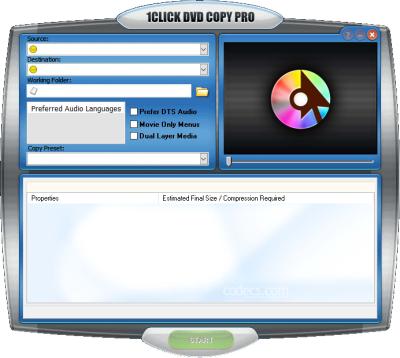
At its simplest it works like the basic 1Click DVD Copy: insert a disc, pick a preset and press Start. The copy goes to a blank DVD through the built-in burner, or to a folder on your hard drive.
The Pro part is the control you get on top:
- Copy presets. Movie only, movie and extras, episode DVD, exact copy, full disc or a custom selection.
- Preview first. Watch the movie, extras and menus, then include or leave out each part.
- Pick the streams. Choose individual video, audio and subtitle tracks, and keep 5.1 Dolby Digital or DTS sound.
- Set the compression. Decide how much to squeeze the video to fit a single-layer disc.
- Extra copies. Burn more backups without reading the original disc again.
It supports NTSC and PAL discs and dual-layer blank media, and handles TV series DVDs as well as films.
The Licence Situation
Like the rest of the range, Pro was a paid program with a trial and a year of updates per licence. With no new licences or renewals for sale, a new trial can no longer be unlocked.
Newer discs depended on CPRx, the developer's regularly updated error-correction technology. The last listed update, CPRx version 1483, arrived on 31 May 2026, so support for brand-new releases ends there.
The notice covers the whole family, including 1Click DVD Converter, so a sibling product is no way around it.
What Changed in the Final Releases
- 5.2.2.6, 28 May 2025. Fixed a bug introduced in 5.2.2.5 that could cause reading problems with some DVDs.
- 5.2.2.5, 13 April 2025. Fixed copy failures on some poorly made Amazon on-demand movie DVDs.
From then on, only CPRx updates followed, until the last one in May 2026.
Requirements
The developer lists Windows 11, 10, 8 and 7, a DVD drive, and up to 9 GB of free disk space for disc images and temporary files. A DVD writer is needed to burn copies.
A Word on Copy Protection
Most commercial DVDs are copy-protected, as our guide to DVD region codes and CSS explains. Many countries ban getting around that protection even for personal backups, so check your local rules before copying.
Who Should Look Elsewhere
The tell: no licence key, no way forward, since there is nowhere left to buy one. Pro's strength was choosing exactly which streams to keep, and these maintained tools do that today:
| You want to | Use |
|---|---|
| Save a disc you own as a file, picking audio and subtitle tracks | MakeMKV, free while in beta |
| Remove or rename tracks afterwards without re-encoding | MKVToolNix |
| Shrink the result into an MP4 with chosen quality | HandBrake (unprotected discs only) |
| Burn a DVD folder or image to a blank disc | ImgBurn |
| A maintained, paid all-in-one copier | DVDFab |
To check what a copied file contains - codecs, audio channels, subtitle languages - open it in MediaInfo. More tools are in the Media Backup category.
Quick questions
Can I still buy 1Click DVD Copy Pro?
No. LG Software Innovations has ended sales and licence renewals for all its 1Click products.
What is the latest version?
5.2.2.6, released on 28 May 2025, is the final build. Licence holders can still download it.
Does it work on Windows 11?
Yes. The developer lists Windows 11, 10, 8 and 7 as supported.
Does it keep 5.1 surround sound?
Yes. Pro can copy multi-channel Dolby Digital 5.1 and DTS audio tracks.
What does Pro add over 1Click DVD Copy?
A preview, copy presets, per-stream selection, compression control and the option to burn more copies without re-reading the disc.
Download 1Click DVD Copy Pro 5.2.2.6 if you still need it, or tell us what you used it for if you have history with it.
User reviews (3)
B
Bill Lowery
29 Sep 2017
5/5Excellent
My question is: Is 1 Click going out of business, Or , Is the company being sold? I like using the program and have for some time.
I don't want to spend money for something I won't get!
I don't want to spend money for something I won't get!
Reviewed on 1Click DVD Copy Pro 5.1.2.1
TH
Tom Hanlon
11 Aug 2015
1/5Poor
Positive: Love the program have been using it for many years had great support over those years with rapid response from support.
CONS: Installed windows 10. Corrupted drive loss all my license which was stored on the drive. Have sent 7 emails requesting a re-send of licence since it happened and to date have received no response. Licences for my other software from various other support request were promptly dealt with.
I still have time before renewing my 1clickCopy Pro but until I receive an answer cannot use or renew my licence. At that point I will then look for an alternative. Support use to be great - so disappointed with current treatment. Something need to be done else they will loose loyal costumers and sales in the future. What a pity such a great program yet a greater let down by support.
CONS: Installed windows 10. Corrupted drive loss all my license which was stored on the drive. Have sent 7 emails requesting a re-send of licence since it happened and to date have received no response. Licences for my other software from various other support request were promptly dealt with.
I still have time before renewing my 1clickCopy Pro but until I receive an answer cannot use or renew my licence. At that point I will then look for an alternative. Support use to be great - so disappointed with current treatment. Something need to be done else they will loose loyal costumers and sales in the future. What a pity such a great program yet a greater let down by support.
Reviewed on 1Click DVD Copy Pro 5.1
JE
Jim Eger
9 Nov 2011
5/5Excellent
I have used this program for over five years and it is the best one I have found yet. Really a great program.
Reviewed on 1Click DVD Copy Pro 4.2.7.9
Share your thoughts on 1Click DVD Copy Pro 5.2.2.6
Thanks, it's in!
Your review will appear once it has been checked.
Related to 1Click DVD Copy Pro
More free downloads to try-

1Click DVD Copy Closest match
1Click DVD Copy is a one-click Windows DVD copier from LG Software Innovations, no longer sold since 2026.
Mentioned in our 1Click DVD Copy Pro write-up
-

DVDFab
DVDFab delivers comprehensive DVD and Blu-ray copying with built-in decryption, format conversion, and 1:1 disc cloning capabilities.
Mentioned in our 1Click DVD Copy Pro write-up
-

DVD-Cloner 2025
DVD-Cloner is one of the most reliable DVD and Blu-ray copying applications using advanced technology.
In common: dvd, advanced
-

ImgBurn Most popular
ImgBurn is a free, lightweight disc burner for Windows that writes ISO images to CD, DVD and Blu-ray and verifies every burn.
Mentioned in our 1Click DVD Copy Pro write-up
-

DVDFab Passkey
DVDFab Passkey is a background disc decrypter that removes DVD and Blu-ray copy protection so other programs can read the disc.
In common: dvd, copy
-

MKVToolNix Top rated
The standard toolkit for rebuilding MKV files - merge, split, retag and extract tracks losslessly, because it rewrites the container and never the video.
Mentioned in our 1Click DVD Copy Pro write-up