First of all, get the QuickTime Player; yep, nobody loves it, but we can't play the files without their wonderful codecs.
Then, in order to Play the AMR files using Winamp:
Download and install MediaLooks QuickTime DirectShow Source Filter.
It is a DirectShow filter, so, after installation, run:
C:\Winamp\Options\Preferences\Plug-ins\Input\
And double-click the Nullsoft DirectShow Decoder in order to pull up it's settings dialog.
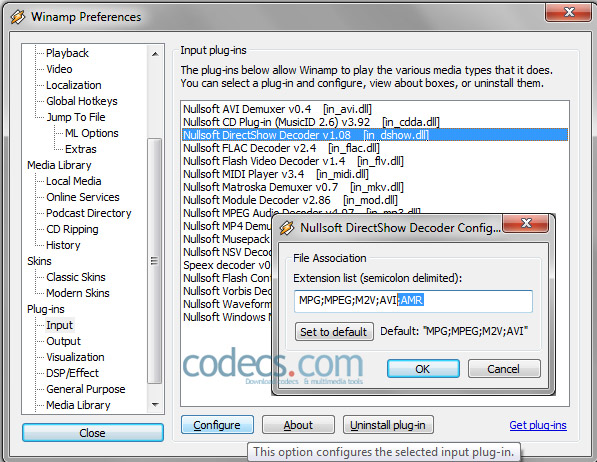
Click on Configure button and add ;AMR to the extension list.
Play the files using Windows Media Player
Download and install River Past QuickTime DirectShow Filter for WMP.


Free Popular IPTV Playlist: Where to Get Fres...
5/5Hey rei, That message is VLC's way of saying it went to the address and found nothing there. MRL ...
Read More →How to Use Helium Audio Converter: Convert An...
5/5@levi Yes, it works offline, it's a desktop software.
Read More →Meet Qwant: The Private, EU-Built Alternative...
4/5I didn't know it was EU, AND france. That doesn't sound like a good idea. Related to coding or ...
Read More →