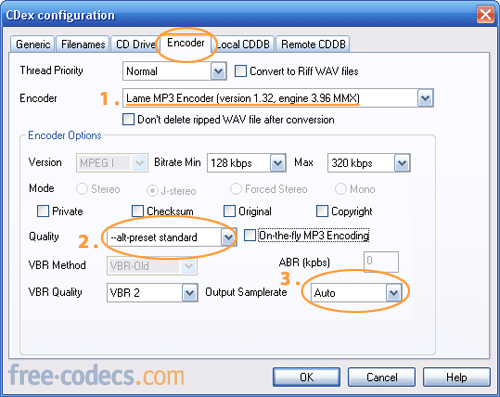
ENCODER:
- Encoder: select Lame MP3 Encoder (version 1.32, engine 3.96 MMX). You can also experiment with other encoders.
- Quality: select --alt-preset standard. You can try other presets, but they will increase the encoding time. Don't recommend On-the-fly_encoding unless hard drive space at a premium.
- Output sample rate: Select Auto. Do NOT change anything else.
Note: The current focus is on encoding to MP3. You can use the dropdown box and slect other superior formats such as Ogg Vorbis, AAC, MP4 and MP3pro.
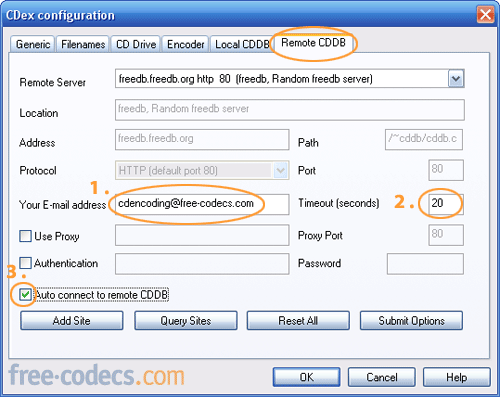
REMOTE CDDB:
- Your e-mail address: Enter an e-mail address. It need not be your real one as long as it follows the username@domain.com format.
- Timeout (seconds): Type in 30 or higher if you have a slower connection.
- Tick the box to Auto connect to remote CDDB.
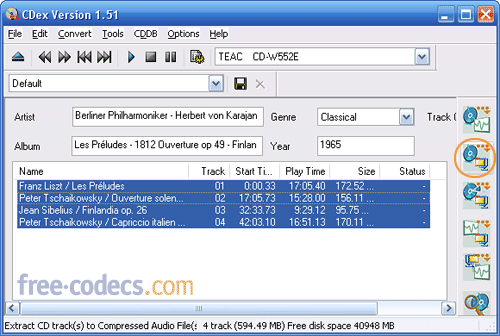
RIPPING CD:
- Insert your CD. If you're connected to the internet, The Remote FreeDB Query will fill in all the album and track info automatically for you. You may have to select the genre of music manually with dropdown box.
- Select all tracks by pressing Ctrl+A. If you don't want to rip all the tracks, just select the one you want by using the Control key. Hit F9 to Rip To Compressed File or click the button on the right.
Now you're rippin'!
Note: Depending upon speed of your computer, CD/DVD ROM and ripping method, it should take between 5-20 minutes.
Note: Depending upon speed of your computer, CD/DVD ROM and ripping method, it should take between 5-20 minutes.
The screenshots were taken using CDex 1.51, the latest version. Being an open source program, the program continues to evolve, but basically the steps will remain the same.
Most of all, have fun and don't be afraid to experiment.
- by Corey A Misch (Mischcabob) -
Table of Contents: 1. Introduction; 2. Using CDex; 3. Encoder
Most of all, have fun and don't be afraid to experiment.
- by Corey A Misch (Mischcabob) -
Table of Contents: 1. Introduction; 2. Using CDex; 3. Encoder


How to Download HEVC Video Extension for Free
Worked 100%, very easy to download and install. Thanks!!!
Read More →How to Play HEVC Files in VLC Media Player (2...
During playback of 265 mkv video in VLC sometimes some pixels become washed out. This was on 3.0.16, I tried MPC-BE ...
Read More →Forget Windows 11 - Linux Mint 22.3 Just Chan...
@Scott I feel you, both my PC and laptop stopped working too. I ended up installing Ubuntu just to ...
Read More →