"Class not registered" is one of the most annoying and frustrating error message I ever got because none of the video files can be played by Windows Media Player, Media Player Classic or other DirectShow player and common fix methods (Windows Media Player reinstallation/upgrade, codec reinstallation...) seems to fail.
Fortunately, the solution (in fact one of them because there are few different solutions) for this problem is very simple.
After some research I found that quartz.dll (a DirectX related DLL) wasn't registered correctly.
How to register it?
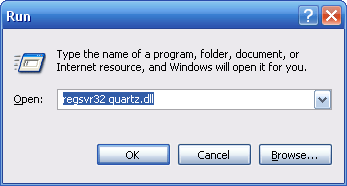
Click on Start > Run... > and type regsvr32 quartz.dll
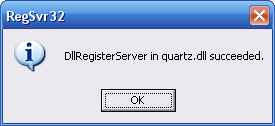
In the end, you should receive a message saying that your file was succesfully installed.
Note: Please, let us know if the solution suggested here wasn't helpful for you so we can try to complete this guide with other hints.





How to play FLAC files in Windows Media Playe...
@Drasko What is the error message you're seeing? Can you provide more details?
Read More →The Best Video Player for Android TV - And th...
On Android, Kodi has far the best foreign language subtitle support. Vlc and MX had issues displaying the correct ...
Read More →How to Download HEVC Video Extension for Free
我是一名中国用户,这是我第二次成功在文章指导下下载插件,这篇文章很实用!简单易懂! 我使用的是Windows 11 家庭中文版,操作系统版本 26200.8246。 2026.4.25我已成功下载并使用!感谢发布者,谢谢您!
Read More →